
Lay out a status row
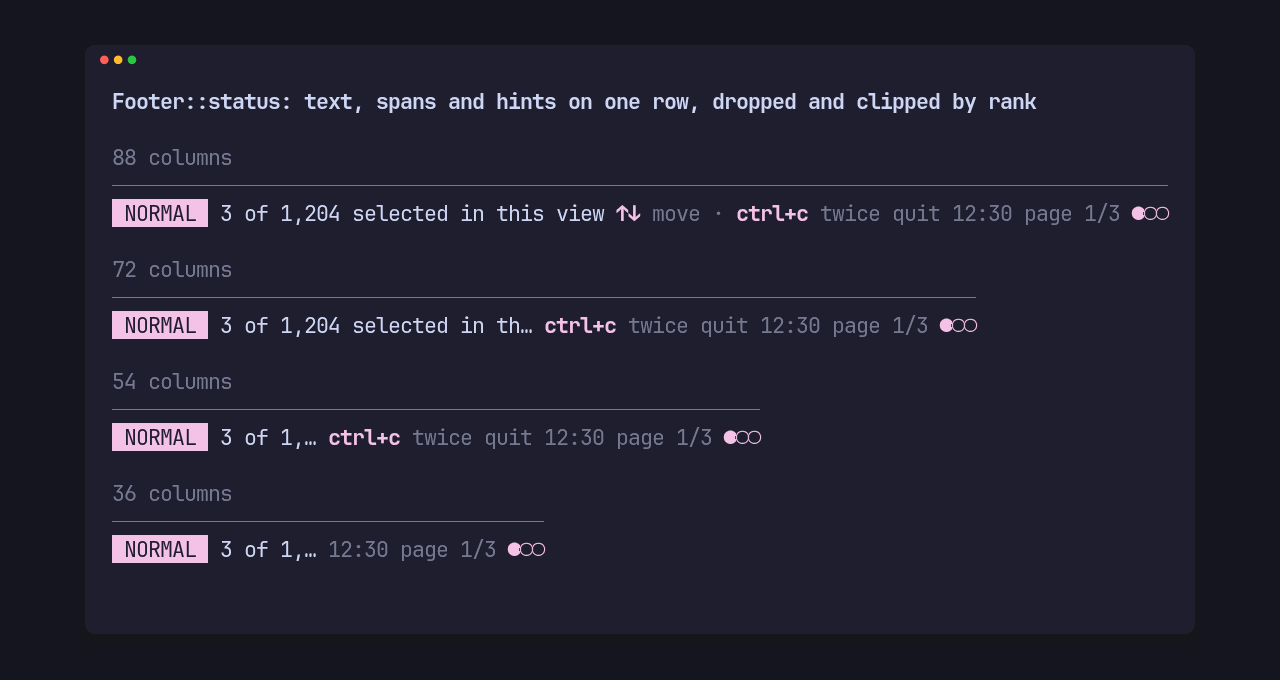
Footer::status lays out segments on one row instead of a row of hints. A
segment is text in one style, text in several styles, or a set of hints:
use pito_footer::{Footer, Segment};use ratatui::style::{Color, Modifier, Style};
const DIM: Style = Style::new().add_modifier(Modifier::DIM);const ACCENT: Style = Style::new().fg(Color::Magenta);const PAGE: [(&str, Style); 2] = [("page 1/3 ", DIM), ("●○○", ACCENT)];
let segments = [    Segment::text(" NORMAL ", ACCENT.add_modifier(Modifier::REVERSED)),    Segment::text("3 of 1,204 selected in this view", Style::new())        .shrink()        .rank(1),    Segment::hints(&SHORT).rank(4),    Segment::text("12:30", DIM).right().rank(3),    Segment::spans(&PAGE).right().rank(2),];let footer = Footer::status(&segments).version("app", "1.4.2").rule(true);
This is the gallery’s status scene, drawn above at four widths:
- segments without
right()line up from the left, the others from the right; - when the row is too short the highest rank drops first, so at 36 columns the hints (rank 4) and the clock (rank 3) are gone;
- a segment marked
shrink()is clipped to the space left with one “…” instead of dropping; Segment::spanskeeps several styles in one segment, so the page dots carry their own colour; it measures, drops and clips as one segment;- the app’s version goes right of every segment and is the first thing to go.
The row is one line, plus the rule above it with rule(true);
height(width) says so.