
Show key hints that fit the width
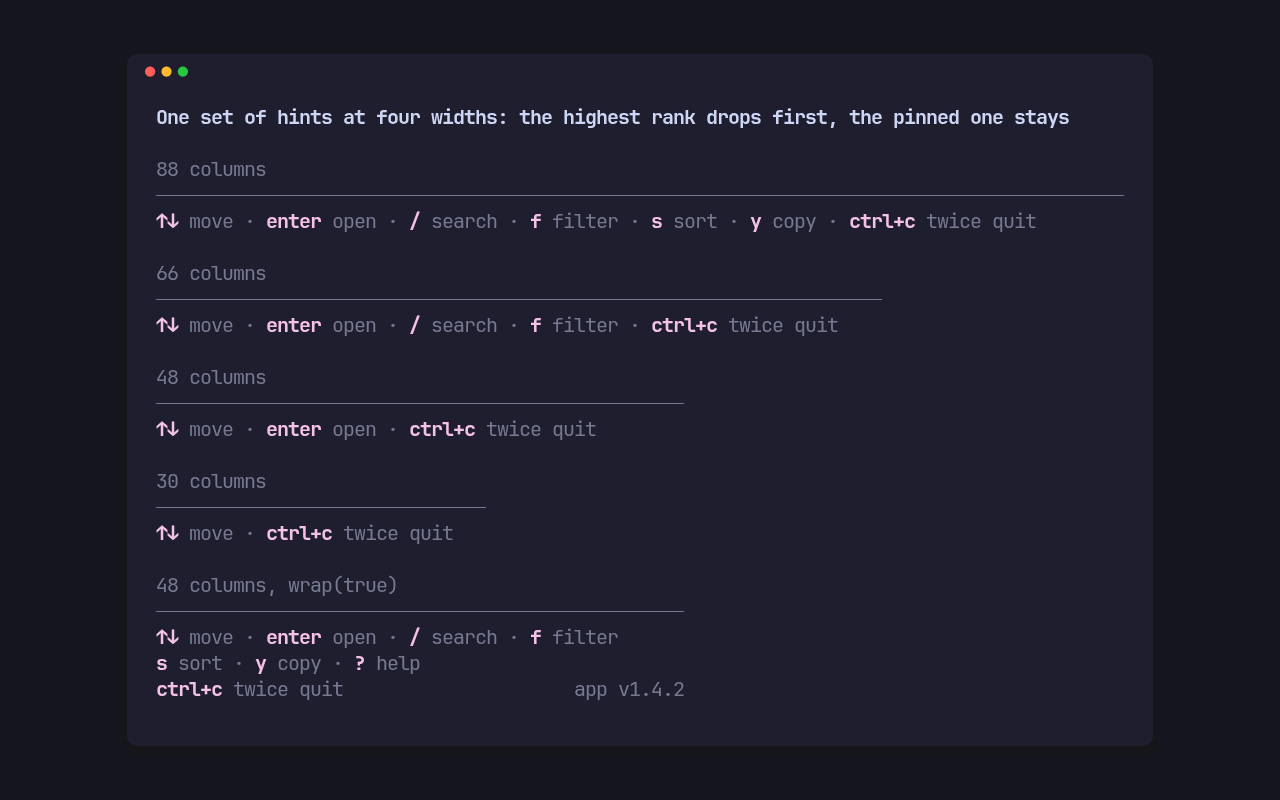
Each screen declares its hints as a const array. A Hint is a key, a label
and a rank:
use pito_footer::Hint;
const HINTS: [Hint; 8] = [    Hint::new("↑↓", "move"),    Hint::new("enter", "open").rank(1),    Hint::new("/", "search").rank(2),    Hint::new("f", "filter").rank(3),    Hint::new("s", "sort").rank(4),    Hint::new("y", "copy").rank(5),    Hint::new("?", "help").rank(6),    Hint::new("ctrl+c", "twice quit").pinned(),];
Footer::new(&HINTS) draws them as key label · key label under a rule, keys
in the accent style made bold and labels in the muted one. When the width runs
out:
- the highest rank drops first, the later one on a tie;
- the order of the hints that stay is kept;
- a pinned hint goes last of all;
- the app’s version, set with
version("app", "1.4.2")and drawn asapp v1.4.2at the right end, goes before any hint. It never pushes a hint out and is never clipped.
The picture above is the gallery’s fit scene:
cargo run --example gallery --features crossterm -- fit.
Wrap instead of drop
Section titled “Wrap instead of drop”wrap(true) flows every hint over as many rows as it needs. Ask the footer how
many rows to give it, and place it at the bottom:
use pito_footer::Footer;use ratatui::{Frame, layout::Rect};
fn draw(frame: &mut Frame) {    let footer = Footer::new(&HINTS).wrap(true).version("app", "1.4.2");    let area = frame.area();    let height = footer.height(area.width);    frame.render_widget(footer, Rect { y: area.bottom().saturating_sub(height), height, ..area });}
height(width) counts every row the footer draws, the rule above the hints
included, so the same call works with or without wrapping, a notice or a
confirm.
Show or hide the hints with ?
Section titled “Show or hide the hints with ?”Help holds whether the hints are open, and toggles on ? unless the app
names another key with toggle_on. Pinned hints and the notice stay when it
closes:
use pito_footer::{Footer, Help, Key};
let mut help = Help::new(true);let used = help.key(Key::Char('?'));assert!(used && !help.open());let footer = Footer::new(&HINTS).help(&help);
help.key(key) returns true when it used the key. An app whose ? opens a
help page instead simply doesn’t use Help.
Accept only the keys on screen
Section titled “Accept only the keys on screen”shown(key, width) says whether a key’s hint is on screen at that width, so an
app can ignore a key whose hint was dropped:
let footer = Footer::new(&HINTS);if footer.shown("s", area.width) { sort();}Fine tuning
Section titled “Fine tuning”separator(" · ")sets what goes between hints, andgap(n)the cells between the segments of a status row.indent(n)insets the hints, the notice and the confirm byncells while the rule stays full width.rule(false)drops the rule row above the footer.Hint::lead("Press")puts a word before the key, as in “Press ctrl+c again to quit”.styles(Styles::new().accent(..).muted(..).rule(..))sets the styles; every style comes from the app.