
Bands, takeovers, toasts and gates
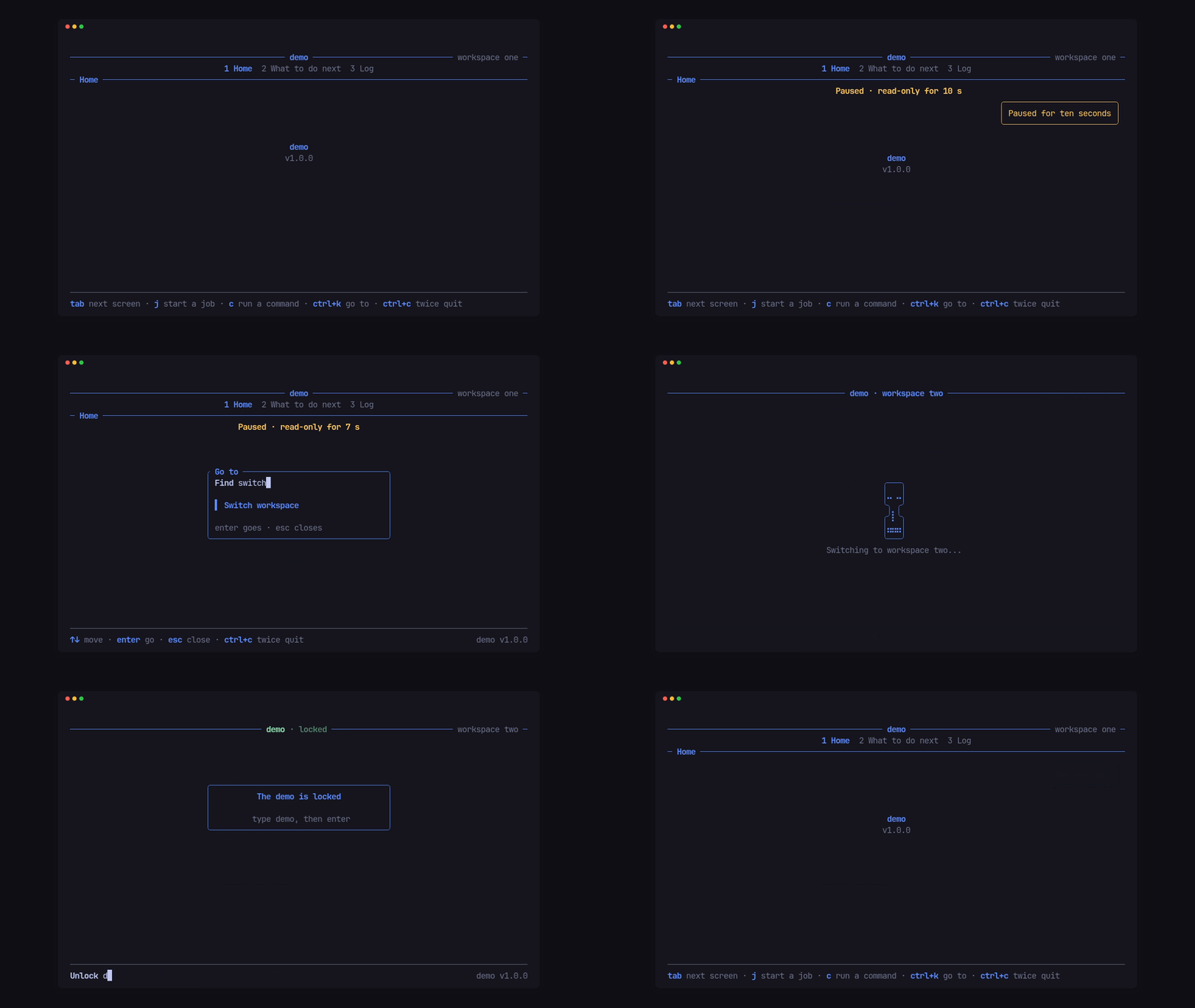
Toasts
Section titled “Toasts”cx.toast(Toast::new("Paused for ten seconds").tone(Tone::Warn));cx.toast( Toast::new("Now in workspace two") .tone(Tone::Good) .at(Spot::BOTTOM_RIGHT),);A toast is an app-wide notice over the content, top right unless placed
elsewhere, stacked with the others at its spot. It survives screen changes
and leaves on its own after .lasting(..) (3 s unless set), with one
redraw.
A band under the header
Section titled “A band under the header”Tui::top_band(impl Band) draws a band under the header on every screen. A
Band says how tall it is now, draws itself, and names the next moment it
needs a redraw. The demo’s “Paused · read-only for 7 s” banner:
impl Band for Paused {    fn height(&self, _room: u16, now: Instant) -> u16 {        u16::from(self.left(now).is_some())    }
    fn draw(&mut self, frame: &mut Frame, area: Rect, palette: &Palette, now: Instant) {        let Some(left) = self.left(now) else {            return;        };        let seconds = left.as_secs() + u64::from(left.subsec_nanos() > 0);        let line = Line::styled(format!("Paused · read-only for {seconds} s"), palette.warn)            .alignment(Alignment::Center);        frame.render_widget(Paragraph::new(line), area);    }
    fn deadline(&self, now: Instant) -> Option<Instant> {        let left = self.left(now)?;        let part = Duration::from_nanos(u64::from(left.subsec_nanos()));        Some(now + if part.is_zero() { Duration::from_secs(1) } else { part })    }}
The loop wakes only at the band’s deadline, once a second here, and sleeps in
between. Tui::band(impl Band) uses the same trait for a band flush on the
footer, in place of the activity band.
A takeover
Section titled “A takeover”Cx::takeover(Takeover) covers the app for an app-wide transition: its text
on the title rule, the hourglass under it, the tabs and footer hidden, and
every key ignored but its cancel keys and the quit guard, until
Cx::end_takeover().
let takeover = Takeover::new(SWITCHING, "demo · workspace two") .label("Switching to workspace two...") .cancel(&[Key::Esc]);cx.takeover(takeover);cx.detach(|| { switch_workspace(); Msg::Switched});When the work answers, the owner calls cx.end_takeover() (and usually
cx.epoch(), so reads from the old workspace are dropped). A cancel key
closes it and the owner hears layer(SWITCHING, Event::Closed, cx).
A gate before the app
Section titled “A gate before the app”Tui::gate(screen, shut) puts a screen in front of the app: a lock screen or
a sign-in. While it is shut, it draws the title rule over the gate’s own box,
no tabs, no help and only the gate’s hints, and takes every key after the
quit guard, open prompts and the app’s claim. Cx::gate(false) opens the
app (entering its current screen); Cx::gate(true) shuts it again.
fn key(&mut self, key: KeyEvent, cx: &mut Cx<'_, Msg>) { if let Edit::Submit(value) = self.input.key(key.into()) { self.input.clear(); if value == "demo" { cx.gate(false); cx.toast(Toast::new("Welcome back").tone(Tone::Good)); } else { cx.say("That isn't it.", footer::Tone::Alert); } }}$ demo --dump 80x12 --keys "ctrl+k l o c k enter" ─────────────────────────────── demo · locked ──────────────── workspace one ─ ╭──────────────────────────────────────╮ │ The demo is locked │ │ │ │ type demo, then enter │ ╰──────────────────────────────────────╯
────────────────────────────────────────────────────────────────────────────── Unlock demo demo v1.0.0Overlays and layout
Section titled “Overlays and layout”Tui::overlay(section, keys, screen)opens an app’s own screen over any screen by its keys, the way the activity screen opens: the tabs unlit, only the back keys, its own breadcrumb row.Tui::layout(Layout::new()...)(orCx::layout) sets the margins, the content’s padding and the gaps under the header and above the footer. ASpotplaces a box by anEdgeon each axis (Start,Third,Middle,End):Spot::THIRD.place(area, 40, 5)is the gate’s box above.