
pito-tui
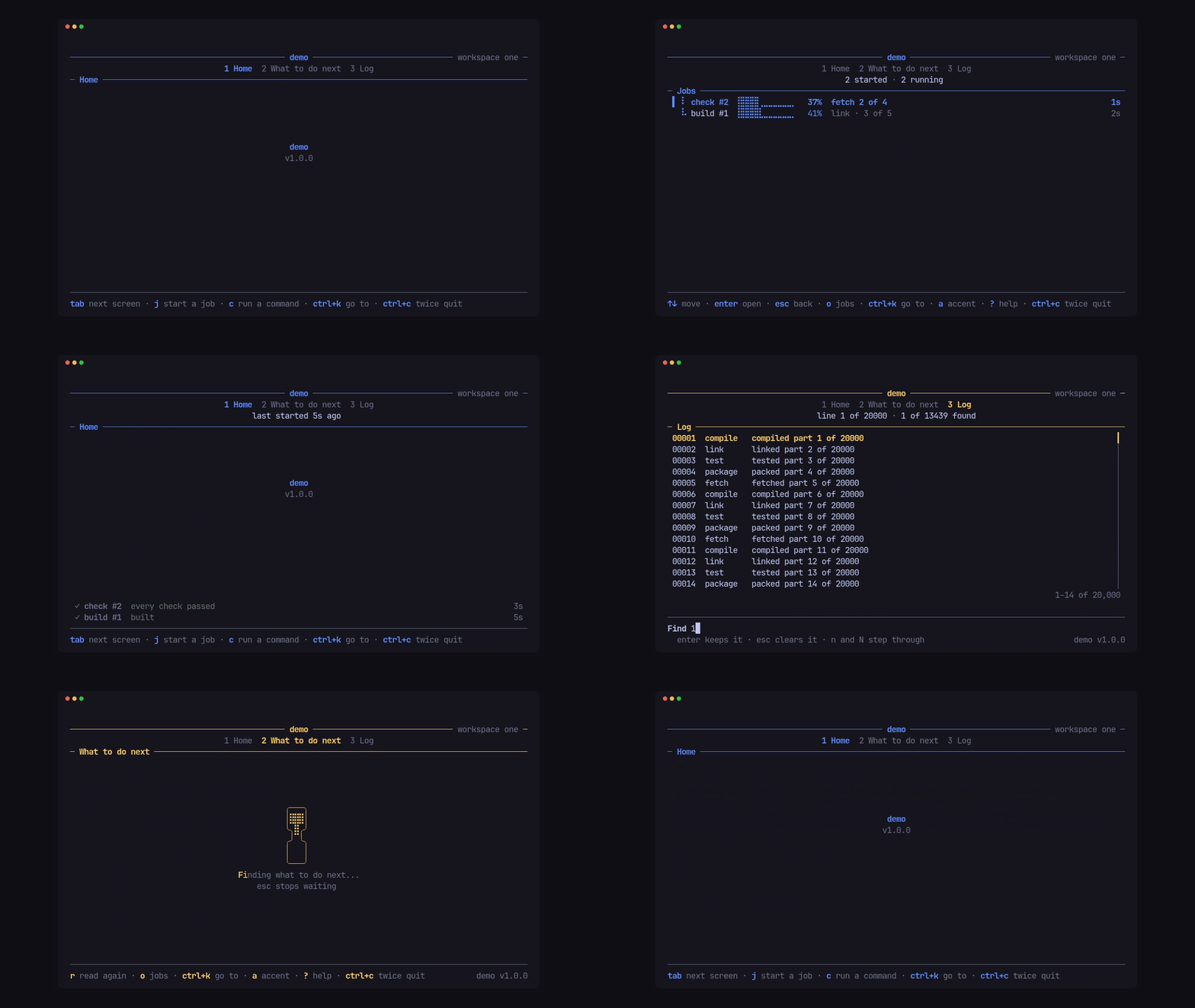
pito-tui is the app shell for PITO MD terminal apps, as one ratatui 0.30 crate. An app gives it a name, a version and an accent colour, and plugs in its screens; the shell does everything around them: the terminal, a 120 fps loop, the keys, the header, the footer, the hourglass while a screen loads, modals, toasts, a live activity band, a log viewer, and headless dumps for tests and reviews. It brings pito-header, pito-footer, pito-hourglass and pito-list with it and re-exports them, so an app pins one crate.
It has no words of its own: every label, hint and message on screen comes from the app, in any language.
- 0.07 to 0.31 ms to draw a whole frame, header, screen and footer, against the 8.3 ms a frame gets at 120 fps.
- Idle, it draws nothing: the loop sleeps until a key, a worker or a deadline wakes it, and redraws only what changed.
- One line in
Cargo.tomlbrings the shell and its four widget crates; 11 direct dependencies, 4 of them PITO MD’s own. - A 1.7 MB demo (stripped release build), from 8,768 lines of Rust.
Works on Linux, Windows and macOS (CI-tested on all three).
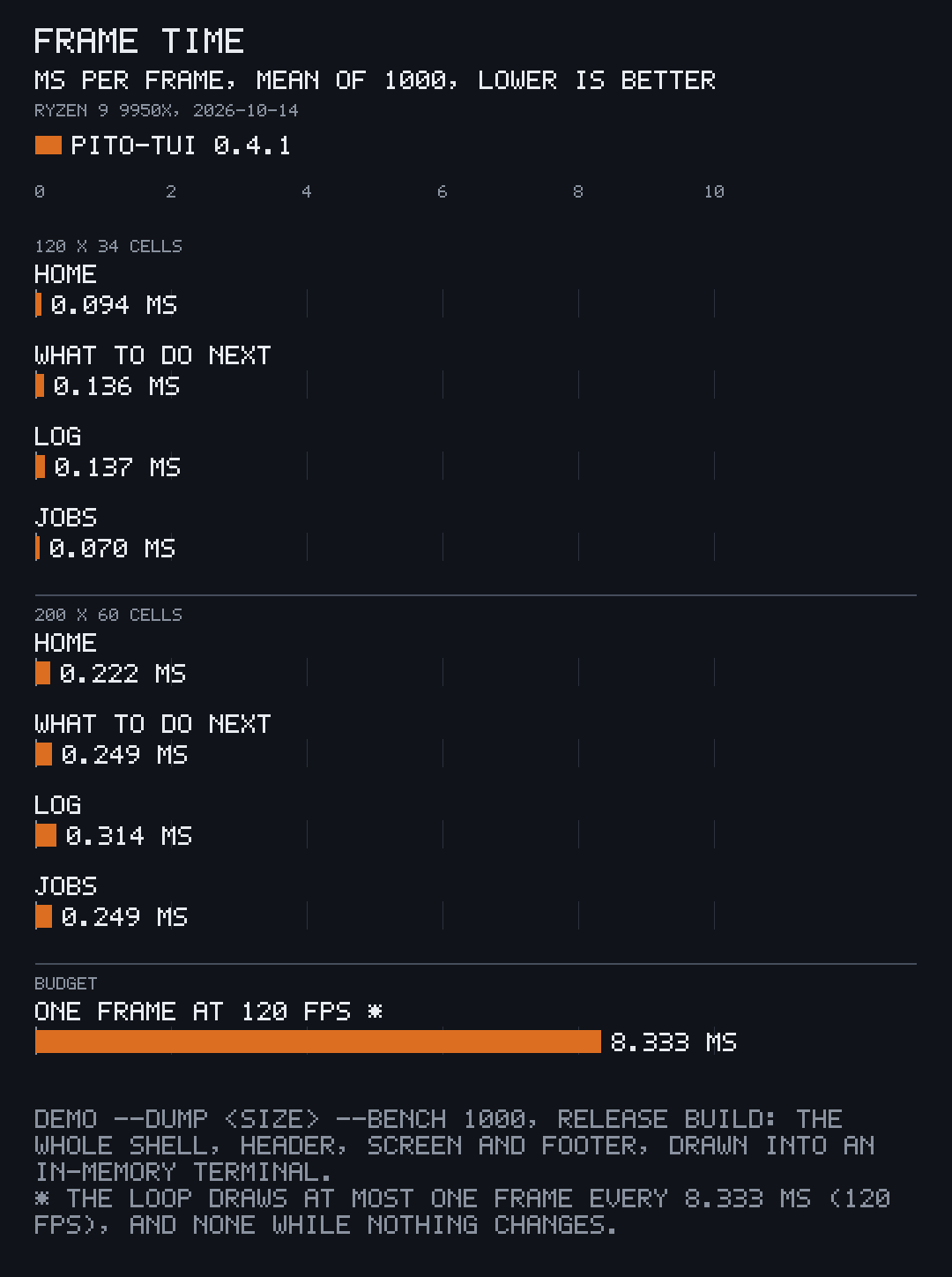
| Screen | 120x34 average | 120x34 worst | 200x60 average | 200x60 worst |
|---|---|---|---|---|
| Home | 0.094 ms | 3.085 ms | 0.222 ms | 1.991 ms |
| What to do next | 0.136 ms | 3.179 ms | 0.249 ms | 1.907 ms |
| Log (20,000 lines) | 0.137 ms | 0.955 ms | 0.314 ms | 6.730 ms |
| Jobs | 0.070 ms | 0.850 ms | 0.249 ms | 2.216 ms |
Measured once, on 2026-10-14, with demo --dump 120x34 --bench 1000 and
--dump 200x60 --bench 1000 on the release build of pito-tui 0.4.1 (1.0.0
draws with the same code), an AMD Ryzen 9 9950X on Linux under other load
(load average about 58 on 32 threads), which shows in the worst frames; every
one still fits the frame budget. Not measured on macOS or Windows.
Time every screen shows how to take the same numbers for
your own app.
Where to go next
Section titled “Where to go next”- Install and first app: the one
Cargo.tomlline and a screen that counts keys, in 30 seconds. - Guides, one task a page:
- Screens, tabs and the header
- Load data without blocking
- Keys and the quit guard
- Colours and words
- Ask the user: confirm, pick and modals
- Bands, takeovers, toasts and gates
- Show running work and run real commands
- Show a 20,000-line log
- Dumps, benches and frame captures
- Give the terminal back, always
- Move an existing app onto the shell
- Reference: the API at a glance, formats, the full API docs and the changelog.
Licence
Section titled “Licence”The code is MIT licensed, by Catalin Ilinca. The PITO MD name and its logos, and the names and logos of every PITO MD app and game, are © Catalin Ilinca, all rights reserved, and are not covered by the MIT licence. The GIFs and the chart are captures and measurements of the demo, under the MIT licence like the code. The look of the crates it brings is in the style of HEY’s terminal UI by 37signals.