
Show running work and run real commands
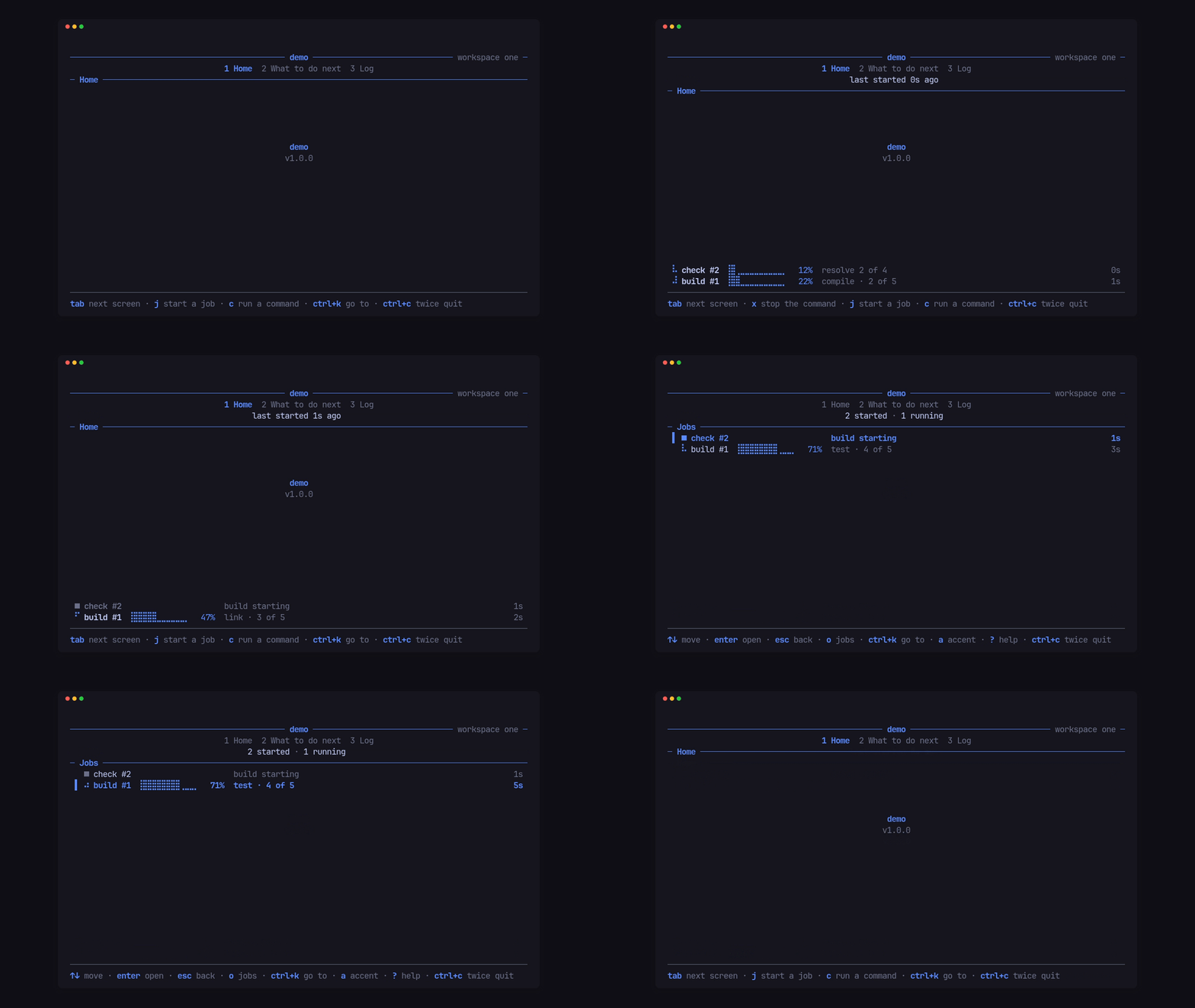
The activity band and screen
Section titled “The activity band and screen”Give the shell an Activities, the activity screen’s name, keys and words:
let jobs = Activities::new(Section::new("Jobs"))    .keys(&[Key::Char('o')])    .hints([        Hint::new("↑↓", "move"),        Hint::new("enter", "open").rank(1),        Hint::new("esc", "back"),    ])    .empty("No jobs yet. j on Home starts one.")    .more(|hidden| format!("+{hidden} more · o shows them all"))    .elapsed(|took| clock::span(took, &Units::new("s", "m", "h", "d")));
Tui::new("demo", VERSION, accent).activities(jobs)
Then whichever screen hears about the work posts it, each time it changes,
under the same id:
let activity = Activity::new(id, format!("build #{id}"), started) .progress(0.5) .status("link · 3 of 5") .detail([Line::from("✓ fetch"), Line::from("✓ compile"), Line::from("› link")]);cx.activity(activity);The shell draws them as a band flush on the footer, the newest first, taking
up to half the room; a finished one fades for 3 s before it goes. o opens
the activity screen over any screen, and enter opens one activity into its
detail lines.
$ demo --dump 80x18 --keys "j j" --at 2500
 ──────────────────────────────────── demo ──────────────────── workspace one ─                        1 Home  2 What to do next  3 Log                              last started 2s ago ─ Home ───────────────────────────────────────────────────────────────────────

                                      demo                                     v1.0.0


⠙ build #2 ⣿⣿⣿⣿⣿⣿⣀⣀⣀⣀⣀⣀ 50% link · 3 of 5 2s ⠙ build #1 ⣿⣿⣿⣿⣿⣿⣀⣀⣀⣀⣀⣀ 50% link · 3 of 5 2s ────────────────────────────────────────────────────────────────────────────── tab next screen · j start a job · c run a command · ctrl+c twice quitstate(State::Done)with.ended(at)finishes one;Running,Waiting,Done,FailedandStoppedare the states..progress(fraction)draws a Braille bar and a percentage; no progress draws a spinner..estimate(true)draws the bar faint and the share as “≈57%”.Cx::activities(list)replaces the app’s whole list;Cx::forget(id)drops one;Cx::band(false)hides the band.- A screen’s
busy()counts its running work for the quit guard.
The data stays the app’s: the shell only draws, pages and takes the keys.
Run a real command
Section titled “Run a real command”Cx::run(id, label, Command) starts a child process and puts it on the band:
KeyCode::Char('c') => { let mut command = Command::new("my-tool"); command.args(["build", "--progress", "json"]); cx.run(self.made, "build", command);}KeyCode::Char('x') => cx.stop(self.made),It follows the --progress json lines the PITO MD command-line tools print
on stdout (the format), so the
band shows that command’s stage, fraction and message live, with no glue.
Cx::run_from(id, label, command, command::Stream::Stderr) follows them on
stderr instead, and Stream::Both on both.
Cx::stop(id) sends a polite signal (SIGTERM to the command’s process group
on Unix, so whatever it started ends too), then a kill after command::GRACE
(2 s) if it still runs. No command outlives the app: when run returns, for
any reason, every command still running is stopped the same way, and on Unix a
hangup or termination signal does the same before the process ends.
Hear every line and the exit
Section titled “Hear every line and the exit”The screen that ran a command hears it in heard, every line in the order it
came, then the exit once:
fn heard(&mut self, id: u64, heard: Heard, cx: &mut Cx<'_, Msg>) { match heard { Heard::Line { text, .. } => self.lines.push(text), Heard::Exit(exit) => { if exit.state() == State::Failed { cx.say(format!("command {id} failed"), footer::Tone::Alert); } } _ => {} }}Exit is Code(n), Signal(n), Stopped, or Error(text) when it never
started. Lines arrive in batches, at most every 100 ms. Once the app posts
its own Activity under that id, the band shows the app’s label and
status, and the command’s lines only fill its detail.
Next: Show a 20,000-line log.