
Overlays and captions on an export
An export can draw one RGBA picture over every frame: a corner mark, or captions that change at every word. Set ExportOptions.overlay to a callback that gets each frame’s time in seconds and the export’s width and height, and returns the layer to draw then, or None for a clean frame:
pub type Overlay = Box<dyn FnMut(f64, u32, u32) -> Option<Arc<Rgba>> + Send>;Return the same Arc for as long as the layer doesn’t change. The layer is prepared once per Arc, so a caption that stays up for a second costs one preparation, not sixty; a layer of another size is scaled to the frame.
use std::sync::Arc;use pito_codecs::media::{ExportOptions, Piece, Rgba, export};
let watermark: Arc<Rgba> = Arc::new(draw_mark(1920, 1080));let caption: Arc<Rgba> = Arc::new(draw_caption(1920, 1080, "Hello"));let opts = ExportOptions {    overlay: Some(Box::new(move |at, _width, _height| {        Some(if at < 3.0 { watermark.clone() } else { caption.clone() })    })),    ..ExportOptions::default()};let done = export("marked.mp4".as_ref(), &[Piece { path: "clip.mp4".into(), from: 0.0, to: 6.0 }], opts, |_| true)?;
draw_mark and draw_caption stand for your own drawing code: anything that fills an Rgba (Rgba::new(width, height) is transparent). With the overlay on, the whole export is re-encoded, and the reasons say so:
360 frames, 0 copied, 360 encoded, smart false, video H.264 GPU reason: an overlay is drawn on every frame, so the whole export is re-encoded reason: frames stay on the GPU from decode to encode, overlay included, through VA-API
On the GPU or the CPU
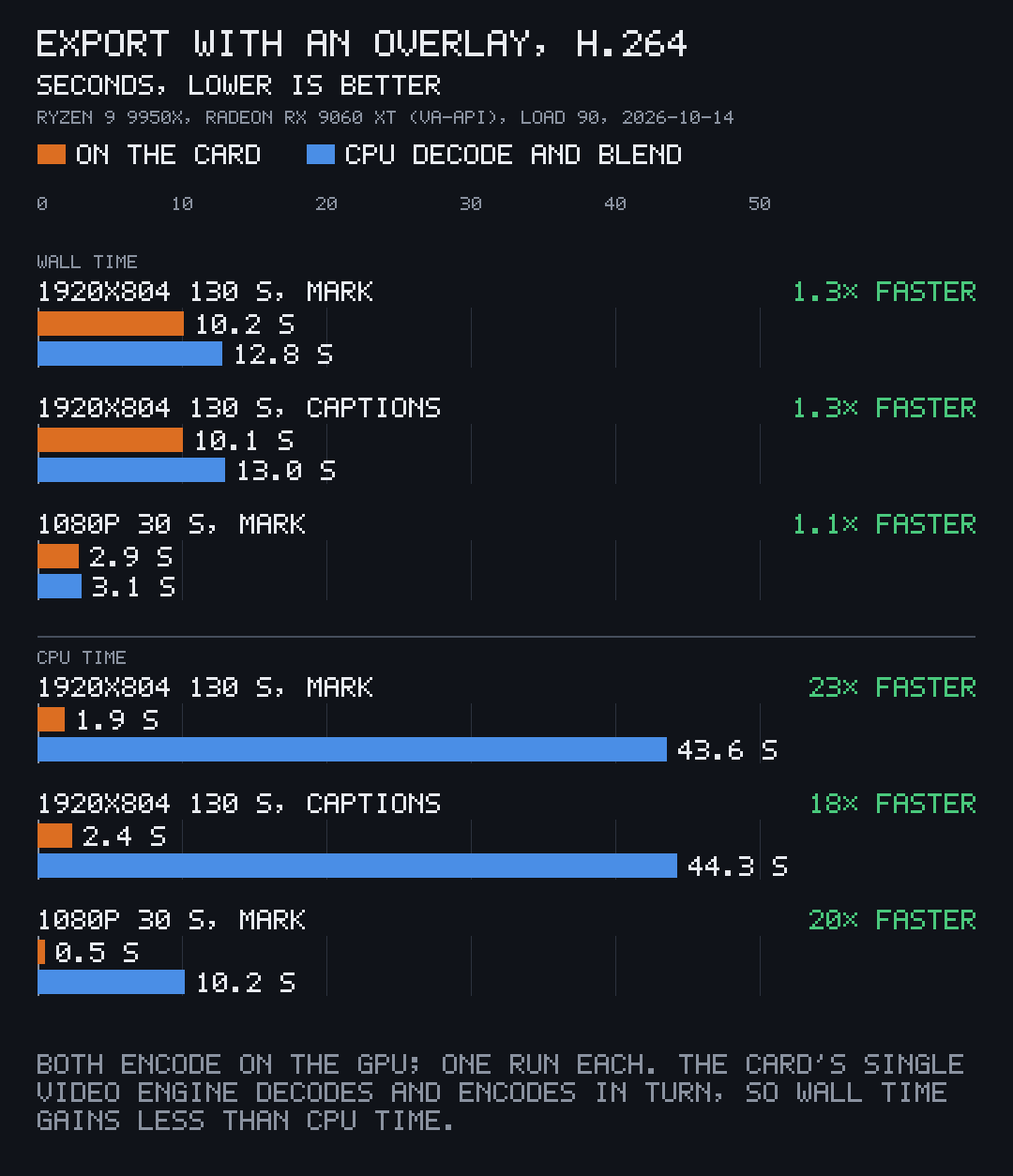
Section titled “On the GPU or the CPU”- VA-API with Mesa’s driver (AMD’s radeonsi on Linux): the overlay is blended on the card by a VA-API video-processing pass straight into the encoder’s input surface. Frames go from decode to encode without a copy to system memory, and the layer is uploaded only when it changes, and only its painted area. The graphics queue is never used. The last reason above says this path was taken.
- Every other route (Intel’s VA-API driver, VideoToolbox, NVENC, the CPU encoder): frames are blended on the CPU before they are encoded. A caption change costs what its painted area costs, 0.5 to 0.9 ms at 1080p.
- If the GPU can’t draw the overlay, or the source doesn’t decode on the GPU, the export goes on with the CPU blend and says why in its reasons.
Blend frames yourself
Section titled “Blend frames yourself”Outside an export, Blender draws a layer onto a decoded Frame (any of the 8 or 10-bit formats). Like the export, it keeps the layer it was given and draws the same Arc again without preparing it:
use std::sync::Arc;use pito_codecs::media::{Blender, Prefs, decode_video, to_rgba};
let mut video = decode_video("clip.mp4".as_ref(), 1.0, None, &Prefs::default())?;let mut frame = video.next().ok_or("no frame")??;let layer = Arc::new(draw_mark(frame.width, frame.height));let mut blender = Blender::new();blender.draw(&mut frame, &layer);blender.draw(&mut frame, &layer);let picture = to_rgba(&frame);
Blender: first draw 6.64 ms, again with the same Arc 0.02 msblend(&mut frame, &layer) is the one-off form.