
GPU routes per vendor and system
The front tries the GPU first and our own CPU code second, for every decode and every encode, and every fallback says why in a plain reason an app can show. Nothing extra is installed or linked: libva is loaded at run time on Linux, VideoToolbox is part of macOS and Media Foundation part of Windows, so a binary starts on a machine without them and decodes on the CPU there.
| Route | System | Decode | Encode | Tested on |
|---|---|---|---|---|
| VA-API, AMD (Mesa radeonsi) | Linux | H.264, H.265, VP9 | H.264, H.265; overlays composed on the card | AMD Radeon RX 9060 XT (RDNA 4), before every release |
| VA-API, Intel (iHD) | Linux | H.264, H.265, VP9 | H.264, H.265 | Built, untested on Intel hardware |
| VideoToolbox | macOS | H.264, H.265 | H.264, H.265 | GitHub’s Apple Silicon runners on every push: decode bit-exact with ffmpeg, encodes decoded back |
| NVENC | Linux, Windows | — | H.264, H.265 | Built and unit-tested, untested on NVIDIA hardware |
| Media Foundation | Windows | H.264, H.265 | — | Built and unit-tested, untested on GPU hardware |
The CPU codecs run and are tested on every push on Linux x86-64 and arm64, Windows x86-64 and macOS on Apple Silicon, with AVX2 kernels on x86-64 and NEON or portable paths on arm64.
See what this machine has
Section titled “See what this machine has”gpu::available() lists every codec, direction and backend found:
use pito_codecs::gpu;
println!("{:?}", gpu::available());
On Linux with an AMD card:
[(H264, Decode, VaApi), (H264, Encode, VaApi), (Hevc, Decode, VaApi), (Hevc, Encode, VaApi), (Vp9, Decode, VaApi)]pcod decode names the route it took, such as GPU (VA-API, radeonsi), and the library guide shows how an app asks the same.
Speed on VA-API
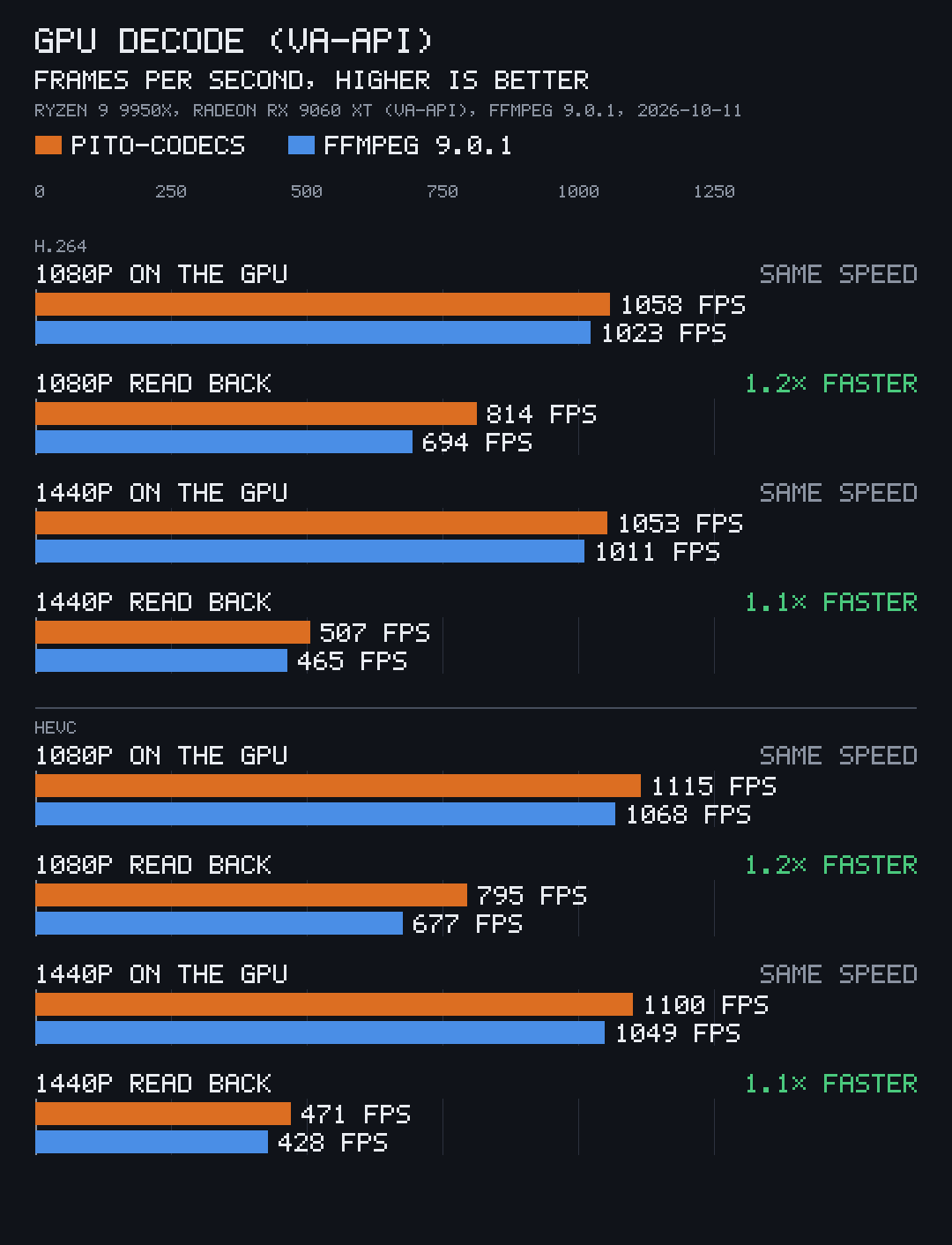
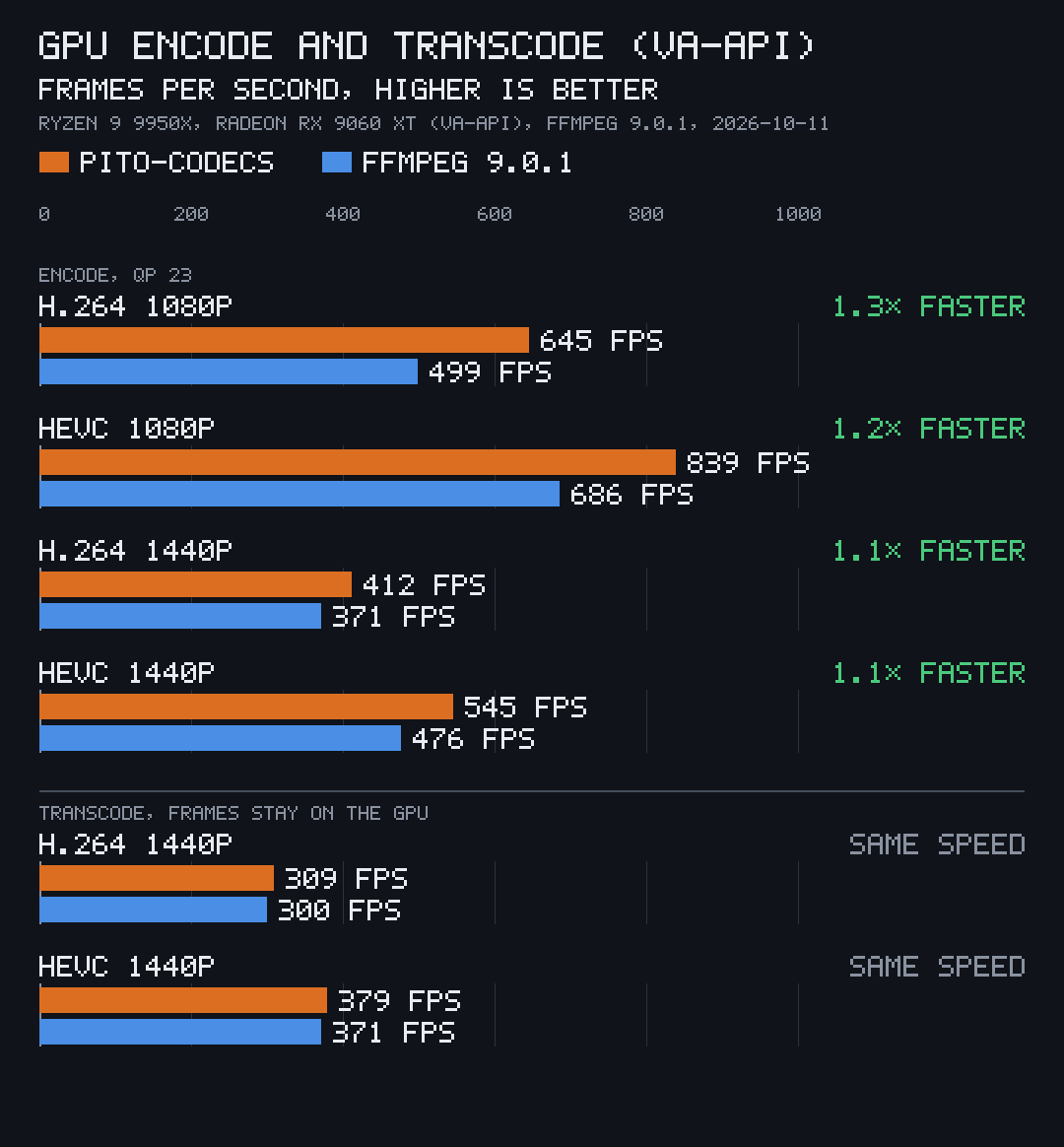
Section titled “Speed on VA-API”GPU decode and encode through VA-API run 1.1× to 1.3× faster than ffmpeg’s at the same settings, and a transcode keeps every frame on the card from decode to encode.
Limits worth knowing
Section titled “Limits worth knowing”- VA-API H.264 and HEVC refuse pictures smaller than 352x240 with an error, since smaller ones faulted AMD’s video engine; decode and encode such small pictures on the CPU route.
- H.265 encodes on the GPU only. Without a GPU HEVC encoder, an HEVC encode falls back to H.264 on the GPU, then on the CPU, as
Prefs::hevc_encode_fallbacksays. - Overlays are composed on the card only with Mesa’s VA-API driver; every other route blends them on the CPU (Overlays and captions).
- On Windows, H.265 decode through Media Foundation needs Microsoft’s HEVC Video Extensions.