
Add title, facts and notice rows
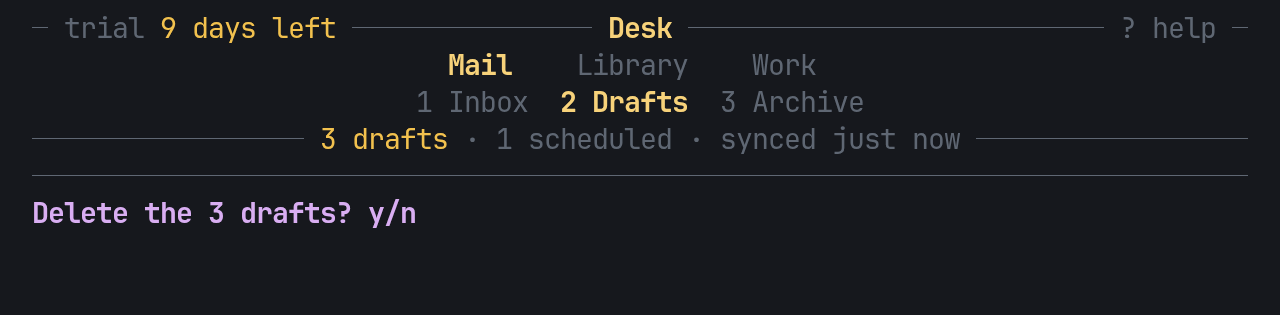
Header draws only the rows it is given, top to bottom:
| Row | Turn it on with |
|---|---|
| A title rule, the name in the middle, a slot each side | title(Some(..)), left(..), right(..) |
| The groups and sections rows | on by default; tabs(false) leaves them out |
| A facts row, plain or on a rule | facts(&[..]), facts_rule(true) |
| A breadcrumb row | crumbs(true); see Drill in with a breadcrumb |
| A closing rule | closing(true) |
| A notice row, for a result, a warning or a question | notice(Some(..)) |
height() answers how many rows that makes, so the app lays out the rest of
the frame under it. This is the header in the image above, from
examples/gallery.rs rows:
use pito_header::{Fact, Group, Header, Nav, Section, Styles};use ratatui::{Frame, layout::Rect, style::{Color, Modifier, Style}};
const ACCENT: Style = Style::new().fg(Color::Yellow);const MUTED: Style = Style::new().fg(Color::DarkGray);const STYLES: Styles = Styles::new().accent(ACCENT).muted(MUTED).rule(MUTED);
fn draw(frame: &mut Frame) {    let mut nav = Nav::new(vec![        Group::new("Mail").section(Section::new("Inbox")).section(Section::new("Drafts")),        Group::new("Work").section(Section::new("Checks")),    ]);    nav.go(2);    let trial = [Fact::new("trial ", MUTED), Fact::new("9 days left", ACCENT)];    let facts = [        Fact::new("3 drafts", ACCENT),        Fact::new("1 scheduled", MUTED),        Fact::new("synced just now", MUTED),    ];    let header = Header::new(&nav)        .styles(STYLES)        .title(Some("Desk"))        .left_parts(&trial)        .right(Some(Fact::new("? help", MUTED)))        .facts(&facts)        .facts_rule(true)        .closing(true)        .notice(Some(Fact::new(            "Delete the 3 drafts? y/n",            Style::new().fg(Color::Magenta).add_modifier(Modifier::BOLD),        )));    let area = frame.area();    frame.render_widget(header, Rect { height: header.height().min(area.height), ..area });}
Styles
Section titled “Styles”Styles holds three styles: accent for the current group and section (drawn
bold), muted for the rest of the nav, and rule for the rules. Every
Fact carries its own style, and text on a rule carries exactly that style:
the rule’s style never leaks into it. With no styles(..), everything draws
in the terminal’s default style.
Slots and facts
Section titled “Slots and facts”- The side slots sit on the title rule, so they show only with a title, which draws in the accent, bold.
- A slot holds one
Fact(left,right), several side by side in their own styles (left_parts,right_parts), or strings the app owns (left_pairs,right_pairs, from a slice of(String, Style)), so the app needs noVec<Fact>built each frame. factsandfacts_pairstake the facts row the same two ways. Facts are joined by·, or by whatseparator(..)sets.- Empty facts are skipped, and a row of only empty facts takes no row. An
empty
titleis no title. - When the width runs out, the facts row elides with “…” only when the room left can’t hold the separator and the next fact’s first two cells, and a cut fact ends the row. When a slot is cut, the “…” takes the style of the part it cuts. The side slots drop before the title does.