
Drill in with a breadcrumb
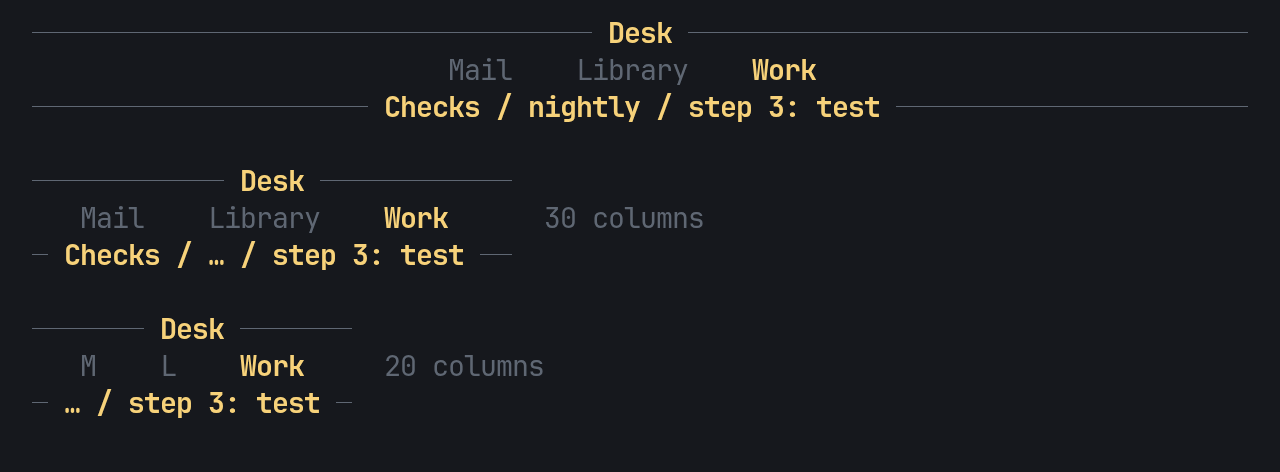
An app often shows a list in a section and opens an item from it. The nav keeps that path for each section: a stack of titles, each with the list row it was opened from.
Open and come back
Section titled “Open and come back”open(title, selected) goes one level deeper and remembers the row that was
selected. back() closes one level and answers that row, so the list comes
back where it was. close() closes every level and answers the row of the
first one.
use pito_header::{Group, Nav, Section};
let mut nav = Nav::new(vec![    Group::new("Work").section(Section::new("Checks")),]);nav.open("nightly", 4);nav.open("step 3: test", 2);assert_eq!(nav.depth(), 2);assert_eq!(nav.title(), Some("step 3: test"));assert_eq!(nav.breadcrumb(), "Checks / nightly / step 3: test");assert_eq!(nav.back(), Some(2));assert_eq!(nav.close(), Some(4));assert_eq!(nav.depth(), 0);
Each section keeps its own stack, so moving to another section and back
finds the path as it was. With the default keys, esc and q map to
Step::Back { selected } while drilled in, and to nothing at the top level;
see Map keys to moves. Opening is the app’s: it knows which key
opens an item.
use pito_header::{Key, Nav, Step};
fn on_key(nav: &mut Nav, key: Key, row: &mut usize) {    match nav.key(key) {        Some(Step::Back { selected }) => *row = selected,        Some(Step::Moved(_)) => *row = 0,        Some(_) => {}        None if key == Key::Enter => nav.open(format!("item {row}"), *row),        None => {}    }}
The breadcrumb
Section titled “The breadcrumb”While drilled in, the header swaps the sections row for a breadcrumb rule,
as HEY’s terminal UI does: the section’s name, then each title, joined by
/. The facts and breadcrumb rows step aside meanwhile, and come back
with the sections row. When the trail doesn’t fit, it elides its middle,
then its head, as in the image above (this is examples/gallery.rs drill).
Clicks on the breadcrumb rule hit nothing.
crumbs(true) adds a breadcrumb row under the nav rows, which at the top
level shows the current section’s name. An app that wants the sections row
to stay while drilled in passes .drill(Drill::Rows): the trail then shows
on that breadcrumb row, under the sections.
use pito_header::{Drill, Group, Header, Nav, Section};
let mut nav = Nav::new(vec![    Group::new("Library").section(Section::new("Ownership")),    Group::new("Work").section(Section::new("Checks")),]);nav.open("build queue", 3);assert_eq!(Header::new(&nav).crumbs(true).height(), 2);assert_eq!(Header::new(&nav).crumbs(true).drill(Drill::Rows).height(), 3);
Drilled in, the first header is the groups row and the breadcrumb rule; the
second keeps the groups, the sections and the breadcrumb row. The
Breadcrumb widget
(Breadcrumb::new(&nav), or nav.breadcrumb_bar()) draws the trail alone,
for an app that titles its own content; centred(true) centres it.