
How prec renders
Record
Section titled “Record”The app runs in a pty of exactly the recipe’s grid, driven by the tape at real speed. Its output bytes are kept with monotonic timestamps as an asciicast v2 cast, with the input events and hide, show, screenshot and end markers (Formats).
Replay
Section titled “Replay”A vendored xterm.js 5.5.0 (canvas renderer, Unicode 11 widths) runs in headless Chromium (--disable-gpu, sRGB), started through env -i with a scratch HOME, TZ=UTC and C.UTF-8, so your locale and fontconfig never reach it. prec steps a virtual clock at exactly 1/fps, writes every cast byte up to that moment, waits for xterm to paint, and screenshots the page at the target size. Hidden stretches are cut, and a frame whose moment brings no new bytes reuses the previous one, so a mostly still terminal replays faster than a busy one.
xterm.js draws truecolor, box drawing, wide CJK and Nerd Font glyphs; the font is fitted to the render size so the grid fills it at its own pixels.
Encode
Section titled “Encode”A clip is one silent x264 High master at the render’s size and fps: preset slow, tune animation, CRF 14, 8-bit 4:2:0, a keyframe every two seconds, BT.709 limited range tagged in the stream and the MP4. Chromium’s 8-bit frames rise to 16 bits through zscale (each level v to exactly v×257), then go to YUV through zscale=matrix=709:range=limited, so every channel lands on its nearest limited-range code. zscale’s filter threads and x264’s 24 threads are fixed, because their output follows their thread count; that keeps a master byte-identical on any machine. ffprobe checks the master’s frame count and size before the manifest claims them.
Atomic
Section titled “Atomic”A render builds its files in its scratch folder, then moves them into the output folder and writes the manifest last, so a failed or cancelled re-render never leaves new files beside an old manifest.
Every frame, against VHS
Section titled “Every frame, against VHS”prec doesn’t capture the screen while the app runs, so a clip has the shown time times the fps in frames, however heavy the frame or the rate. One 10-second tape recorded by both tools at 1280x720:
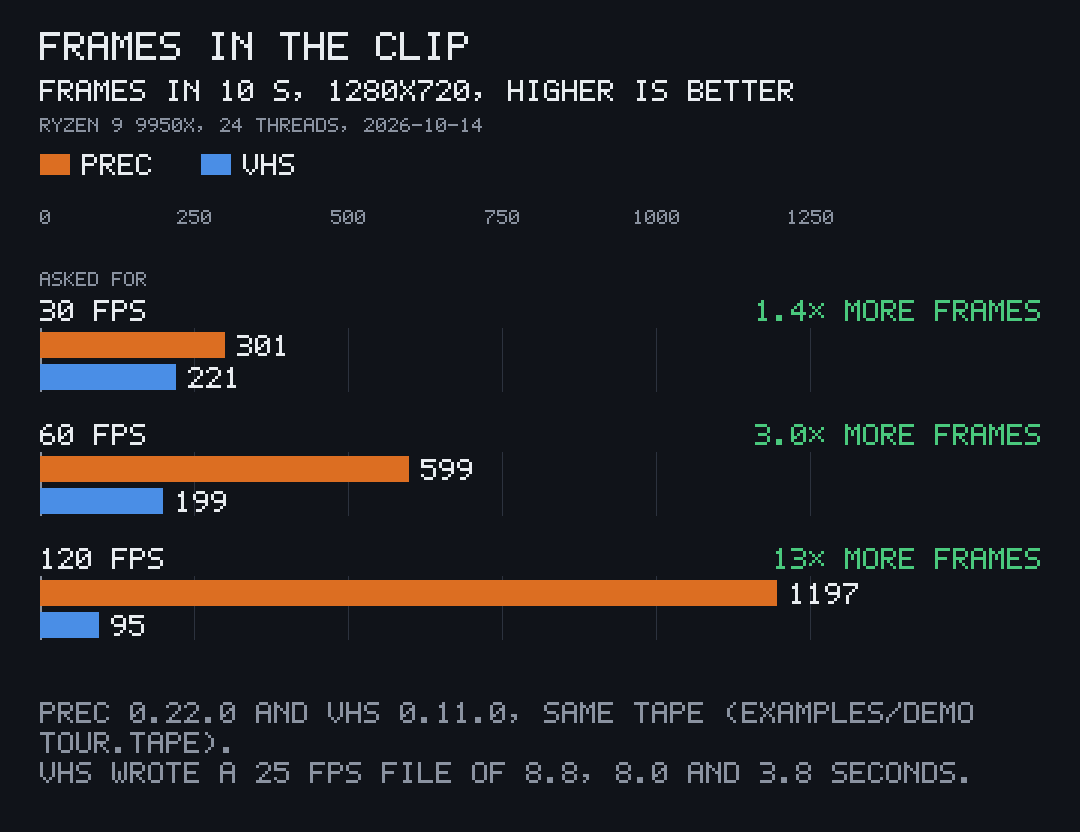
| asked for | prec frames | prec clip | prec wall time | VHS frames | VHS file | VHS wall time |
|---|---|---|---|---|---|---|
| 30 fps | 301 | 30 fps, 10.03 s | 30.4 s | 221 | 25 fps, 8.84 s | 19.9 s |
| 60 fps | 599 | 60 fps, 9.98 s | 34.8 s | 199 | 25 fps, 7.96 s | 29.9 s |
| 120 fps | 1,197 | 120 fps, 9.98 s | 54.9 s | 95 | 25 fps, 3.80 s | 35.7 s |
VHS finishes sooner, because it keeps what it can capture in real time; prec records in real time, then replays and encodes every frame at x264’s slow preset, CRF 14.
Measured on 2026-10-14 by docs/bench/bench.sh in prec’s repository: an AMD Ryzen 9 9950X on Linux, both tools pinned to the same 24 threads at nice 10, prec 0.22.0 with PREC_DIRECT=1 and VHS v0.11.0, recording examples/demo’s tour.tape (about 10 seconds of typing, progress bars and the palette). The charts are drawn by pito-compare.
Size and build
Section titled “Size and build”The Linux x86_64 binary is 5,123,704 bytes (4.9 MB; 2,092,292 bytes as the release’s .tar.gz), built with fat LTO, one codegen unit and stripped; a cold cargo build --release --locked took 71.9 s with 4 build jobs. prec has 17 direct dependencies and 88 crates in its Linux build; the xterm.js files and the VHS themes are compiled in, so it reads nothing from the network.