
Frame, closure and poster
Window or bare
Section titled “Window or bare”--frame window draws a window with its bar and shadow on a ground; --frame bare leaves the app’s own background to the edges, for a TUI that fills its terminal. The recipe’s frame is the default.
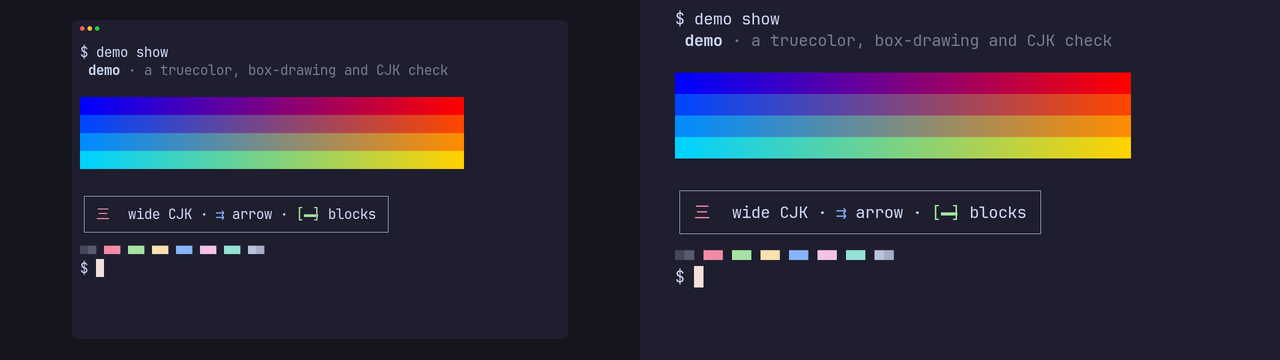
The ground around the window comes from the theme; ground = "#rrggbb" in the recipe or --set ground=#rrggbb sets it.
Closure: how a clip ends
Section titled “Closure: how a clip ends”A clip that loops, as a GIF or a muted autoplay video does, jumps from its last frame back to its first. A closure smooths that:
| closure | what it does |
|---|---|
| none | the clip ends where the tape ends |
closure = "palindrome" |
plays forward, then back to the start |
closure = { crossfade = 0.5 } |
blends the last 0.5 s into the first frame |
Set it per shot in the recipe, or for one render with --set closure=palindrome, --set closure=none or --set closure.crossfade=0.5. The sample app’s typing shot crossfades over 0.4 s, which is why its 3.8 s of shown time make a 3.4 s master.
Poster
Section titled “Poster”A clip writes <stem>.poster.png beside its master, an 8-bit sRGB PNG of one frame:
| poster | frame |
|---|---|
first (the default) |
the first frame |
before-closure |
the last frame shown in full before the closure starts |
| a number | that many seconds of shown time |
Set it per shot with poster = …, or for one render with --poster before-closure or --poster 2.5. The manifest’s poster entry records which master frame it shows.