
Show 100,000 items
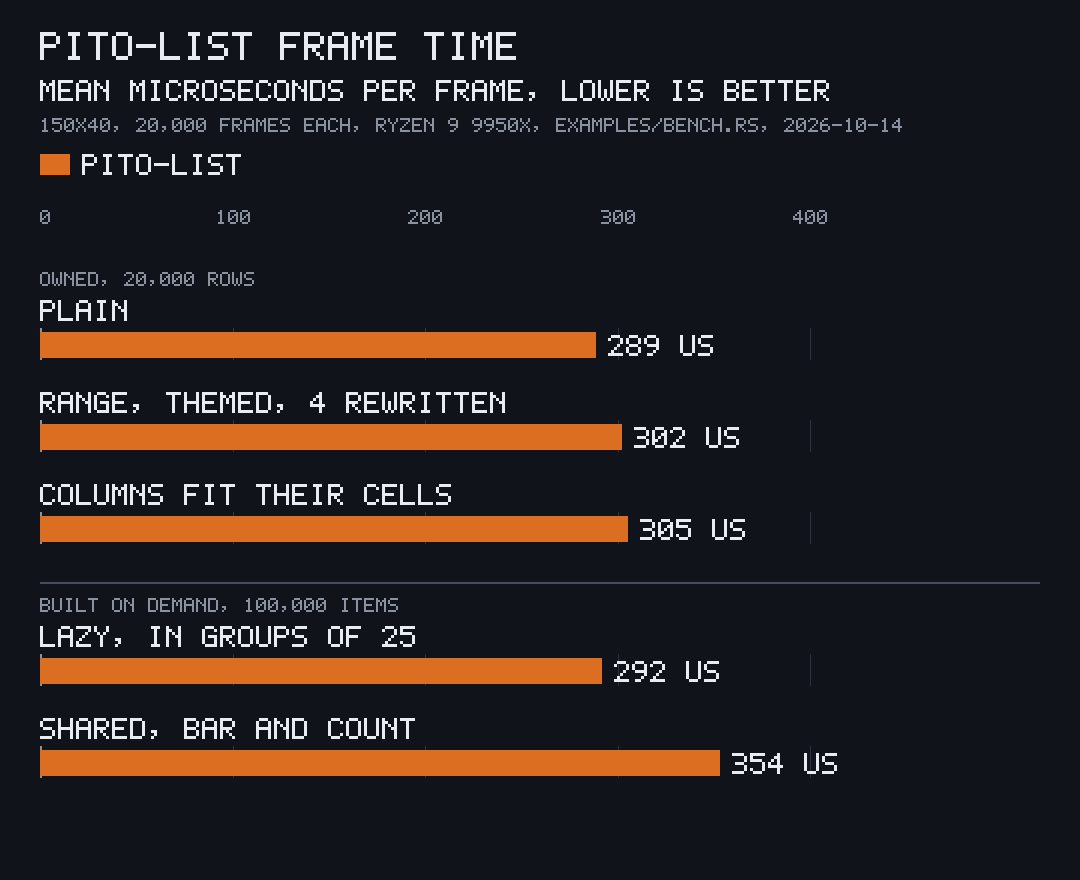
A list draws only the rows on screen, so its frame time doesn’t grow with its length. A list that owns its rows still holds every one; for tens of thousands of items, keep them in your own type and let the list build a row only when a draw or a key asks for it.
A shared vector, rows built on demand
Section titled “A shared vector, rows built on demand”Shared::new(items, builder) is a ready source over an Arc<Vec<T>> of your
items. The builder turns one item into a Row:
use std::sync::Arc;
use pito_list::{Bar, Column, Count, List, ListView, Row, Shared};use ratatui::{buffer::Buffer, layout::Rect, widgets::Widget};
struct Job {    name: String,    bytes: u64,}
let jobs: Arc<Vec<Job>> = Arc::new(    (0..100_000)        .map(|n| Job { name: format!("job {n}"), bytes: n << 20 })        .collect(),);let build = |_: usize, job: &Job| Row::new([job.name.clone(), format!("{} MB", job.bytes >> 20)]);let mut list = List::from_source(Shared::new(Arc::clone(&jobs), build));list.select(99_999);
let columns = [Column::new("Job", 8, 12).pinned(), Column::new("Size", 6, 0).right()];let area = Rect::new(0, 0, 30, 5);let mut buffer = Buffer::empty(area);ListView::new(&mut list, &columns)    .header(true)    .end(Some("· end ·"))    .scrollbar(Some(Bar::LINE))    .count(Some(Count::new("–", " of ").group(",")))    .render(area, &mut buffer);assert_eq!(list.shown(), Some((99_999, 100_000, 100_000)));
draws the end of the list, building only the rows it shows and the few above the selection it checks for a heading. The count reads from 1, so the item at index 99,999 is the 100,000th:
Job Size job 99998 99998 MB│▌ job 99999 99999 MB│ · end · ┃ 99,999–100,000 of 100,000When your data changes, hand over the new vector:
list.update(|shared| shared.set_items(Arc::clone(&jobs))) costs an Arc
clone, keeps the selection on its index, clamped, and builds nothing until
the next draw. Doing it every frame is how the benchmark above runs its
100,000-item list.
A builder with state
Section titled “A builder with state”A closure can’t be named in a struct field. A type of your own that
implements Build<T> can (List<Shared<Job, Cells>>, or
List<Shared<Job>> with a plain fn), and it can hold what the rows are
built with, such as a unit or a clock; builder_mut() changes it. It may
also answer selectable(index, item) without building the row, which the
keys use to skip headings in a list of sections.
use std::sync::Arc;
use pito_list::{Build, List, Row, Shared, Source};
struct Job {    name: String,    bytes: u64,}
struct Cells {    unit: &'static str,    shift: u32,}
impl Build<Job> for Cells {    fn row(&self, _: usize, job: &Job) -> Row {        Row::new([job.name.clone(), format!("{} {}", job.bytes >> self.shift, self.unit)])    }}
struct App {    jobs: List<Shared<Job, Cells>>,}
let items = Arc::new(vec![Job { name: "backup".into(), bytes: 3 << 20 }]);let mut app = App {    jobs: List::from_source(Shared::new(items, Cells { unit: "kB", shift: 10 })),};app.jobs.update(|shared| *shared.builder_mut() = Cells { unit: "MB", shift: 20 });assert_eq!(app.jobs.source().row(0).cells()[1].text(), "3 MB");
Shared builds no row to find the width of the marks, so name it with
.marks(width) when your rows carry marks.
Other sources
Section titled “Other sources”- Rows your app has already built can be shared as they are:
Arc<Vec<Row>>andArc<[Row]>are sources, so handing the list a clone of theArcevery frame copies no row. - Any type can be a source by implementing
Source:len()androw(index), which answersCow::Ownedfor a row built on demand orCow::Borrowedfor one it holds.selectable(index)andmark_width()have defaults.
List::from_source(source) takes any of them, set_source replaces the
source and update changes it in place; both clamp the selection. Keys,
paging, clicks, the scrollbar and the count work the same on every source.