
Small areas
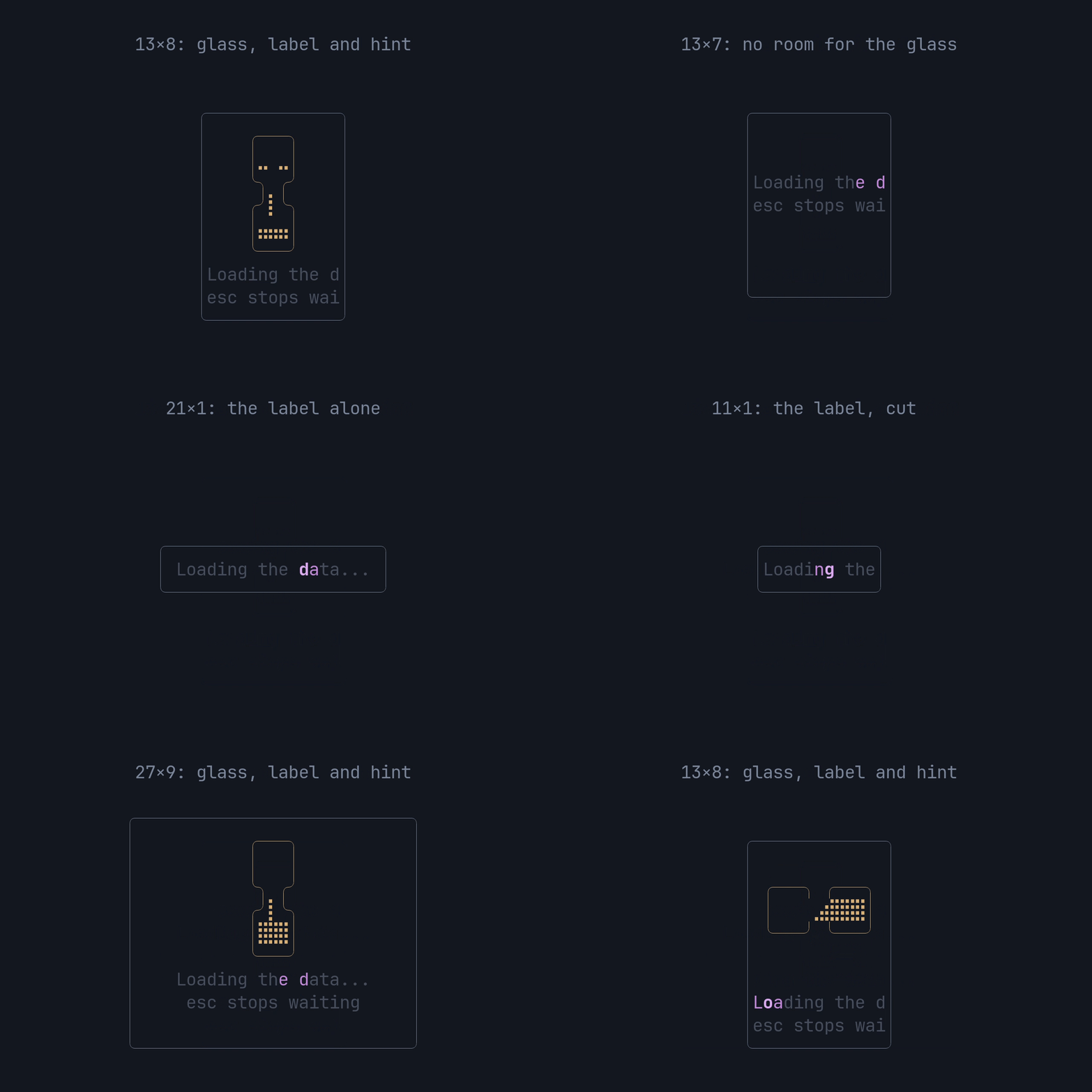
The widget fits whatever Rect it’s given and never draws outside it. It
picks one of four layouts from the area’s size alone:
| Area | What’s drawn |
|---|---|
| at least 11 wide and 7 high (8 with a hint) | the 11×6 glass, the label and the hint, centred as one block |
| narrower or lower, 2 rows or more | the label, with the hint on the next row, centred |
| 1 row | the label alone |
| zero width or zero height | nothing |
WIDTH (11) and GLASS_ROWS (6) are public, so an app can reserve exactly
the room for the full picture:
use pito_hourglass::{GLASS_ROWS, WIDTH};use ratatui::layout::Rect;
fn full_size(has_hint: bool) -> Rect {    Rect::new(0, 0, WIDTH, GLASS_ROWS + 1 + u16::from(has_hint))}
Long copy
Section titled “Long copy”A label or hint wider than the area is cut at a character, never mid-glyph: a two-cell glyph that doesn’t fit is left out whole, and a combining mark stays with its letter. The band counts only the characters drawn, so a cut label still shimmers end to end.
From a clone, cargo run --example fit steps through the sizes above; Esc or
q quits.