
Frames and timing
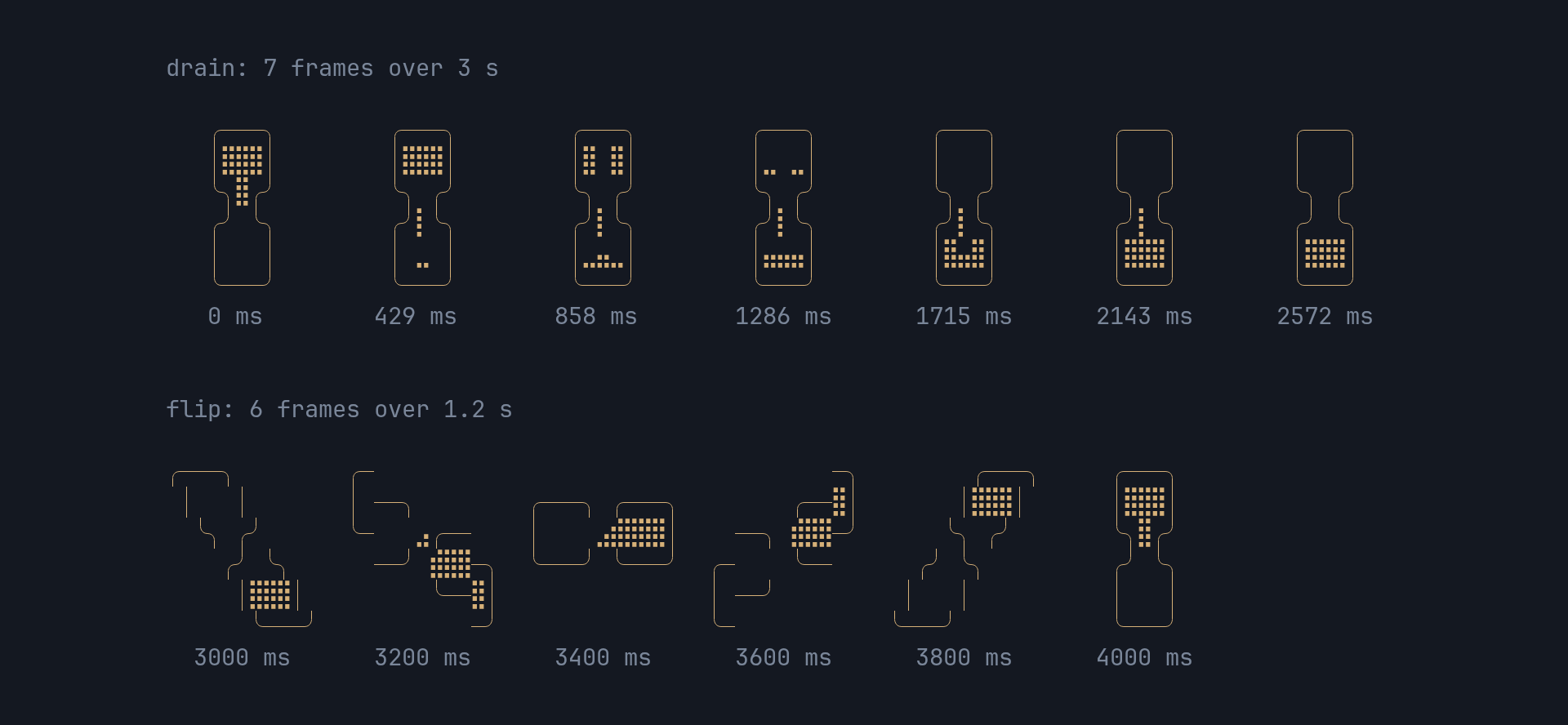
The picture is a pure function of the elapsed time: the widget keeps no state between frames, and a redraw at any moment lands on the same picture. The functions it draws with are public, for an app that wants to draw the glass itself, test what it shows, or sync something to it.
pub const WIDTH: u16; // 11, every frame's widthpub const GLASS_ROWS: u16; // 6, every frame's heightpub const FRAMES: [[&str; 6]; 13]; // HEY's frames, verbatimpub const CYCLE: Duration; // one full turn, drain plus flip: 4.2 spub fn frame_at(elapsed: Duration) -> usize;pub fn band_at(elapsed: Duration, n: usize) -> Option<usize>;The glass
Section titled “The glass”A turn is 4.2 s (CYCLE): the sand drains through 7 frames over 3 s, about
430 ms each, then the glass flips through 6 frames of 200 ms each.
frame_at(elapsed) e = elapsed mod CYCLE (4200 ms) e < 3000: frame = floor(e * 7 / 3000) the 7 drain frames e >= 3000: frame = 7 + floor((e - 3000) * 6 / 1200) the 6 flip framesFRAMES[frame_at(elapsed)] is the frame’s six rows, each 11 cells wide:
use std::time::Duration;
use pito_hourglass::{FRAMES, frame_at};
fn main() {    for ms in [0, 429, 3000, 4199, 4200] {        let frame = frame_at(Duration::from_millis(ms));        println!("{ms:>4} ms: frame {frame:>2}  [{}]", FRAMES[frame][1]);    }}
0 ms: frame 0 [ │⣿⣿⣿│ ] 429 ms: frame 1 [ │⣿⣿⣿│ ]3000 ms: frame 7 [ │ │ ]4199 ms: frame 12 [ │⣿⣿⣿│ ]4200 ms: frame 0 [ │⣿⣿⣿│ ]The shimmer
Section titled “The shimmer”band_at(elapsed, n) t = elapsed mod 1500 ms t < 1200: centre = floor(t * (n + 4) / 1200) - 2 t >= 1200: None, the pauseband_at returns the band’s centre as an index into the n characters of the
label, and None while the centre is off the label (below 0, or at n or
beyond) and through the pause. The band’s neighbours, one character either
side, can be on the label while the centre is off it: that’s how it slides in
and out.
use std::time::Duration;
use pito_hourglass::band_at;
fn main() {    for ms in [0, 200, 600, 1100, 1300] {        println!("{ms:>4} ms: {:?}", band_at(Duration::from_millis(ms), 10));    }}
0 ms: None 200 ms: Some(0) 600 ms: Some(5)1100 ms: None1300 ms: NoneTesting what an app shows
Section titled “Testing what an app shows”Since the picture depends only on the elapsed time, a test can draw the
widget at a fixed Duration into a ratatui Buffer and compare cells, with
no clock and no sleeping:
use std::time::Duration;
use pito_hourglass::{FRAMES, Hourglass};use ratatui::{buffer::Buffer, layout::Rect, widgets::Widget};
fn main() {    let area = Rect::new(0, 0, 20, 8);    let mut buf = Buffer::empty(area);    Hourglass::new(Duration::ZERO).label("Loading...").render(area, &mut buf);    let top: String = (4..15).map(|x| buf[(x, 0)].symbol()).collect();    assert_eq!(top, FRAMES[0][0]);}
The frames and their timing come from
basecamp/hey-cli’s
internal/tui/loading.go, used under its MIT licence.