
Put P99 on a site
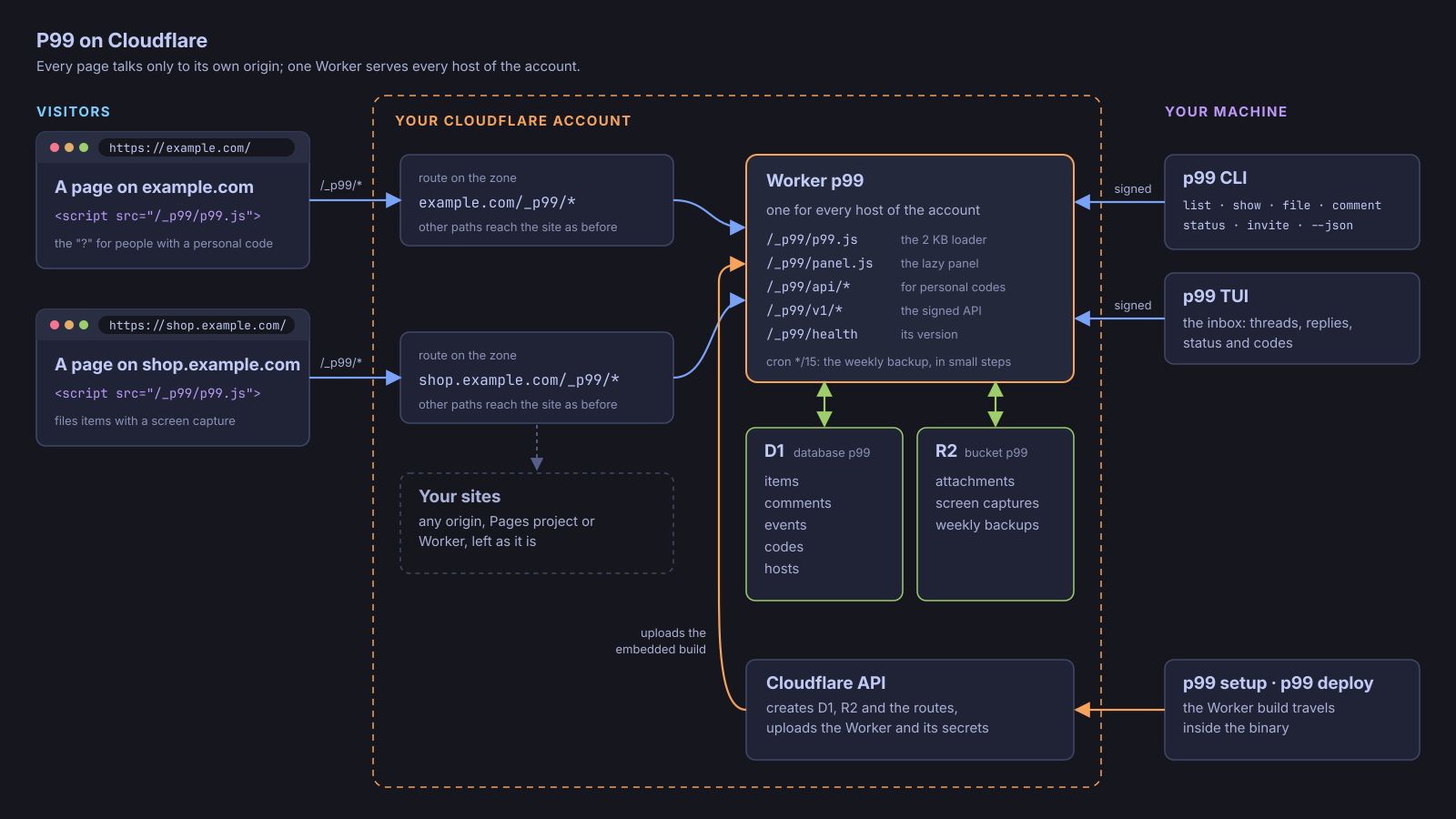
Each site P99 serves is a host: a hostname on one of your Cloudflare zones. The Worker answers on https://<host>/_p99/* through a Worker route, so your pages talk only to their own origin. Everything else on the host reaches your site as before.
1. Add the host
Section titled “1. Add the host”p99 setup adds the hosts you name. To add one later:
p99 hosts add shop.example.com --env productionp99 hosts add dev.shop.example.com --env dev --kind developmenthosts add writes the host to your config, adds the route <host>/_p99/* on its zone and tells the Worker the host’s environment. A new environment is a release unless --kind development says otherwise. A site with a production and a development address makes them two hosts with their own environments, so their items stay apart and share one numbering.
p99 hosts lists every host with its account, environment and whether the Worker answers. p99 hosts remove <host> takes a host off the Worker and out of the config; its items stay, and so does its route in Cloudflare.
2. Add the tag
Section titled “2. Add the tag”One tag in the shared <head> of every page:
<script src="/_p99/p99.js" async></script>The loader is under 2 KB gzipped. It draws the “?” only for people holding a personal code and does nothing for anyone else; the panel and the screen capture load only when the “?” is pressed. Shipping the tag before the route exists is harmless: the script fails to load and nothing is drawn.
3. Place and theme the button
Section titled “3. Place and theme the button”Nothing else goes in the page: the button’s corner, offset, theme and words come from the host’s config, which the Worker writes into the loader it serves for that host.
p99 hosts set shop.example.com --corner bottom-left --offset 24,24p99 hosts set shop.example.com --above "#cookie-banner"p99 hosts set shop.example.com --theme accent=#3b7dd8 --string file=Sendp99 hosts set shop.example.com --off "/checkout/*/done" --off "/admin/**"--cornerisbottom-right(the default),bottom-left,top-rightortop-left;--offset X,Yis in pixels from the corner’s two edges.--abovenames an element the button sits above while it is visible, such as a cookie banner.--theme key=valuesets a--p99-*custom property without its prefix, and--string key=valuereplaces one of the panel’s English words; an empty value removes either.--offlists the paths where P99 never loads (*matches one segment,**any); repeat it, and the list replaces the old one.
The same keys live in the host’s table in the config ([hosts."shop.example.com"]), where a dark table inside theme holds the dark-mode values; p99 hosts set pushes them to the Worker. The host reference lists every key.
4. Keep pages private
Section titled “4. Keep pages private”- A page carrying
<meta name="p99" content="off">never loads P99, nor does any path in the host’sofflist: there the loader draws nothing, reads nothing and captures nothing. data-p99-redacton an element blanks it in every capture and keeps its text out of marked regions;data-p99-ignoreleaves it out of captures altogether.- Addresses are recorded without their query string and hash.
5. Content-Security-Policy
Section titled “5. Content-Security-Policy”P99 works under a strict policy such as:
default-src 'none'; script-src 'nonce-…' https://shop.example.com/_p99/; connect-src 'self'; style-src 'self'; img-src 'self' data:; font-src 'self'; frame-ancestors 'none'Give the tag the page’s nonce, and allow the https://<host>/_p99/ path in script-src: the loader imports panel.js and capture.js from there. P99 styles its Shadow DOM through constructable stylesheets only, so style-src needs no 'unsafe-inline'. It fetches only same-origin URLs, uses no inline handlers, eval, workers or frames, and adds one element and one global, P99, to the page.
6. Hosts behind Cloudflare Access
Section titled “6. Hosts behind Cloudflare Access”A host behind Cloudflare Access keeps /_p99/* behind Access: the browser already carries the Access cookie, so the page’s requests pass. The CLI, the TUI and p99 announce carry no cookie. They reach the Worker through any host of the account, skip one that answers with Access’s login and keep the one that answered, so a public production host next to a private dev host needs nothing more. When every host of the account is behind Access, give them one of two ways in:
- point the account’s
urlin the config at an address of the Worker that is not behind Access, such as a custom domain of its own; or - create an Access service token for the application and set the account’s
access_client_idandaccess_client_secret: every request then carriesCF-Access-Client-IdandCF-Access-Client-Secret.
Either way, P99’s own signature still guards every request. p99 setup and p99 deploy report a host behind Access as such, not as a failed check.
Invite people: the “?” shows only for someone holding a personal code.