
Set up an account
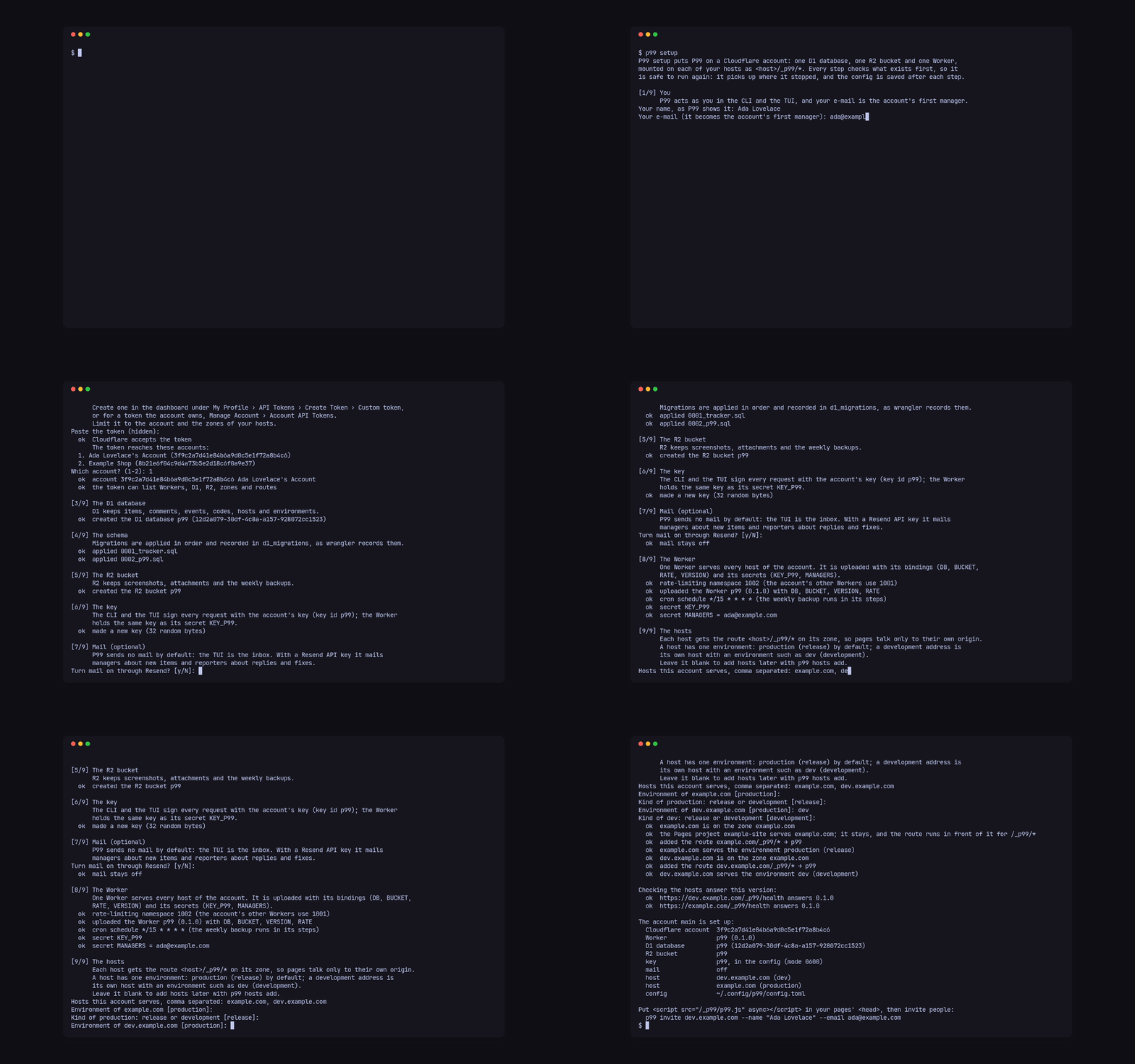
p99 setup puts P99 on one Cloudflare account: one D1 database, one R2 bucket and one Worker, mounted on each of your hosts as <host>/_p99/*. It runs in nine steps, checks what exists before it creates anything, and saves the config after each step, so it is safe to run again: it picks up where it stopped.
Before you start
Section titled “Before you start”You need a Cloudflare account whose zones hold your sites’ hostnames, and an API token for it. Create the token in the dashboard under My Profile › API Tokens › Create Token › Custom token (or, for a token the account owns, Manage Account › Account API Tokens), limit it to the account and the zones of your hosts, and give it these permissions:
| Permission | Why P99 needs it |
|---|---|
| Account › Workers Scripts: Edit | upload the P99 Worker, set its secrets and its cron schedule |
| Account › D1: Edit | create the D1 database and apply its migrations |
| Account › Workers R2 Storage: Edit | create the R2 bucket that keeps attachments and backups |
| Zone › Workers Routes: Edit | add the route <host>/_p99/* on each host’s zone |
| Zone › Zone: Read | find the zone each host belongs to |
Setup prints the same list when it asks for the token, and checks the token against Cloudflare before it creates anything; a missing permission is named, and setup waits for you to edit the token and paste it again.
Run it
Section titled “Run it”p99 setupThe steps and what each asks:
- You. Your name, as P99 shows it, and your e-mail, which becomes the account’s first manager. The CLI and the TUI act as you. The first time, they go to
[me]; when you add another account, setup asks whether you act as that same person there, and a different name or e-mail (or--nameand--emailthat differ from[me]) goes to that account’s[accounts.<name>.me](the configuration). - The Cloudflare token. Pasted without echo. When the token reaches several accounts, setup lists them and asks which one.
- The D1 database
p99, which keeps items, comments, events, codes, hosts and environments. - The schema. Migrations are applied in order and recorded in
d1_migrations, as wrangler records them. - The R2 bucket
p99, which keeps screenshots, attachments and the weekly backups. - The key. 32 random bytes the CLI and the TUI sign every request with; the Worker holds the same key as its secret
KEY_P99. - Mail (optional). P99 sends no mail by default: the TUI is the inbox. Answer yes to give a Resend API key and a sender such as
P99 <p99@example.com>; P99 then mails managers about new items and reporters about replies and fixes. - The Worker, uploaded with its bindings (
DB,BUCKET,RATE,VERSION), its secrets (KEY_P99,MANAGERS) and a cron schedule for the backups. Setup picks a rate-limiting namespace no other Worker in the account uses. - The hosts. The hostnames this account serves, comma separated, and each one’s environment and kind. A host has one environment:
production(areleasekind) by default; a development address is its own host, with an environment such asdev(adevelopmentkind). Each host gets the route<host>/_p99/*on its zone. A Pages project, Custom Domain or Worker already serving the host is named and left as it is: the route only runs in front of it for/_p99/*.
Setup ends by checking that each host answers this version on /_p99/health, then prints a summary:
The account main is set up:  Cloudflare account  3f9c2a7d41e84b6a9d0c5e1f72a8b4c6  Worker              p99 (0.1.0)  D1 database         p99 (12d2a079-30df-4c8a-a157-928072cc1523)  R2 bucket           p99  key                 p99, in the config (mode 0600)  mail                off  host                dev.example.com (dev)  host                example.com (production)  config              ~/.config/p99/config.toml
Put <script src="/_p99/p99.js" async></script> in your pages' <head>, then invite people:  p99 invite dev.example.com --name "Ada Lovelace" --email ada@example.com
Where the secrets go
Section titled “Where the secrets go”The token, the key and the Resend key are written to ~/.config/p99/config.toml with mode 0600, and P99 refuses a config file anyone else can read. When a supported password manager CLI is installed, setup offers to keep them there and writes only references to the config; --vault <name> picks the vault and --no-vault keeps the secrets in the file. The configuration reference lists every key.
Without questions
Section titled “Without questions”Every question has a flag, and --yes takes the default for the rest, so a script can run setup end to end. Pass the token and the Resend key in the environment, never as flags, so they stay out of the shell history and ps:
export P99_TOKEN=…p99 setup --yes --name "Ada Lovelace" --email ada@example.com \ --account-id 3f9c2a7d41e84b6a9d0c5e1f72a8b4c6 --no-mail \ --host example.com --host dev.example.com=dev:development--host takes host[=env[:kind]] and repeats. --json prints the summary as JSON, with each host’s route, health and notes, and sends the step lines to standard error.
More than one account
Section titled “More than one account”Run p99 setup --account <name> with a token for another Cloudflare account: it adds that account beside the first, and the others stay as they are. Every command then takes --account <name>, and a command that names a host uses that host’s account. Run p99 setup again at any time to add hosts or finish a setup that stopped; it picks up the account it finds in the config.
- Put P99 on a site: the tag, the button’s place, Content-Security-Policy and Access.
- Invite people: personal codes and their links.