
Work the inbox
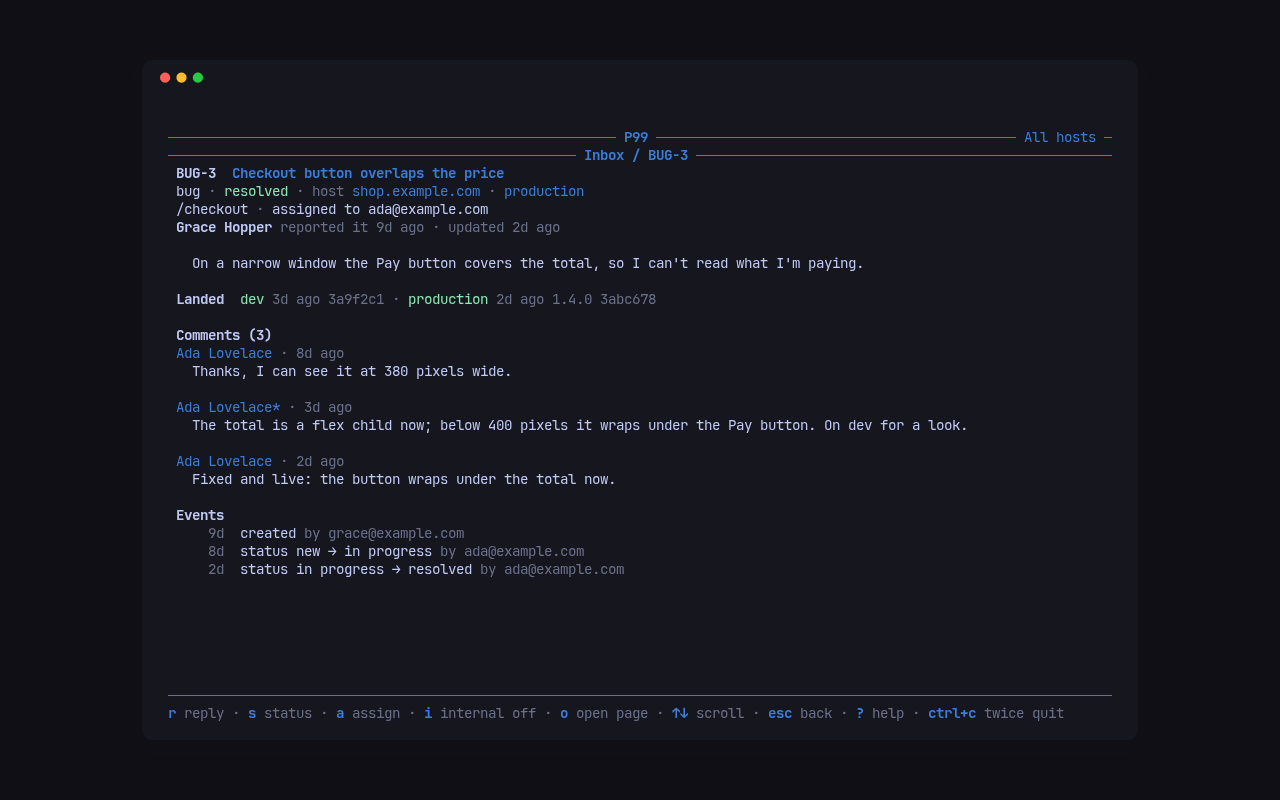
Everything people file lands in one inbox per Cloudflare account, across all its hosts. Work it in the terminal UI, or one command at a time from the CLI.
An item is a bug, feature (an idea), improvement, question or task (tasks are filed by managers). Its key is a prefix and a number, BUG-12, FEAT-7, IMP-5, Q-10, TASK-6, over one numbering per account: any prefix with the right number, or the bare number, names the same item, so 12, bug-12 and BUG-12 all work.
Its status is one of new, confirmed, in_progress, waiting (on the reporter), resolved, abandoned or duplicate. The first four are open, the rest closed. Every change is recorded as an event, and the reporter is mailed about replies and status changes when mail is on.
The TUI
Section titled “The TUI”p99 tuiThe Inbox screen lists the open items of every host, newest activity first, with a dot on the unread ones; the header counts the items shown and the unread. tab, or 1 and 2, switch between the Inbox and the Codes screens.
| Key | In the list |
|---|---|
↑ ↓ |
move |
enter |
open the item |
/ |
filter by text as you type; esc clears it |
s |
show open, closed or any status, in turn |
h |
show every host, or pick one |
r |
read the list again |
? |
every key of the screen |
ctrl+c twice |
quit |
| Key | In an item |
|---|---|
r |
write a reply; enter sends it, esc drops it |
i |
make the next reply internal (managers only see it), or not |
s |
change the status; duplicate then asks for the item it duplicates |
a |
assign it to someone, or to no one |
o |
open the item’s page in the browser |
↑ ↓, space, g, G |
scroll |
ctrl+r |
read the item again |
esc |
back to the list |
An item shows its kind, status, host and environment, the page it was filed on, who reported it, its text, its comments with their files, where its fix has landed, and its events.
The CLI
Section titled “The CLI”The same work, one command at a time:
p99 list example.comp99 list --all --status any --kind bugp99 list --mine -q checkoutp99 show BUG-12p99 comment BUG-12 "Fixed on dev, can you check?"p99 comment BUG-12 "The cart caches the total." --internalp99 status BUG-12 resolvedp99 status BUG-13 duplicate --duplicate-of BUG-12p99 assign BUG-12 mep99 assign BUG-12 --nonep99 file example.com --kind task --title "Move product images to the new bucket"p99 download 41 -o receipt.pngp99 list takes a host; without one it lists every host of the account, and --all every host of every account in the config. --status is open (the default), closed, any or one status, and --limit caps the lines at 50 unless you raise it. Its lines read:
*BUG-11 new shop.example.com The total does not update after removing a line [4 comments] TASK-6 in_progress shop.example.com Move product images to the new bucket -> ada@example.com BUG-8 in_progress dev.example.com Search box loses focus on mobile -> ada@example.com [3 comments] fixed on a branch IMP-5 confirmed shop.example.com Show delivery dates on product pages -> ada@example.com landed: devA * before the key marks it unread. p99 show prints the item, the commits that named it, its files with the ids p99 download takes, its comments (internal ones marked) and its events. A comment or a file body of - is read from standard input, and --attach <file> adds files to p99 file and p99 comment: images, PDFs, text, CSV, JSON, zip and office files, up to 20 MiB each.
JSON for scripts
Section titled “JSON for scripts”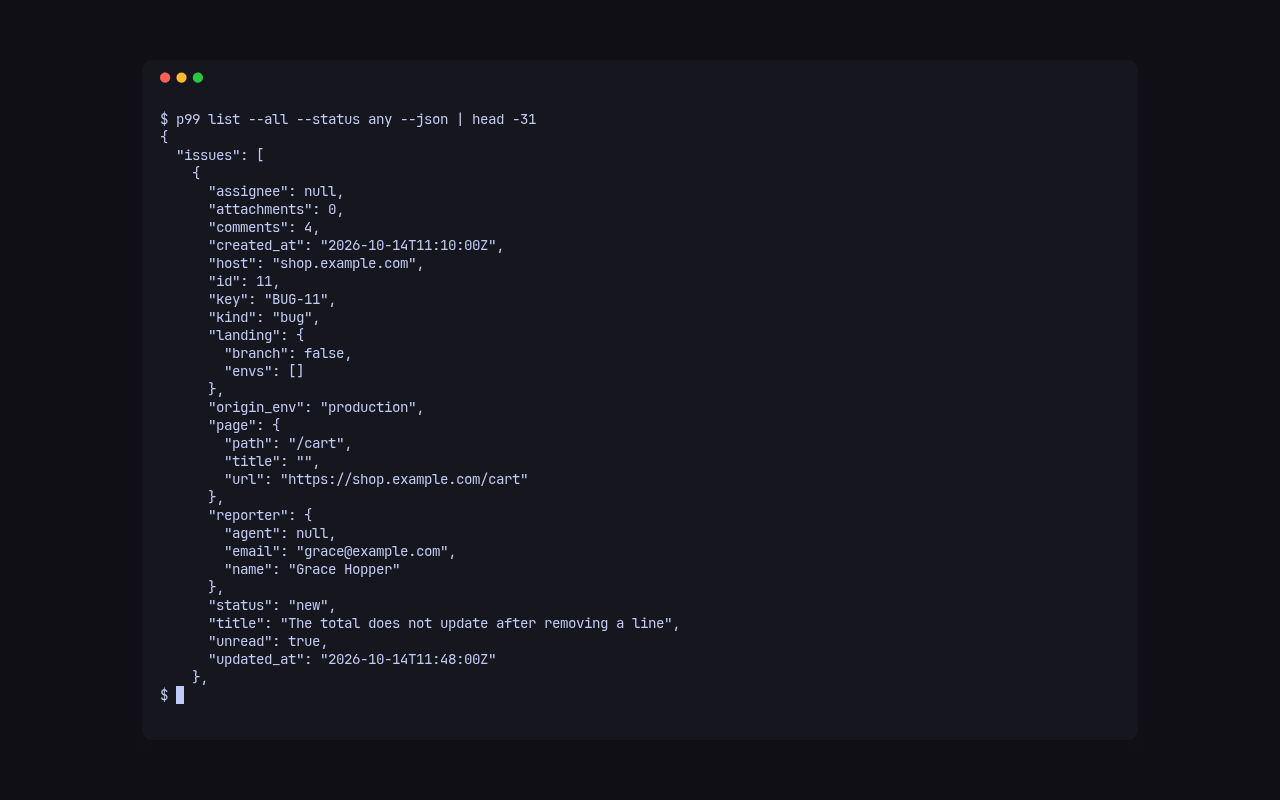
Every command takes --json and then prints one JSON document on standard output: p99 list --json prints {"issues":[…]} with each item’s summary, and p99 show --json the whole thread, {"issue","comments","attachments","events"}. The objects are the Worker’s own, described field by field in the API reference:
p99 list --all --json | jq -r '.issues[] | select(.unread) | .key'- Let agents work the inbox: the same commands, marked as an agent’s.
- Announce builds and landings: show on each item where its fix is.