
Speed and memory
pito-fetch downloads and verifies in one pass of the network and one read of the file, in flat memory. These are the numbers, how they were measured, and how to measure them on your own machine.
Download and verify
Section titled “Download and verify”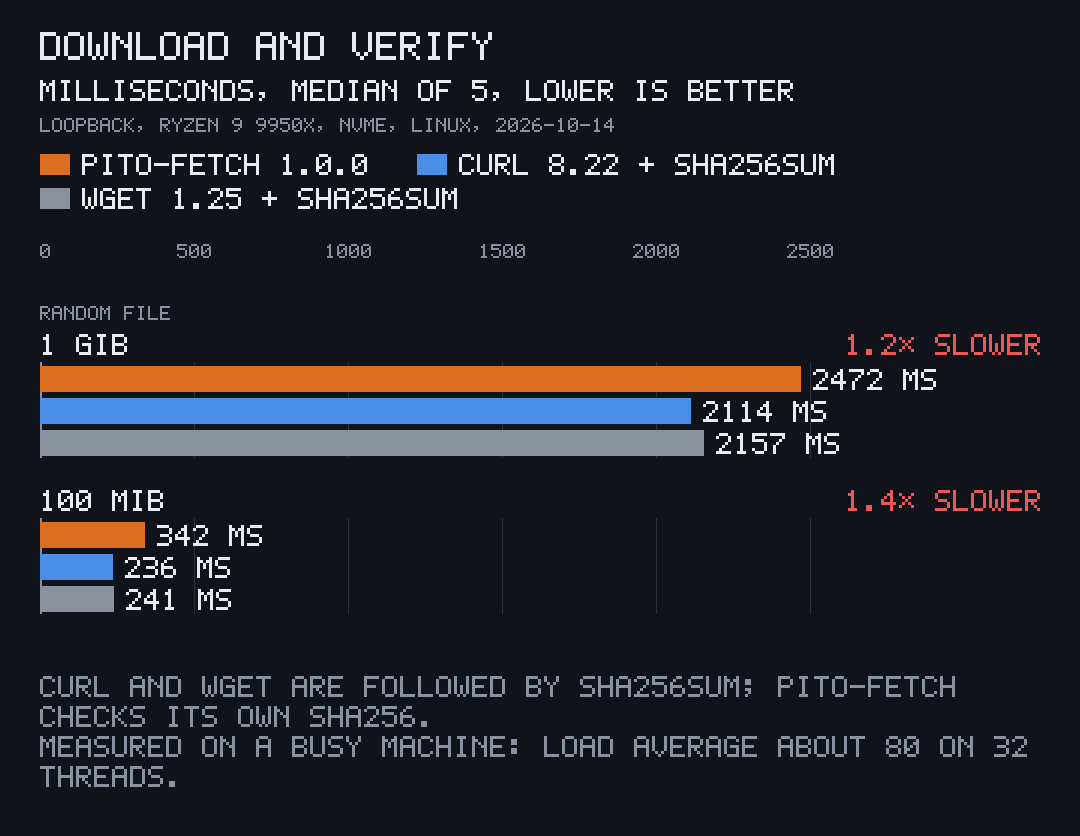
Downloading a file and checking its sha256 takes pito-fetch 1.2 times as long as curl or wget followed by sha256sum on a 1 GiB file, and 1.4 times on 100 MiB. That is over loopback, where the network costs nothing and the client is all that’s measured; over a real connection the network’s speed dominates all three.
Peak memory
Section titled “Peak memory”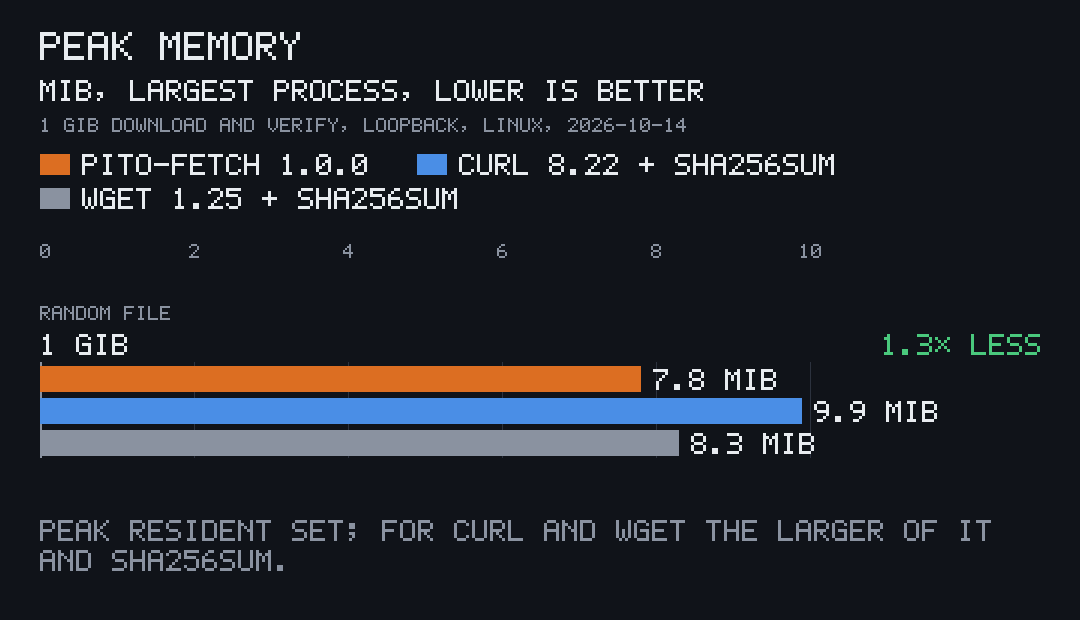
Memory stays flat whatever the file’s size: bytes stream through a 64 KiB buffer to disk, and the hash reads the file back in the same 64 KiB steps.
| Library code | 699 lines of Rust |
| Dependencies | 3 direct (ureq, sha2, thiserror), 35 crates in all |
| Clean release build | 11.7 s |
The get example |
3.4 MB as built, 2.5 MB stripped, TLS and root certificates included |
How it was measured
Section titled “How it was measured”Once on 2026-10-14, on Linux with an AMD Ryzen 9 9950X (16 cores, 32 threads) and an NVMe disk, with Rust 1.97.1. The machine was busy with other work at the time (load average about 80), so every client ran slower than it would alone; all three ran under the same load, interleaved run by run.
- Download and verify: the
serveexample serves a file of random bytes on 127.0.0.1; thegetexample (download and sha256 check in one process),curl -o(curl 8.22) andwget -O(wget 1.25), each of the last two followed bysha256sum, are timed five times each, interleaved. The chart shows the medians: 1 GiB in 2472, 2114 and 2157 ms; 100 MiB in 342, 236 and 241 ms. - Peak memory: the peak resident set (
ru_maxrss) of each process for the 1 GiB file:get7.8 MiB; curl 9.9 MiB, wget 8.3 MiB andsha256sum8.3 MiB, so the larger of each pair is charted. - Lines: the library’s
src/, without its unit tests, blank lines or comments. - Dependencies:
cargo tree, build-time macros included. - Build:
cargo build --release --lockedfrom a clean target folder. - Binary: the
getexample fromcargo build --release --examples, before and afterstrip.
The charts are drawn by pito-compare from the data files in the repository’s docs/charts/.
Measure it yourself
Section titled “Measure it yourself”bin/bench in the repository runs the download-and-verify comparison: it builds the examples, serves a 1 GiB and a 100 MiB file of random bytes on port 8472, and times get, then curl and wget each followed by the sha256 check, interleaved, printing the median of each. A client missing from the PATH is skipped; it needs perl for the clock. The optional argument is the number of runs, 5 by default.
git clone https://github.com/gmrdad82/pito-fetch && cd pito-fetchbin/bench 5It prints one line per client and size, <client> <MiB> MiB median <ms> ms of <runs> runs. The test files stay in tmp/bench/files for the next run.