Expand description
§pito-tui


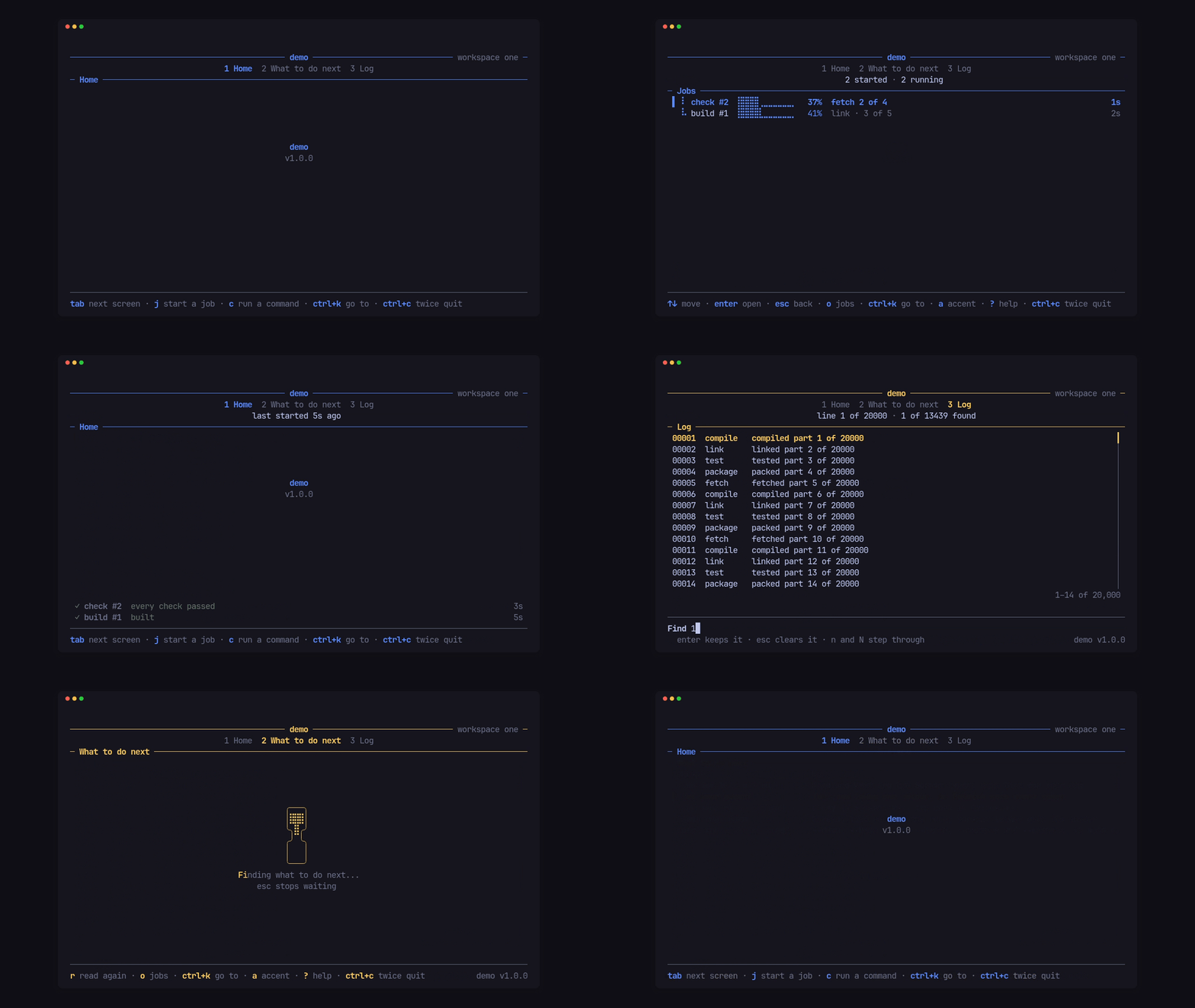
The app shell for PITO MD terminal apps, as one ratatui 0.30 crate. An app gives it a name, a version and an accent colour, and plugs in its screens; the shell does everything around them: the terminal, a 120 fps loop, the keys, the header, the footer, the hourglass while a screen loads, modals, toasts, a live activity band, a log viewer, and headless dumps for tests and reviews. It brings pito-header, pito-footer, pito-hourglass and pito-list with it and re-exports them, so an app pins one crate.
It has no words of its own: every label, hint and message on screen comes from the app, in any language.
- 0.07 to 0.31 ms to draw a whole frame, header, screen and footer, against the 8.3 ms a frame gets at 120 fps.
- Idle, it draws nothing: the loop sleeps until a key, a worker or a deadline wakes it, and redraws only what changed.
- One line in
Cargo.tomlbrings the shell and its four widget crates; 11 direct dependencies, 4 of them PITO MD’s own. - A 1.7 MB demo (stripped release build), from 8,768 lines of Rust.
Works on Linux, Windows and macOS (CI-tested on all three).
§Install and first use
With Rust installed, the same lines work on Linux, macOS and Windows:
cargo new hello
cd hello
cargo add pito-tui --git https://github.com/gmrdad82/pito-tui --tag v1.0.1
or by hand in Cargo.toml:
pito-tui = { git = "https://github.com/gmrdad82/pito-tui", tag = "v1.0.1" }That one line brings ratatui 0.30, crossterm 0.29, pito-header v0.2.0,
pito-footer v0.4.0, pito-hourglass v0.1.3 and pito-list v0.8.0, reachable as
pito_tui::ratatui, pito_tui::crossterm, pito_tui::header,
pito_tui::footer, pito_tui::hourglass and pito_tui::list.
Put this in src/main.rs, then cargo run: a titled screen with a key count,
the hints and version in the footer, and ctrl+c twice to quit.
use pito_tui::crossterm::event::KeyEvent;
use pito_tui::footer::Hint;
use pito_tui::header::Section;
use pito_tui::ratatui::{Frame, layout::Rect, style::Color, text::Line};
use pito_tui::{Cx, Palette, Screen, Tui, Words, message};

struct Hello {
    presses: usize,
}

impl Screen<()> for Hello {
    fn draw(&mut self, frame: &mut Frame, area: Rect, palette: &Palette) {
        let text = format!("{} keys pressed", self.presses);
        message(frame, area, Line::styled(text, palette.ink));
    }

    fn key(&mut self, _key: KeyEvent, _cx: &mut Cx<'_, ()>) {
        self.presses += 1;
    }

    fn hints(&self) -> Vec<Hint<'_>> {
        vec![Hint::new("any key", "count")]
    }
}

fn main() -> std::io::Result<()> {
    let words = Words::new()
        .help("? help")
        .again("ctrl+c again to quit")
        .yes("Yes")
        .no("No")
        .too_small("Make the window bigger");
    Tui::new("hello", env!("CARGO_PKG_VERSION"), Color::Rgb(0x5b, 0x8c, 0xff))
        .words(words)
        .hints([Hint::new("ctrl+c", "twice quit").pinned()])
        .screen(Section::new("Hello"), Hello { presses: 0 })
        .run()
}
To see everything in this README live, run the demo from a checkout
(ctrl+c twice quits):
git clone https://github.com/gmrdad82/pito-tui
cd pito-tui
cargo run --release --example demo
cargo run --release --example demo -- --stack
cargo run --release --example demo -- --dump 100x24 --keys "tab down enter"
ctrl+k in the demo opens a “Go to” list that reaches every screen and
every layer below; --stack shows the header as a row stack with groups,
and --mono the monochrome palette.
§Speed
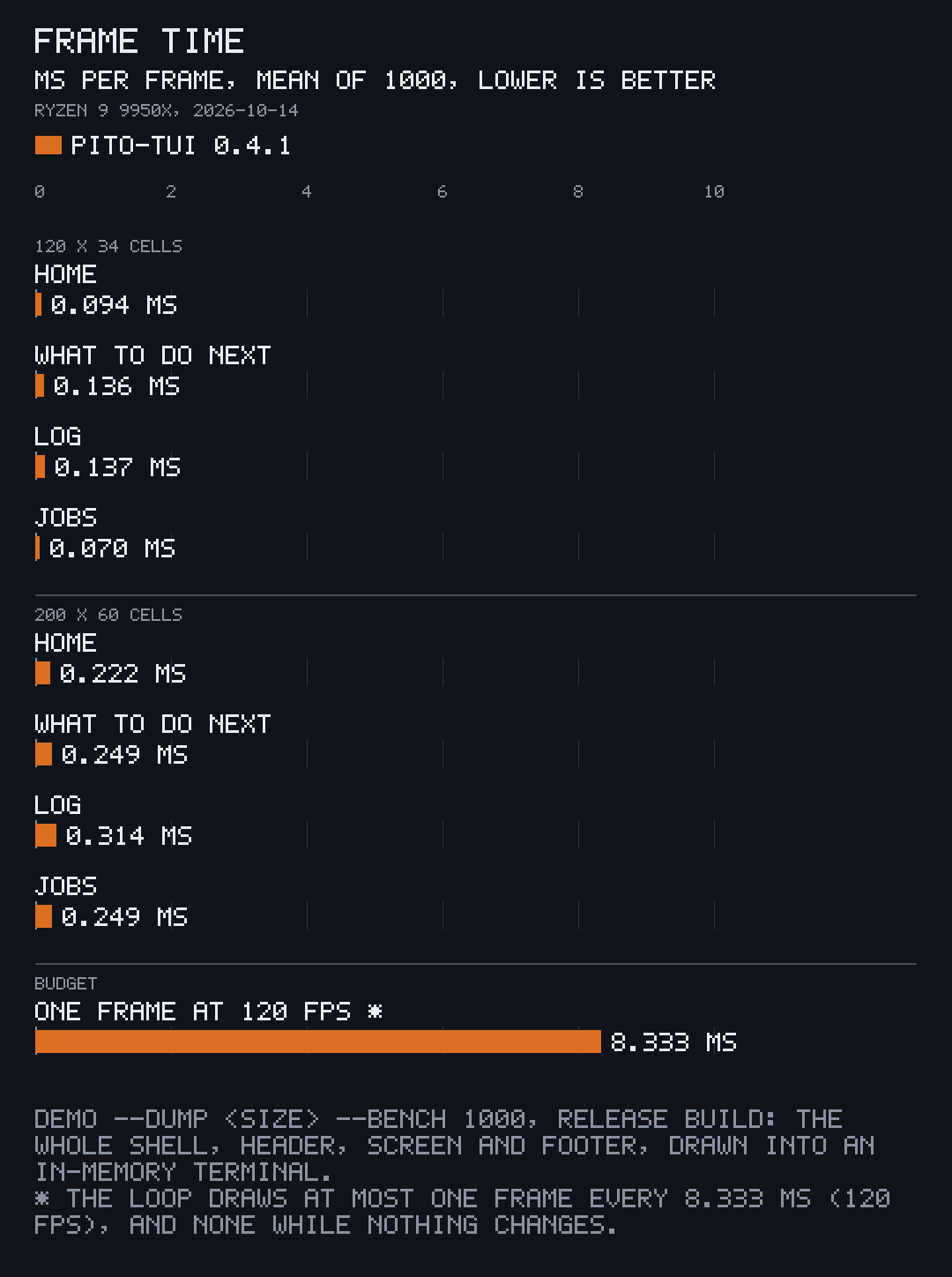
The loop draws at most one frame every 8.333 ms (120 fps), batches every wake that came in since, and draws nothing while nothing changes. Each frame is a synchronized update, so the terminal never shows half of one. Drawing reads the loop’s moment, never the clock or the input, so a frame costs only the drawing:
| Screen | 120x34 average | 120x34 worst | 200x60 average | 200x60 worst |
|---|---|---|---|---|
| Home | 0.094 ms | 3.085 ms | 0.222 ms | 1.991 ms |
| What to do next | 0.136 ms | 3.179 ms | 0.249 ms | 1.907 ms |
| Log (20,000 lines) | 0.137 ms | 0.955 ms | 0.314 ms | 6.730 ms |
| Jobs | 0.070 ms | 0.850 ms | 0.249 ms | 2.216 ms |
How it was measured, once, on 2026-10-14: demo --dump 120x34 --bench 1000
and --dump 200x60 --bench 1000 on the release build of pito-tui 0.4.1
(rustc 1.97.1; 1.0.0 draws with the same code), an AMD Ryzen 9 9950X on Linux; Tui::bench draws each screen
1,000 times into an in-memory terminal, the whole shell each time, moving the
clock a frame at a time. The machine was busy with other work (load average
about 58 on 32 threads), which shows in the worst frames; every one still
fits the frame budget. Not measured on macOS or Windows.
Size and build, the same day and machine: the demo’s release build is 2.3 MB,
1.7 MB stripped; src/ is 8,768 lines of Rust, tests included; the crate has
11 direct dependencies and 71 in all on Linux; a clean release build of the
demo, every dependency included, takes 39 s.
§Features
§A header, a footer and screens
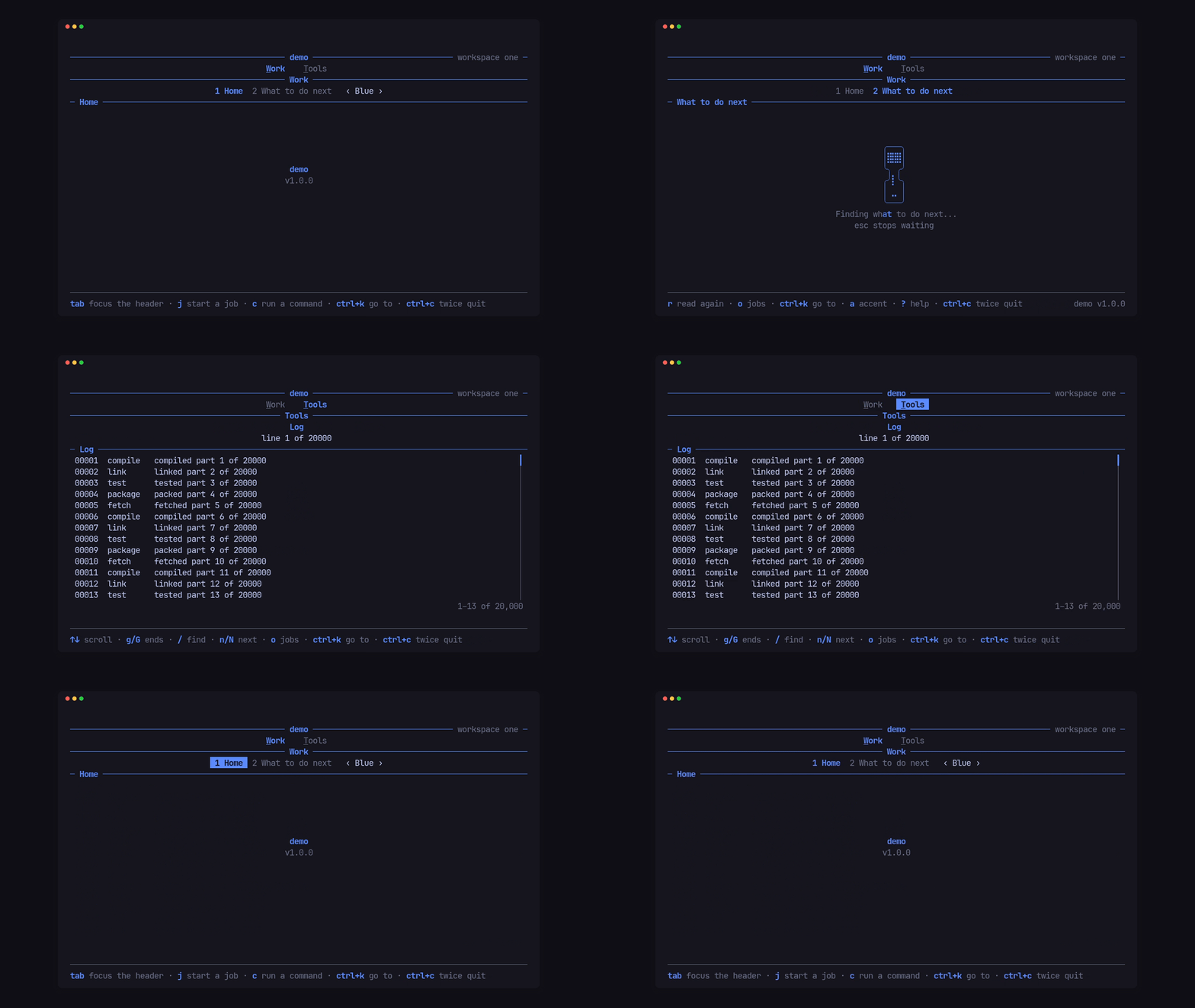
Each screen is a type that implements Screen: it draws its area, takes its
keys, and says what it shows in the header and the footer. The shell lays the
screens out as numbered tabs in groups, keeps a breadcrumb when a screen drills
in, and fits the footer’s hints to the width. The header can also be a stack of
rows in the app’s order: groups with an underlined key, a caption, tabs numbered
within their group, keyboard focus moving through the rows, and a selector after
the tabs.
§A quit guard and keys in a fixed order
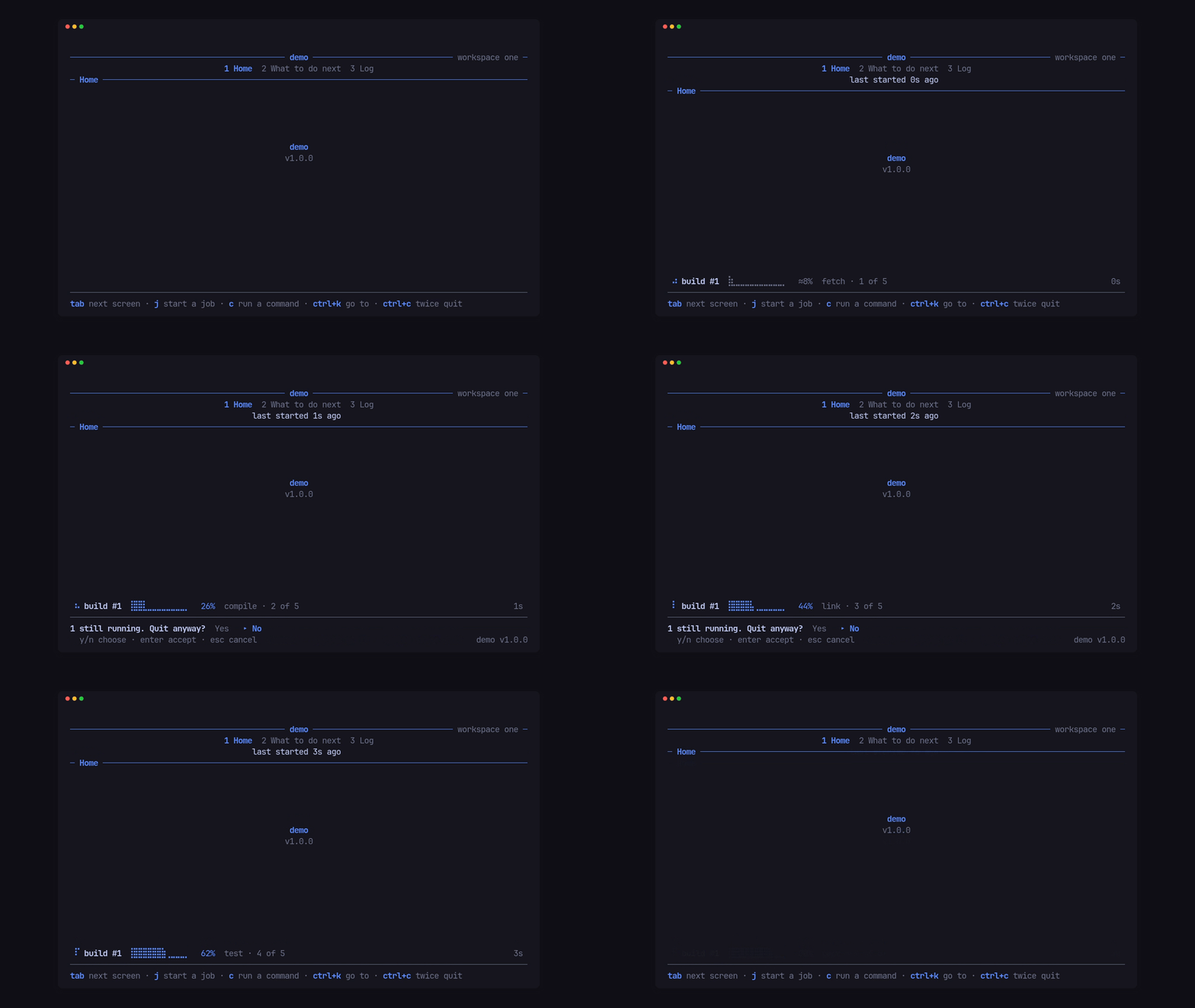
One ctrl+c arms the quit guard until it lapses, a second quits, and while
work runs it asks first, in the app’s words. Every key goes through one fixed
order (the guard, a takeover, a modal, a confirm, a pick, the app, the header,
the nav, the screen), so layers never fight over a key.
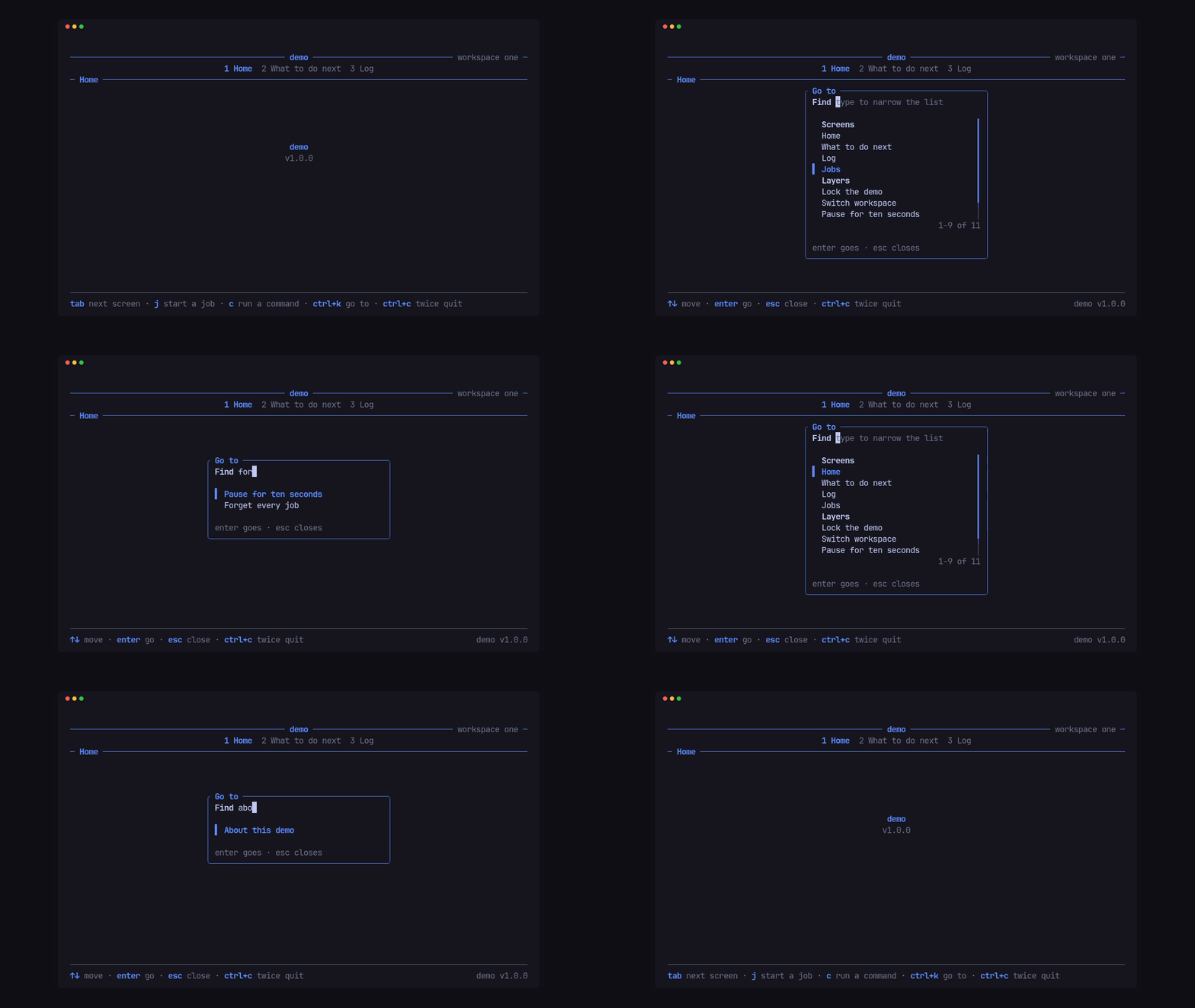
§Modals
Cx::open(Modal) puts a centred, titled container over the live screen, built
from text, lists and fields: filtered pick lists, search boxes, step menus with
a reason field, and forms. A field narrows a list as it is typed, headings are
skipped by the cursor, a risky row needs a second enter, and modals stack, so
an alert can sit over a form.
§Bands, takeovers, toasts and gates
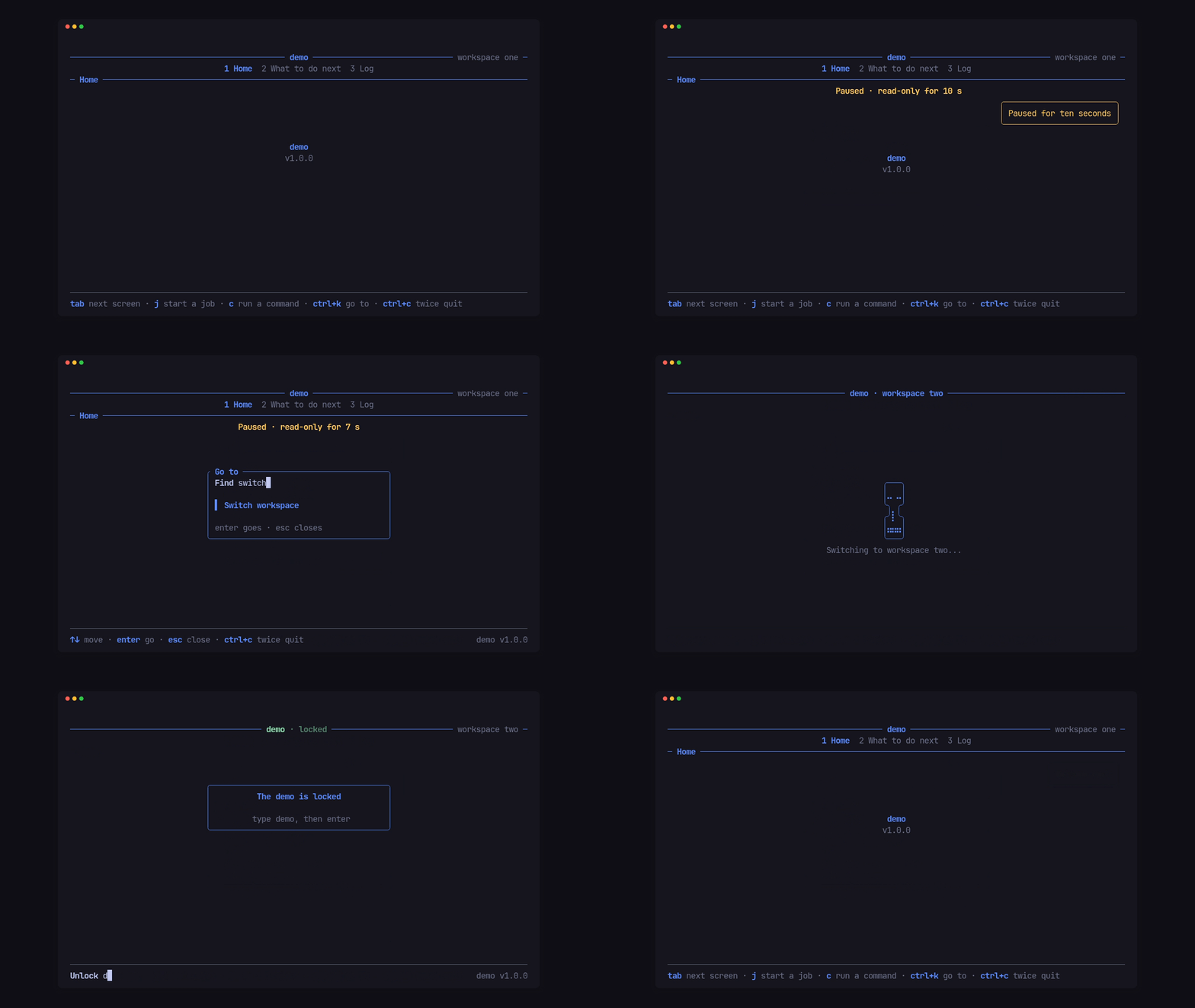
A band under the header with a live countdown, a takeover that covers the app with the hourglass during a switch, toasts that outlive a screen change, and a gate in front of the app (a lock screen, a sign-in) that takes every key until the app opens it.
§Activities and real commands
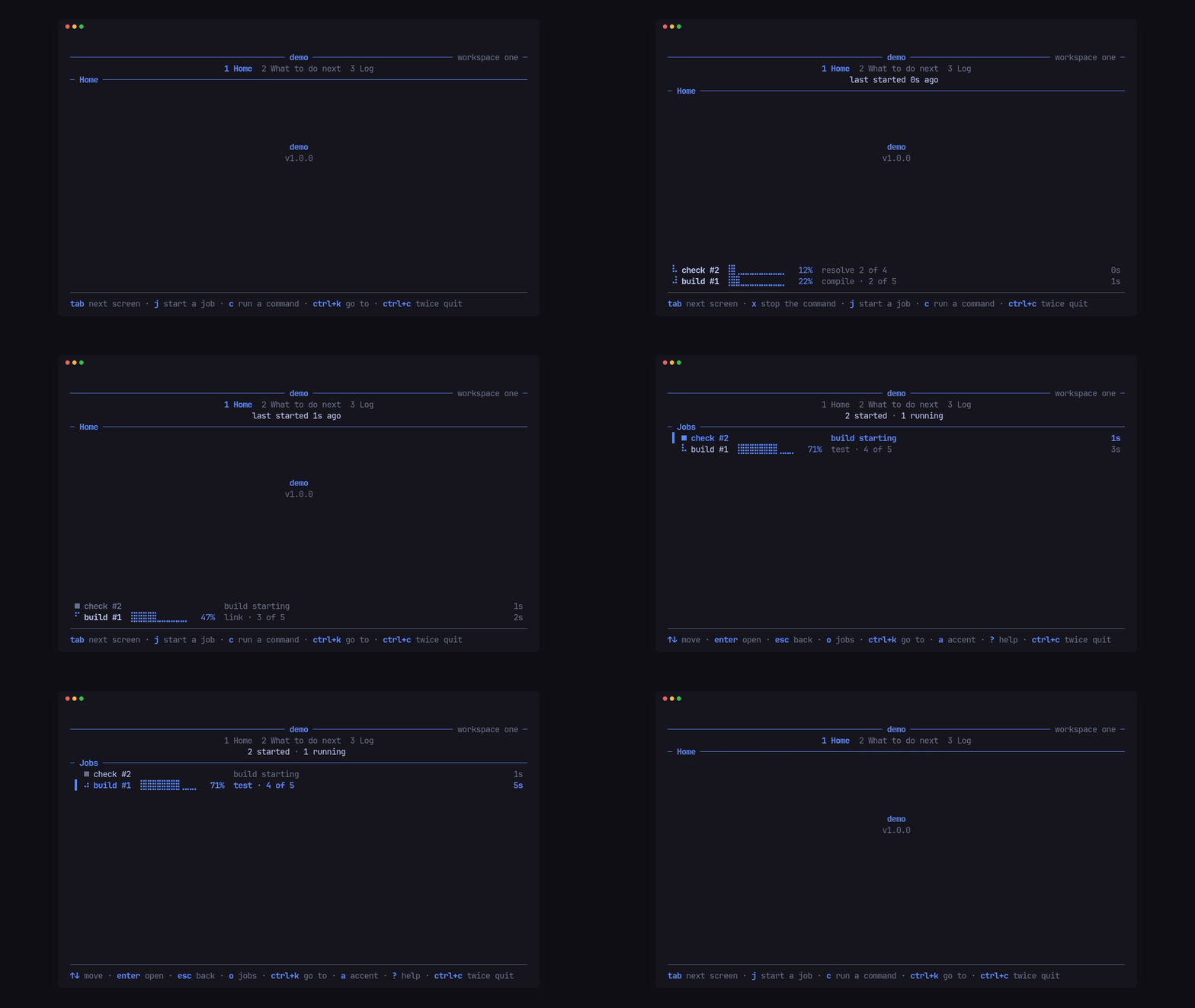
The app hands the shell what it has running, and the shell draws it as a band
on the footer and an activity screen that opens over any screen. Cx::run
starts a real child command and follows its --progress json lines live; x
stops it with a polite signal, then a kill, and no command outlives the app.
§A pick-one prompt
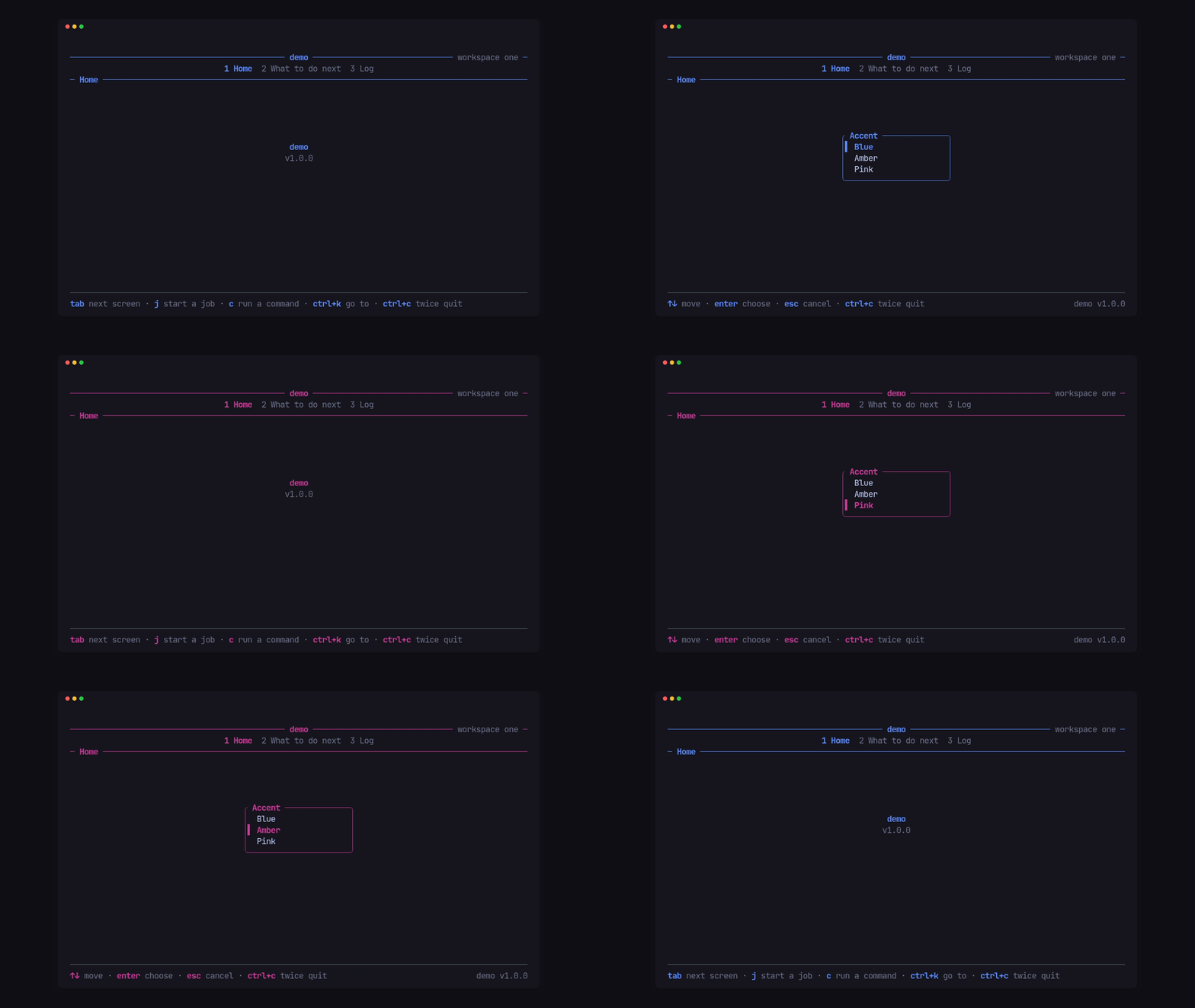
Cx::pick(Pick::new(title, options)) puts a small list over the screen, and
the answer comes back to the screen that asked. Here it picks the accent, and
the whole palette follows from that one colour.
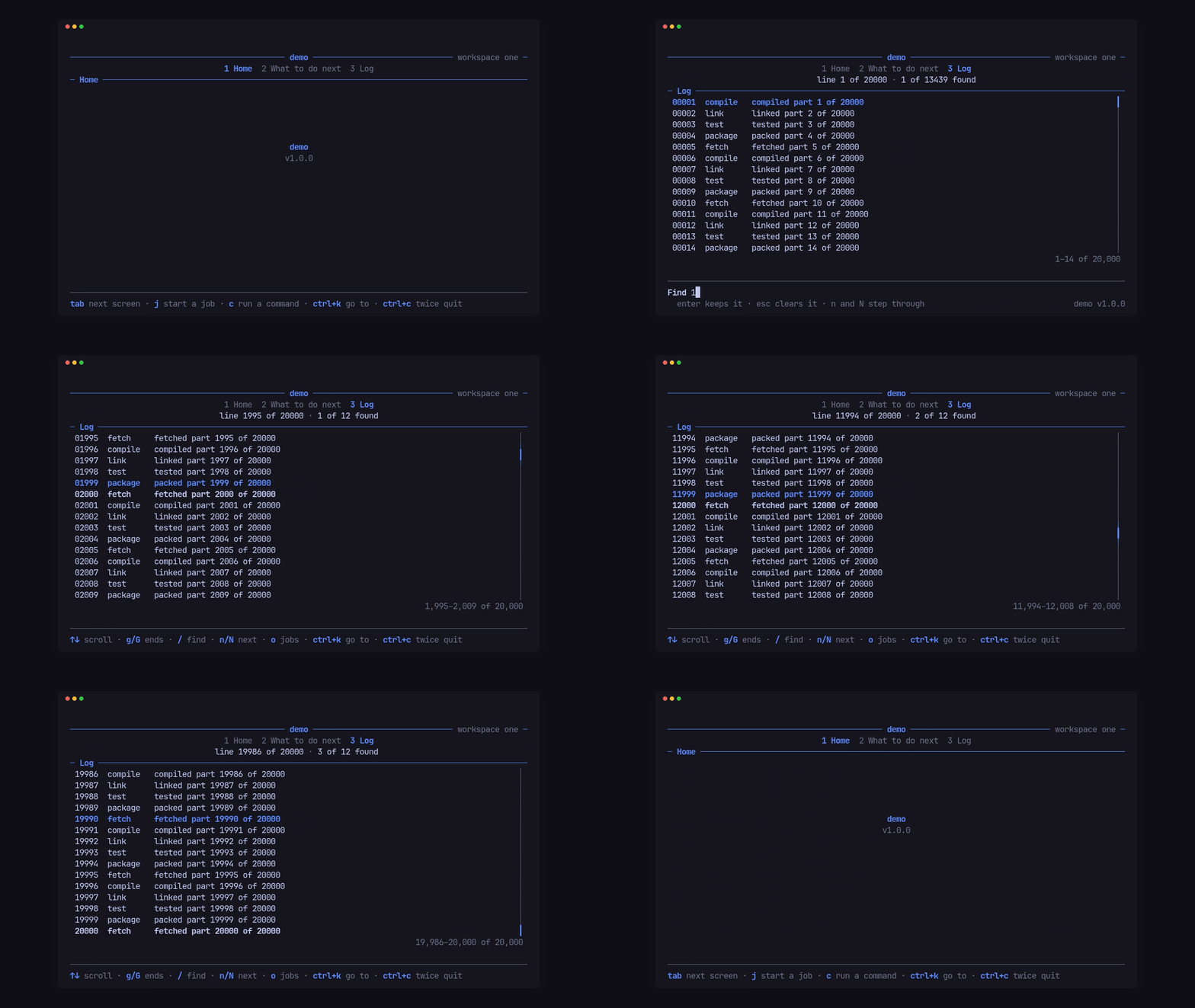
§A log viewer for 20,000 lines
Log holds the lines once, builds only the rows on screen, and scrolls, pages
and jumps to either end; / finds every line holding each word, n and N
step through the hits, and the scrollbar and range count show where you are.
Drawing the Log screen at 200x60 took 0.314 ms on average.
§Headless runs, dumps and frame captures
Tui::shot draws the app at any size after a list of keys, dump::text and
dump::ansi print it, Tui::bench times every screen, and capture::capture
and capture::compare record every cell of every screen before a big change
and report each cell that moved after it. Time comes from the run, never the
wall clock, so the same app gives the same frames.
$ cargo run --release --example demo -- --dump 72x14 --keys "tab"
 ──────────────────────────────── demo ──────────────── workspace one ─
                    1 Home  2 What to do next  3 Log
                                5 steps
 ─ What to do next ────────────────────────────────────────────────────
    Step                        How
  ▌ Replace this screen         Home and Next are two Screen types; s…
    Set your accent             Tui::new takes one colour, or Palette…
    Add your first command      a key in Screen::key, its work in Cx:…
    Load real data              Screen::load returns the read; Screen…
    Wire the headless flags     --dump, --keys, --at, --bench, --capt…

 ──────────────────────────────────────────────────────────────────────
↑↓ move · enter open · / filter · ctrl+k go to · ctrl+c twice quit§A terminal that is always given back
Term turns on raw mode, the alternate screen and bracketed paste, remembers
each one, and turns exactly those off again on quit, on an error, on a hangup
or termination signal, and on a panic, before the panic message prints.
§Part of PITO MD
pito-tui is the shell of the PITO MD terminal apps, and the crate that ties its terminal widgets together:
- pito-header: the groups, tabs, breadcrumb and facts rule at the top.
- pito-footer: the key hints, notice line, confirm, input and quit guard at the bottom.
- pito-hourglass: the Braille hourglass shown while a screen loads.
- pito-list: the selectable rows, scrollbar and range count of every list.
Its README visuals come from the PITO MD tools too: prec records the demo frame by frame, pconv turns the recordings into GIFs, and pito-compare draws the frame-time chart.
§Everything it does
- Screens, plugged in. Each screen is a type that implements
Screen: it draws its area, takes its keys, and says what it shows in the header (facts, a status, a breadcrumb) and the footer (hints, an input bar). The shell lays them out as numbered tabs in groups (pito-header), switches between them with the app’s nav keys, and starts a screen the first time it is shown. A screen hears each time the nav brings it up (entered): a tab, group or digit key, the digit of the screen already shown too, a click on its tab, orgo; not the first screen at start. - Loads that can’t land late. A screen hands the shell its read
(
load), the shell runs it on a worker and delivers the answer (loaded) only if it is still the newest one: each read carries a generation, so an answer that comes back after the user stopped waiting, or after a newer read, is dropped. While a screen loads, the shell shows the hourglass (pito-hourglass) with the screen’s own words; a stop key (escunless the app picks others) stops waiting.Cx::changed(source)marks every screen that reads that source stale, and they read again. - Timed work without a key. A screen’s
deadlinewakes the loop, and when the loop’s moment reaches it the shell calls the screen’stick, once for each deadline the screen gives, whichever screen is showing: a poll every few seconds, a read that timed out. The same happens insettleand whenTui::advancemoves the clock of a headless run. - A 120 fps paced loop that never blocks the UI thread. An input thread and the app’s workers wake one channel; the loop drains every wake in a batch, redraws only when something changed, no more often than every 8.3 ms, and otherwise sleeps until the next wake or deadline (the quit notice running out, a screen’s own deadline, the next frame of an activity’s spinner). Every frame is a synchronized update, so the terminal never shows half of one. Idle, it draws nothing.
- Keys in a fixed order: a key release is ignored; then the quit guard
(a double
ctrl+c, asking first while work runs, with the app’s words); then a takeover, which hears only its cancel keys; then the modal on top; then an open confirm, unless the key is one the app lets through (through_keys, such asctrl+rfor a refresh), which goes toon_keyand the screen with the confirm left open; then an open pick; then the app slot’sclaim; then a gate, which takes every other key; then a screen that is typing into an input; then the help toggle (?); then the header’s focus keys and, while a header row has focus, its arrows; then the keys that open an overlay (the activity screen or the app’s own); then the nav keys (only the back keys while an overlay is open), the group keys and the number keys; then the stop key while a screen loads; then the app’s own keys (on_key); then the screen.Cx::keytells a callback which key led to it, sobackknowsescfromq. - A terminal that is always given back.
Termturns on raw mode, the alternate screen and bracketed paste (mouse capture and focus events only when the app asks), remembers each one it turned on, and turns exactly those off again on quit, on an error, on a hangup or a termination signal while the loop runs, and on a panic on the UI thread, before the panic message prints. A panic on a worker thread leaves the running app alone. The app’s own panic hook still runs after it, and a hook that ends the process callspito_tui::restore()first: any thread may call it, the first call gives the terminal back and waits for a frame being drawn to finish, later calls do nothing, and the shell draws nothing after it. - A palette from one colour, or a whole one.
Palette::new(accent)derives every style the header, footer, list and hourglass draw with;Palettealso takes each token by hand (base, ink, strong, muted, accent, selected, good, warn, bad, rule, line, glass, shimmer, title, inactive, focus, small).Cx::paletteswaps it while the app runs, and the hourglass follows.Palette::tone(Tone)turns the shell’sTone(Ink,Strong,Muted,Accent,Good,Warn,Bad) into a style for toasts and modal status lines. Named colour roles, one per app mode, come fromTui::role(name, style), andCx::role(Some(name))makes one active: the title and the hourglass take it.Palette::mono()lets reverse, bold and dim stand in for colour;Tui::runuses it whenNO_COLORis set, andTui::monochrome(true)forces it (headless runs stay as built, so a capture doesn’t depend on the environment). - The footer, assembled: the screen’s hints and the app’s, the notice
line, the confirm bar, the input bar, and the app’s name and version at
the right end of the row of keys (pito-footer’s version slot). The notice
line is the first that speaks of: the quit guard, what a screen said with
Cx::say(gone at the next key), the screen’s ownnotice(in any tone, for as long as the screen keeps it, such as an error until the next action), and the screen’slegendwhile the hints show. While an input bar or a confirm is open, the quit guard’s word takes the bar’s hint row, in the accent, and the bar’s own hint comes back when the guard lapses; withlit_again(false)it takes an input bar’s hint row in the bar’s own hint style, and a confirm keeps its own hint. The quit question has its own hint (Words::leave), falling back to the confirm’s (Words::choose).?hides the hints; the header then shows the app’s help word.quit_sticky(true)keeps the armed guard through other keys, from any layer, until it lapses or quits;quit_tonegives its word a tone (footer::Tone::Alert, say) andquit_hints(false)hides the hints while it is armed.version_fit(true)shows the name and version only when they cost the footer no extra row and the quit guard is quiet. While a modal or pick owns the keys, only the app’s pinned hints stay beside its own. - The header, assembled: the app’s name on the title rule, with the help
word and the screen’s
leadon its left and the screen’s status on its right, each in styled parts and each told the room it has, so a screen can drop a part that won’t fit rather than see it cut; the groups and screens as tabs; the screen’s facts; and its breadcrumb kept in step: when a screen opens something (crumb), the sections row becomes the breadcrumb, and the nav’s back key (esc,q) calls the screen’sback. The facts row goes while a screen is drilled in, unless the app keeps it (keep_facts), on the same row. A screen that wants the whole left side, the help word joined to its lead in its own style, gives it inleft(room, help):helpis the help word when the shell would show it (the hints hidden), andNonekeeps the shell’s join. The title is the app’s name untilTui::title,Cx::titleorCx::title_spanschanges it, while the app runs too (“demo · locked”). - The header as a stack of rows.
Tui::head(Head::new([..]))draws the header from rows in the app’s order, each optional:Row::Title(the title rule),Groups,Caption(a ruled label between two rows: the current group’s name, or the screen’scaption()),Sections,Facts,Crumbs(the breadcrumb rule) andBlank. Groups and tabs take aLabel: styled spans, an underlined accelerator letter, say, with a short form for narrow widths; the current one is drawn lit, the others inPalette::inactive.Head::numbersnumbers the tabs across the app (Across), within their group (InGroup, starting at 1 in each) or not at all (Off),Head::lone(true)leaves a group of one tab unnumbered, and the number keys follow what is drawn. A screen’safter_tabs()spans sit after the tabs on the sections row, a “‹ value ›” selector in place of a facts row.Tui::focus_keys(next, previous)moves keyboard focus through the groups row, the sections row, that slot and the content: the focused row’s current item takesPalette::focus, left and right move along it, up and down move between rows, andescorentergives focus back; in the slot, keys reach the screen andCx::focus()saysFocus::Slot.Tui::group_keys(keys)gives the group added last its keys, and they (orCx::go_group(n)) return to that group’s last-used tab.Tui::showandCx::show(|item| ..)show or hide groups and tabs by the app’s predicate (Item::Group(n),Item::Tab(screen)) whenever the app says, keeping each group’s last tab and the current tab while it is shown. Withouthead, the header is pito-header’s as before, andheader_lookapplies to it. - The app slot.
Tui::app(screen)adds one app-level screen that is never drawn as content. Itslead,leftandstatus_partsfeed the title rule on every screen (a screen’s own show only when it gives none), so app-wide indicators come from one place. It hears app-wide keys first inScreen::claim(key, cx) -> bool, over a gate, a typing screen or any screen (Cx::typing()says when the screen in front takes text), and everything it opens (a modal, a pick, a confirm, a takeover, a detach or a command) answers to it rather than to a screen. - Layers.
Tui::gate(screen, shut)puts a gate before the app: the title rule over the gate’s own box, no tabs, no help and only the gate’s own hints, every key the gate’s after the quit guard, open prompts and the app’s claim;Cx::gate(false)reveals the app (entering its current screen) andCx::gate(true)shuts it again.Cx::takeover(Takeover)covers the app for an app-wide transition: its text on the title rule, the hourglass under it, tabs and footer hidden, every key ignored but its cancel keys (the owner hearslayer::Event::Closed) and the quit guard, untilCx::end_takeover().Cx::open(Modal)puts a container over the live screen, which keeps drawing: centred, bordered and titled, owning the keys until it closes, its body built from parts in order (text, alistofChoices andFields, tab and shift+tab moving focus between them), one primitive for filtered pick lists, search boxes, step menus with a reason field, and forms.Modal::filter(field, list)narrows a list as the field is typed,Choice::skip()is a heading the cursor passes over,Choice::confirm(warning)needs a second enter and shows its warning on the status line (Modal::status(text, tone)), andCx::modal(id)changes rows and status while it is open. Its owner hearsScreen::layer(id, Event):Chosen,Moved,Edited,SubmittedandClosed;Cx::close(id)closes it. Modals stack, so an alert can sit over a form.Cx::alert(id, title, lines)is a dismiss-only one:esc,enterorqcloses it. - Toasts and a band under the header.
Cx::toast(Toast::new(text))shows an app-wide notice over the content,.at(Spot::TOP_RIGHT)unless placed elsewhere,.tone(Tone::Good), stacked with the others at its spot, surviving screen changes and leaving on its own after.lasting(..)(3 s unless set), with one redraw.Tui::top_band(impl Band)draws a band under the header with the sameBandtrait as the footer’s, a one-row banner with a live countdown, say, waking for itsdeadline. - Layout.
Tui::layout(Layout::new()...)(orCx::layout) sets the top and bottom margins, the side margin of the header and footer, the content’s padding, the gap under the header and the gap above the footer, and theSpotwhere the too-small words sit (inPalette::small). ASpotplaces a box by anEdgeon each axis (Start,Third,Middle,End);message_atplaces text by one. - Activities. The app hands the shell what it has running (
Cx::activity,Cx::activities,Cx::forget): each with a label, a state (running, waiting, done, failed, stopped), a progress fraction or none (a spinner then), when it started and ended, a short status line and the detail lines it opens into (a log, its steps). The shell draws them as a band flush on the footer, the newest first, taking up to half the room, with a finished one fading for 3 s before it goes; the app turns the band on and off (Cx::band). A key the app picks opens the activity screen over any screen, outside the tabs: the tabs unlit, only the back keys, its own breadcrumb row (“Operations / update pfx”), every activity listed, andenteropening one into its detail lines. Every word on them is the app’s (Activities), and the data stays the app’s: the shell only draws, pages and takes the keys, and its time is the loop’s moment.Cx::activitiesreplaces the app’s own list and leaves the commands’ activities (below) where they are. - The app’s own band and overlays.
Tui::band(impl Band)draws the band from the app’s own data in place of the activity band: the shell asks itsheightfor the room between the header and the footer (and never gives it the content’s blank row), places it flush on the footer with that blank row above, draws it on every screen and under every overlay, picker and confirm, and wakes for itsdeadline.Tui::overlay(section, keys, screen)opens an app’s own screen the way the activity screen opens: by its keys over any screen, the tabs unlit, only the back keys, its own breadcrumb row (the section’s name, then the screen’s crumb: “Operations / update pfx”), and its confirms and picks answered to it. Overlays come after every tab, in the order added; a screen that wants a digit to switch tabs from it callsCx::go. - Commands on the band.
Cx::run(id, label, Command)runs a child command and follows the--progress jsonlines the PITO MD command-line tools print (version 1: one object a line withstatestart, progress, done, fail or end, andstage,fraction,msgand, on the end line,ok; unknown fields are ignored), so an app that drives its own CLI shows that command’s progress live with no glue. The lines come from stdout;Cx::run_from(id, label, Command, command::Stream::Stderr)follows them on stderr instead, andStream::Bothon both. Every line on either stream goes into the activity’s detail (a progress line as a short note); the activity ends on theendline, or with the command’s exit status.Cx::stop(id)ends a running command: a polite signal (SIGTERMto the process group the command runs in on Unix, so whatever it started ends too), then a kill aftercommand::GRACE(2 s) if it is still running. The activity shows as stopped at once and keeps its status and detail; lines printed after that no longer change it.command::readparses one line. While a command runs it counts as busy for the quit guard. WhenTui::runorrun_inreturns, for a quit or anything else, every command still running gets the same polite signal;run_inwaits up tocommand::GRACEfor them to end, kills the ones still running, and only then returns, so no command outlives the loop that started it, and a command queued but not yet started never starts. The terminal going away or the app being told to end does the same: while the loop runs, on Unix,SIGHUP,SIGTERMandSIGINTend it as a quit does, without asking, every command it started is stopped that way, forgotten ones too, the terminal is given back, and then the process ends by that same signal, as it would have without the shell (Wake::Signalis the wake that ends the loop). Before the loop and after it, those signals keep their default action. Headless runs never spawn a command, and a stop there marks a queued one stopped. - The app hears its commands. The screen that ran a command hears it in
Screen::heard(id, command::Heard, cx): every line in the order it came, asHeard::Line { stream, text, progress }(the raw text, the stream it came on, and the parsed progress when it came on the stream the app follows, so the app reads its own fields fromtext), then onceHeard::Exitwith acommand::Exit:Code(n),Signal(n),Stopped, orError(text)when it never started or couldn’t be waited on.Exit::statemaps it to done, failed or stopped. Lines arrive in batches, at most every 100 ms. The band follows the progress lines until the app posts its own activity for that id (Cx::activity): from then on the band shows the app’s label, status, progress, state and start, the command’s lines only fill its detail, and the shell still holds the process, the stop and the busy count. If the app hasn’t ended it by the time the command exits or is stopped, the shell ends it byExit::stateand keeps the app’s status.Cx::run_fromkeeps the start of an unfinished activity already on the board under that id (one shown waiting first), andCx::forgettakes a command’s activity off the board for good: the shell stops keeping that command’s lines, and the screen still hears every one inheard. - A pick-one prompt.
Cx::pick(Pick::new(title, options))puts a small list over the screen: arrows (orj,k,g,G) move,enterchooses,escorqcancels, every key goes to it while it is open, its hints replace the screen’s, and the answer comes back to the screen that asked, inpicked.Pick::full(true)fills the screen’s area instead of a box: the title as a heading, a blank row, then the list;Pick::columnslays the rows out in the app’s own columns. - A log viewer.
Logis a pane a screen embeds for a 20,000-line log or a 10,000-event trace: it holds the lines once (Arc), builds only the rows on screen, clips rather than wraps, and scrolls, pages and jumps to either end (g,G);/finds every line holding each word of the query,nandNstep through them, andycopies the page andYevery line. At the bottom it follows new lines, unlessfollow(false)keeps its place. A list that big wants pito-list’sShared, which builds only the rows on screen from the app’s own items. The activity screen’s detail is aLog. - A scrollbar and a range count.
Palette::bar(Some(list::Bar::LINE))andPalette::count(Some(list::Count::new("–", " of ").group(",")))hold the app’s choice once;Palette::view(&mut list, &columns)gives any list a screen draws the app’s styles, bar and count (pito-list v0.8.0: shown only when the list overflows, every word the app’s). The pick, the activity screen,Filter::viewand the modal lists use it, andLogdraws the same bar beside its lines and the count on its bottom line. - Time, bars and spinners.
clock::span(“1m 2s”, “2d 1h”) andclock::span_hours(“49h 3m”, never days, for a “took”) andclock::age(“3m”) in the app’s own unit words (clock::Units, with optional words for under a second, “under 1s”, for an age under a minute, “just now”, and a year unit for ages of 365 days and more), andclock::next_spanandnext_age, the moment the text may next change, for a screen’sdeadline;progress::bar(a Braille bar,⣿⣿⣿⣀⣀),progress::share(“41%”, or “≈57%” for an estimate) andprogress::spinner. The activity band draws an estimate’s bar faint (Activity::estimate). - A filter over a list.
Filterholds a pito-listList, a pito-footerInputand the rows that match;/starts typing,enterkeeps the filter,escclears it, and the keys are the app’s to change. - Loads that never flash.
Tui::hourglass_timing(delay, least): a load shorter thandelayshows nothing, and an hourglass once shown stays at leastleast, so quick reads stay quiet and slow ones never blink. - An epoch.
Cx::epoch()marks the app changing mode (another account, another workspace): detach jobs and reads started before it, and waker events sent before it, are dropped, and every started screen reads again. A waker made earlier still delivers what it sends after, so a long-lived watcher keeps working. - The rest of the glue: a too-small guard with the app’s message, OSC 52
copy (
Cx::copy, up to 48 KiB), a y/n confirm whose answer comes back to the screen that asked, an optional callback after every draw with the time it took, and width-aware text helpers (text::clip,fit,wrapat spaces,hard_wrapat the width). - Headless.
Tui::shotdraws the app at any size after a list of keys,Tui::advancemoves the run’s clock (the hourglass as if it had run that long, deadlines ticking),dump::textanddump::ansiprint the result,dump::keysreads a--keysstring andTui::benchtimes every screen, moving the clock a frame at a time. Time never comes from the wall clock there: drawing reads the loop’s moment, which a screen sees inmomentbefore each frame. The app wires them to its own flags. - Frames before and after.
capture::capturewalks every screen on its own, and the app’s key scripts for deeper states (a drill-in, a confirm, a search, the quit guard, the hourglass at a given moment), at a list of sizes, and saves every cell (its symbol, colours and modifiers) to a directory;capture::comparewalks the same again and reports each cell that differs, by screen, size and position, before and after. Time comes from the run and data from the app’s own fixtures, so the same app gives the same frames. It is a safety net for a big change: capture, change, compare, and delete the captures. It is not a test to keep, and it pins no wording. An app still on its own loop records the same frames from its own headless buffers withcapture::Recorder, socompareproves its move onto the shell; an app that keeps its own loop compares its states against a capture withRecorder::against, and any two captures compare withcapture::compare_dirs.
§The demo
examples/demo.rs is the fuller starting point: two screens, a read with
the hourglass, a filtered list, a drill-in with a breadcrumb and copy, fake
jobs with progress on the activity band and screen (j starts one, o
lists them), a real command on the band (c runs the demo itself as a
child printing progress lines, x stops it), a pick-one prompt (p picks
the accent), a 20,000-line log with find and copy (the Log tab), a time
label kept fresh by a deadline, an app-wide key that swaps the palette, an
app slot whose ctrl+k opens a “Go to” modal reaching a lock gate, a
workspace switch under a takeover (ending in an epoch, a role and a toast),
a paused band under the header and an alert, the header as a row stack
(--stack), the monochrome palette (--mono), and the headless flags,
--capture DIR and --compare DIR among them.
§The API
Tui::new(name, version, accent: Color) -> Tui<E>          // E: the app's worker answers
  .palette(Palette) .words(Words) .hints([Hint<'static>]) .min_size(w, h)
  .group(impl Into<Label>) .group_keys(&[footer::Key]) .screen(impl Into<Label>, impl Screen<E>)
  .show(Fn(Item) -> bool) .head(Head) .focus_keys(next, previous) .title(text) .title_spans([(text, Style)])
  .layout(Layout) .role(name, Style) .monochrome(bool) .hourglass_timing(delay, least) .version_fit(bool)
  .nav_keys(NavKeys) .help(Option<Help>) .quit(Mode) .quit_window(Duration)
  .quit_keys(&[footer::Key]) .quit_sticky(bool) .quit_tone(footer::Tone) .quit_hints(bool)
  .stop_keys(&[footer::Key]) .eager(bool) .keep_facts(bool)
  .modes(Modes) .activities(Activities) .overlay(header::Section, &[footer::Key], impl Screen<E>)
  .app(impl Screen<E>) .gate(impl Screen<E>, shut: bool)
  .band(impl Band) .top_band(impl Band) .lit_again(bool) .through_keys(&[footer::Key])
  .header_look(fn(Header) -> Header) .footer_look(fn(Footer, width: u16) -> Footer)
  .on_key(FnMut(KeyEvent, &mut Cx<E>) -> bool) .after_draw(FnMut(Duration))
  run() -> io::Result<()>, run_in(&mut Term)
  key(KeyEvent) -> Flow, paste(&str), mouse(MouseEvent), event(screen, E), handle(Wake<E>) -> Flow
  loaded(screen, generation, E) -> bool, changed(source), go(screen) -> bool, start()
  pump(), settle(), advance(Duration) -> Flow, draw(&mut Frame), busy(), current(), names()
  find::<T>(), find_mut::<T>(), sender(), waker(screen), set_palette(..), set_words(..), set_layout(..)
  frame(w, h) -> Buffer, shot(w, h, &[KeyEvent], settle) -> Buffer, bench(w, h, frames) -> Vec<Bench>
pub enum Flow { Stay, Quit }

pub trait Screen<E>: Any {                                 // every method but draw has a default
  fn draw(&mut self, &mut Frame, Rect, &Palette);
  fn moment(&mut self, now: Instant);                      // the loop's moment, before each draw
  fn phase(&self) -> Phase;                                // Ready | Loading(label) | Trouble(lines)
  fn load(&mut self) -> Option<Job<E>>;  fn loaded(&mut self, E, &mut Cx<E>);
  fn sources(&self) -> &[&str];  fn cancel(&mut self);  fn start(&mut self, &mut Cx<E>);
  fn entered(&mut self, &mut Cx<E>);                       // each time the nav brings it up
  fn key(&mut self, KeyEvent, &mut Cx<E>);  fn paste(&mut self, &str, &mut Cx<E>);
  fn mouse(&mut self, MouseEvent, Rect, &mut Cx<E>);  fn event(&mut self, E, &mut Cx<E>);
  fn answer(&mut self, yes: bool, &mut Cx<E>);  fn picked(&mut self, Option<usize>, &mut Cx<E>);
  fn heard(&mut self, id: u64, command::Heard, &mut Cx<E>);  // a command it ran: each line, then the exit
  fn layer(&mut self, id: u64, layer::Event, &mut Cx<E>);  // a modal or takeover it opened
  fn claim(&mut self, KeyEvent, &mut Cx<E>) -> bool;       // the app slot's app-wide keys, first
  fn back(&mut self, &mut Cx<E>);
  fn after_tabs(&self) -> Vec<(String, Style)>;            // after the tabs, with Tui::head
  fn caption(&self) -> Option<Vec<(String, Style)>>;      // Row::Caption's label
  fn hints(&self) -> Vec<Hint>;  fn facts(&self) -> Vec<(String, Style)>;
  fn status(&self) -> Option<(String, Style)>;
  fn status_parts(&self, room: u16) -> Vec<(String, Style)>;  // default: status() as one part
  fn lead(&self, room: u16) -> Vec<(String, Style)>;      // beside the help word
  fn left(&self, room: u16, help: Option<&str>) -> Option<Vec<(String, Style)>>;  // the whole left side
  fn notice(&self) -> Option<Notice>;  fn legend(&self) -> Option<&str>;
  fn typing(&self) -> bool;
  fn input(&self) -> Option<InputBar>;  fn crumb(&self) -> Option<String>;
  fn selected(&self) -> usize;  fn busy(&self) -> usize;
  fn animating(&self) -> bool;  fn deadline(&self) -> Option<Instant>;
  fn tick(&mut self, &mut Cx<E>);                          // once when the moment reaches a deadline
}
pub type Job<E> = Box<dyn FnOnce() -> E + Send>;
pub trait Band {                                           // the app's own band, Tui::band
  fn height(&self, room: u16, now: Instant) -> u16;
  fn draw(&mut self, &mut Frame, Rect, &Palette, now: Instant);
  fn deadline(&self, now: Instant) -> Option<Instant>;     // default None
}

Cx<'_, E>: screen(), now(), key() -> Option<KeyEvent>, detach(FnOnce() -> E), waker() -> Waker<E>,
  say(text, footer::Tone), hush(), confirm(question), confirm_with(question, Confirm),
  copy(text) -> bool, go(screen), quit(), reload(), changed(source),
  palette(Palette), words(Words), hints(Vec<Hint<'static>>),
  activity(Activity), activities([Activity]), forget(id), band(bool),
  run(id, label, process::Command), run_from(id, label, Command, command::Stream), stop(id),
  pick(Pick), focus() -> Focus, typing() -> bool, epoch(), title(text), title_spans([(text, Style)]),
  layout(Layout), role(Option<name>), show(Fn(Item) -> bool), go_group(n), toast(Toast),
  open(Modal), alert(id, title, [Line]), modal(id) -> Option<&mut Modal>, close(id),
  takeover(Takeover), end_takeover(), gate(shut: bool)

Head::new([Row]) .numbers(Numbers) .lone(bool)            // Head::default(): Title, Groups, Sections, Facts, Crumbs
pub enum Row { Title, Groups, Caption, Sections, Facts, Crumbs, Blank }
pub enum Numbers { Across, InGroup, Off };  pub enum Focus { Content, Groups, Sections, Slot }
pub enum Item { Group(n), Tab(screen) }
Label::new(text) | Label::spans([(text, Style)])  .short(text) .short_spans([(text, Style)])   // From &str, String, Section, Group
layer::Modal::new(id, title) | Modal::alert(id, title, [Line])
  .text([Line]) .list([Choice]) .list_rows([Choice], rows) .field(Field) .filter(field, list)
  .status(text, Tone) .width(cells) .hints([Hint]) .cancel_keys(..) .close_keys(..) .focus(part)
  id(), focused(), set_status(..), set_text(part, ..), set_choices(part, ..), choice(part), value(part), input_mut(part)
layer::Choice::new(text) | Choice::spans([(String, Style)])  .skip() .confirm(warning)
layer::Field::new(label) .placeholder(..) .input(Input)
pub enum layer::Event { Chosen { part, choice }, Moved { part, choice }, Edited { part }, Submitted { part }, Closed }
layer::Takeover::new(id, title) .title_spans(..) .label(text) .cancel(&[footer::Key])
layer::Toast::new(text) .tone(Tone) .at(Spot) .lasting(Duration)
Layout::new() .top .bottom .side .pad .head_gap .gap (cells) .small(Spot)
Spot::new(Edge, Edge), Spot::TOP_LEFT .. BOTTOM_RIGHT, MIDDLE, THIRD; place(area, w, h) -> Rect
pub enum Edge { Start, Third, Middle, End };  pub enum Tone { Ink, Strong, Muted, Accent, Good, Warn, Bad }

Activity::new(id: u64, label, started: Instant)            // every field pub, and a builder each
  .state(activity::State) .progress(f64 or None) .estimate(bool) .ended(Instant) .status(text)
  .detail([Line]) .shared(log::Lines)
pub enum activity::State { Running, Waiting, Done, Failed, Stopped }  // activity::LINGER: 3 s once finished
Activities::new(header::Section)                           // the activity screen's name and words
  .keys(&[footer::Key]) .band(bool) .hints([Hint]) .detail_hints([Hint]) .log(Log) .empty(text)
  .more(Fn(usize) -> String) .elapsed(Fn(Duration) -> String) .facts(Fn(&[Activity]) -> Vec<(String, Style)>)
command::read(line) -> Option<Progress { state, stage, fraction, message, ok }>   // one --progress json line, v 1
pub enum command::Stream { Stdout, Stderr, Both }          // where Cx::run_from follows the lines; command::GRACE: 2 s
pub enum command::Heard { Line { stream, text, progress: Option<Progress> }, Exit(command::Exit) }
pub enum command::Exit { Code(i32), Signal(i32), Stopped, Error(text) }   // .state() -> activity::State

Pick::new(title, [option]) | Pick::rows(title, [list::Row])  .selected(index) .hints([Hint]) .keys(list::Keys) .cancel_keys(..)
  .columns([list::Column]) .full(bool)
Log::new(label) .placeholder(..) .hint(..) .keys(list::Keys) .search_keys(..) .hit_keys(next, previous) .copy_keys(page, all) .follow(bool)
  set_lines(log::Lines), lines(), len(), top(), hits(), hit(), query(), typing(), bar() -> Option<InputBar>,
  key(KeyEvent) -> log::Turn, paste(&str) -> log::Turn, draw(frame, area, &Palette)
pub enum log::Turn { Pass, Taken, Copy(text) };  pub type log::Lines = Arc<Vec<Line<'static>>>
clock::Units::new(second, minute, hour, day) .year(..) .under(..) .now(..)   // the app's unit words
clock::span(Duration, &Units) -> "1m 2s", span_hours(..) -> "49h 3m", age(Duration, &Units) -> "3m",
  next_span(since, now), next_age(since, now)
progress::bar(fraction, cells) -> "⣿⣿⣀⣀", percent(fraction), share(fraction, estimate) -> "≈57%", spinner(Duration), SPIN

capture::Walk::new() .sizes([(w, h)]) .screens(bool) .script(Script::new(name, [KeyEvent]) .loading() .at(Duration))
capture::capture(dir, &Walk, Fn() -> Tui<E>) -> io::Result<frames>
capture::compare(dir, &Walk, Fn() -> Tui<E>) -> io::Result<Vec<Difference>>   // Cell { scenario, size, x, y, before, after } | Added | Removed
capture::compare_dirs(before dir, after dir) -> io::Result<Vec<Difference>>   // two captures, frame by frame
capture::Recorder::new(dir) -> io::Result<Recorder>        // frames from an app's own buffers, written as capture writes them
capture::Recorder::against(dir) -> io::Result<Recorder>    // the same frames compared with a capture instead
  .screen(index, name, &Buffer) .record(script name, &Buffer) -> io::Result<()>, frames(), finish() -> io::Result<Vec<Difference>>

Palette::new(accent: Color)                                // every token a pub field and a builder
  .base .ink .strong .muted .accent .selected .good .warn .bad .rule .line .glass .shimmer
  .title .inactive .focus .small (Style)  .bar(Option<list::Bar>) .count(Option<list::Count>)
  mono(), tone(Tone) -> Style, header() -> header::Styles, footer() -> footer::Styles,
  list() -> list::Styles, view(&mut List, &[Column]) -> ListView, hourglass(elapsed, label, hint) -> Hourglass
Words::new()                                               // every word empty until the app sets it
  .help .again .yes .no .choose .leave .too_small .waiting (text)  .busy(Fn(usize) -> String)

Term::enter(Modes) -> io::Result<Term>                     // restored on drop and on a UI-thread panic
restore() -> bool                                          // any thread, once: true if it gave the terminal back
  terminal(), modes(), draw(FnOnce(&mut Frame)), mouse(bool)
Modes::new()  .alternate(true) .paste(true) .mouse(false) .focus(false)
Pace, FRAME (8.333 ms), wait_until(now, dirty, &Pace, deadlines)
pub enum Wake<E> { Input(Event), Lost(io::Error), Event(screen, E), Loaded(screen, generation, E), Activity(Activity),
  Command(screen, command::Report),                        // a command's lines and exit, from the shell's runner
  Stamped(epoch, screen, E),                               // a detach answer or a shell-made waker's event
  Signal(number) }                                         // SIGHUP, SIGTERM or SIGINT while the loop runs: it quits
Waker<E>: new(sender, screen), send(E) -> bool, screen();  listen(sender)   // the input thread

Filter::new(label) .placeholder(..) .hint(..) .keys(list::Keys) .start_keys(..) .clear_keys(..) .input(Input)
  sift(rows, keeps, line), key(KeyEvent) -> Turn, paste(&str) -> Turn, bar() -> Option<InputBar>,
  view(&columns, &Palette) -> ListView, typing(), query(), active(), shown(), current(), list(), list_mut()
pub enum Turn { Pass, Taken, Filtered, Open(index) }
matches(text, query) -> bool                               // every word of the query, any case

dump::size("120x34"), dump::keys("tab / foo enter ctrl+c") -> Result<Vec<KeyEvent>, word>,
dump::text(&Buffer), dump::ansi(&Buffer);  Bench { screen, frames, average, worst }
text::clean, cells, split, clip, fit, wrap, hard_wrap;  message(frame, area, text);  message_at(.., Spot)
copy(text), base64(bytes)
TOP, SIDE, PAD, GAP                                        // Layout::new()'s spacing, in cells
Until the app says otherwise, a Tui wants at least 40 × 12 cells, uses
NavKeys::HEY (tab, [ ], digits, esc and q back), shows the hints
with ? to hide them, quits on a double ctrl+c within 2 s and asks first
while any screen is busy (Mode::Ask), stops a load on esc, reads a screen
the first time it is shown (eager(true) reads them all at start), hides the
facts row while a screen is drilled in (keep_facts(true) keeps it), has no
activity band or screen until the app gives it Activities (the band then
shows unless band(false)) or its own Band, lights the quit word in the
accent over an input bar or a confirm (lit_again), lets no key past an open
confirm (through_keys), draws pito-header’s header (no head), shows an
hourglass at once and drops it at once (hourglass_timing), shows the name
and version wherever pito-footer fits them (version_fit), has no app slot,
gate, takeover, modal, toast or top band until the app makes one, and turns
on raw mode, the alternate screen and bracketed paste only.
Phase, Turn, Wake, Words, Palette, Tone, Layout, Spot, Edge,
Head, Row, Numbers, Focus, Item, layer::Event, Modes, Bench, Activity,
Activities, activity::State, Pick, log::Turn, clock::Units,
command::Progress, command::Stream, command::Heard (and its Line), command::Exit,
capture::Walk, capture::Script, capture::Look and
capture::Difference are
#[non_exhaustive]: match the enums with a wildcard arm and build the structs
with new() and their builders, so a later release can add to them in a minor
version.
§Adopting pito-tui
This section is for an app that already draws with pito-header, pito-footer, pito-hourglass and pito-list directly, and keeps its own loop. Moving to the shell deletes that glue; the app’s screens and data stay as they are.
§What the app keeps
-
Its screens’ content: what each one draws, its data, its rows and columns, its detail views. pito-list and pito-footer’s
Inputstay the app’s to use inside a screen, throughpito_tui::listandpito_tui::footer. -
Its words, every one, in any language:
Wordsfor the shell’s few places (the help word, the quit notice and question and its hint line, Yes and No, the confirm’s hint line, the too-small message, the hint under the hourglass),Activitiesfor the activity band and screen, the global hints, and each screen’s hints, facts, notices, labels and messages. An empty word is simply not drawn. -
Its keys beyond the shell’s: anything a screen’s
keytakes, and app-wide actions throughon_key. The shell’s own keys are the app’s to change too:nav_keys(pito-header’sNavKeys,NavKeys::NONEincluded),quit_keys,stop_keys,help(None), and the filter’sstart_keysandclear_keys. Mouse capture stays off unless the app turns it on withModes. -
Its workers and their messages: the app’s own enum is the
EinTui<E>, and its threads post through aWaker<E>. -
Its command line: the app parses its own flags and calls the shell’s headless helpers.
-
Its crash reporting: a panic hook the app installs before
runstill runs, after the shell has given the terminal back on a UI-thread panic. A hook that ends the process callspito_tui::restore()before it exits, so a panic on a worker thread gives the terminal back too:std::panic::set_hook(Box::new(|info| { pito_tui::restore(); eprintln!("{info}"); std::process::exit(101); }));
§What the shell takes over
| The app’s own code today | With pito-tui |
|---|---|
ratatui::init and ratatui::restore, bracketed-paste and mouse toggles, panic hooks that restore the terminal | Tui::run (or Term::enter for a loop of its own) |
An input thread feeding a channel, an enum with an input arm, recv_timeout | listen and Wake<E>, inside run |
| A frame pacer, a dirty flag, deadlines, draining a batch of wakes | run: Pace at 120 fps, synchronized updates, deadline and animating per screen |
| Polls on a timer, slow reads timed out, a clock threaded into drawing | Screen::deadline and tick, Screen::moment, Tui::advance headless |
| Code that hands the app’s asks to threads and routes their answers back | Screen::load (tracked by generation) and Cx::detach (one-off work) |
| Key routing: release, quit guard, confirm, input, help, nav | Tui::key, in that order |
| Quit guard wiring: busy count, wording, tick, deadline, notice, bar | Screen::busy, Words::again and Words::busy, quit, quit_window |
| A confirm gathered from several places | Cx::confirm and Screen::answer |
| Header assembly: title, help word, a lead beside it, a status fitted to the room, facts, a breadcrumb kept in step | Screen::lead, status_parts, facts, crumb, selected and back, keep_facts |
| Footer assembly: hints, notice, legend, confirm, input, version, height | Screen::hints, input, notice, legend, Cx::say, Words::leave; the version slot is wired |
| A panel of running work above the footer and a screen listing it, with a detail view | Activities, fed by Cx::activity, activities and forget; or the app’s own Band and Tui::overlay screen |
| A screen of its own opened over any other by a key, with unlit tabs and its own breadcrumb | Tui::overlay(section, keys, screen) |
Code that runs the app’s own CLI, parses its --progress json lines and stops it | Cx::run(id, label, Command) (Cx::run_from when the lines come on stderr), Cx::stop(id), Screen::heard for each line and the exit, and command::read for a single line |
| A picker drawn over a screen, its keys and its answer | Cx::pick(Pick) and Screen::picked |
| A long-log or trace pane: scroll, page, ends, find, copy, a cache of built rows | Log; a long list takes pito-list’s Shared |
| Age and duration text, Braille bars, percent, spinners, label redraw timing | clock, progress, Activity::estimate |
| Frames compared cell by cell before and after a change, by hand | capture::capture and capture::compare behind --capture and --compare, capture::Recorder for the frames from before the move or from an app that keeps its own loop, and capture::compare_dirs for two captures |
A tone module mapped to four crates’ Styles | Palette, and Cx::palette at runtime |
| A loading wrapper around the hourglass | Phase::Loading(label) |
| The too-small guard, a centred message, OSC 52, text helpers | min_size and Words::too_small, message, Cx::copy, text |
| Dump size and key parsing, text and ANSI output, a bench loop | dump::*, Tui::shot, Tui::bench |
§Moving over, step by step
- One pin. Replace the four
pito-*lines inCargo.tomlwith the pito-tui line above, and import throughpito_tui::header,pito_tui::footer,pito_tui::hourglassandpito_tui::list. Keep ratatui and crossterm throughpito_tui::ratatuiandpito_tui::crossterm, or pin the same versions (0.30 and 0.29). - The palette. Build
Palette::new(accent), then set the tokens the app’s tone module had (good,bad,muted,basefor a painted background). Hand it toTui::palette. - The words. Move every shell-facing string into one
Wordsand the app-wide hints (? help,ctrl+c twice quit) intoTui::hints. - One screen at a time. Make each section or page a type that
implements
Screen<E>: its draw function becomesdraw, its hints and facts becomehintsandfacts, its loader becomesload(return the work as a closure) andloaded(take the answer from the app’s enum, no downcast), its “stop waiting” becomescancel, its detail view becomescrumbplusback, and its search box becomes aFilteror its ownInputreturned frominputwhiletypingis true. A password field is anInput::new().masked(true); a bracketed paste arrives inpaste. - Groups.
Tui::group(Group::new("Work"))before the screens that belong to it; screens before any group join one unnamed group, and a single group draws no groups row. - Workers. One-off work goes through
Cx::detach(move || E::Done(..))and comes back to the same screen’sevent. A long-lived watcher takescx.waker()(ortui.waker(index)beforerun) and posts withsend. A watcher that sees a source change sends an event whose screen callscx.changed("source"). A poll on a timer is a screen’sdeadlinewith the poll in itstick, which gives the next deadline. - Activities. If the app shows what it has running (operations,
exports, simulations), give
Tui::activitiesanActivitieswith the screen’s name (Section::new("Operations")), the key that opens it, its hints and its words (the empty message, the overflow line, the elapsed time, the facts). Whichever screen hears about the work callscx.activity(Activity::new(id, label, started)...)each time it changes, with the sameid;cx.activities(..)replaces the whole list, which suits an app that reads its work as a list, andcx.forget(id)drops one. The app’s own panel and its screen go; their data stays where it was. The activity screen always comes after the app’s screens, whereverTui::activitiessits in the builder chain, so the screens keep the indicesgo,wakerandeventuse. The demo’s fake jobs (Homeinexamples/demo.rs) are the pattern. - The loop goes. Replace the app’s
runwithTui::run(); delete the pacer, the terminal setup and restore, the restoring panic hooks, the input thread and the key routing. The app’s crash hook stays where it is, installed beforerun; if it ends the process, it callspito_tui::restore()before it exits. - Headless flags. Wire
--dump WxHtodump::sizeandTui::shot,--keystodump::keys,--ansitodump::ansi,--loadingtoshot(.., settle: false),--at MStoTui::advanceand a secondframe,--bench NtoTui::bench, and--capture DIRand--compare DIRtocapture::captureandcapture::comparewith acapture::Walkof the app’s deeper states (exit 1 when a frame differs);mainandwalkinexamples/demo.rsdo exactly this. A dump or a walk with fixtures builds the screens from fixture data, so the same build gives the same frames. A game that keeps its dev tools out of the shipped build puts these behind its own feature. - Check. Before the move, record every screen and deeper state at
the sizes the app cares about with the old build, through
capture::Recorder(Proving the switch); after it, compare. The header, footer and spacing should match, since the shell draws them with the same crates and the same layout (a one-cell side margin for the header and footer, two cells for the content, one row above the footer). Then delete the captures: they are a safety net for the move, not a test to keep. - What the app had built in. Its own pickers become
Cx::pick, its log and trace panes aLog(a long list a pito-listShared), its age and duration textclock, its bars and spinnersprogress, and the code that ran its own CLI and read the progress linesCx::run(orCx::run_fromfor lines on stderr), withCx::stopfor its stop andScreen::heardfor what it read from the lines and the exit; the app keeps its own words on the band by posting its activity for that id.
§Proving the switch
capture::capture walks an app that already runs on Tui, so it can’t
record the old build. capture::Recorder writes the same frames from the
buffers the app’s own headless dump draws: record them with the old build,
switch to Tui::run, and capture::compare walks the new build against
them, scenario names and sizes matched.
Recorder::new(dir)wants a directory that is absent or empty, ascapturedoes.screen(index, name, &buffer)saves a screen the way a walk names it:indexis its place among the new build’s screens, in the order the app adds them withTui::screen(the activity screen comes after all of them), andnameits section’s name.record(name, &buffer)saves a deeper state under the name the new build’scapture::Scriptcarries, sorecord("Next drilled in", ..)meetsScript::new("Next drilled in", keys).- A frame is the whole terminal at one size, as a
TestBackendholds it after a draw; its size is the buffer’s own. Record each state at every size the walk lists. The same state at the same size twice is an error, so two states never share a name by accident. - Both builds draw from the same fixture data at the same moment, as any capture does.
Recorder::against(dir)takes the same calls but compares each frame with the one of the same name indir, an existing capture, instead of writing it;finish()then lists the differences, ascomparedoes. So one function that draws every state into a&mut Recordergives an app both--capture DIR(Recorder::new) and--compare DIR(Recorder::against), as below.capture::compare_dirs(before, after)compares two captures already on disk, frame by frame and cell by cell: each frame in both, each one onlyafterholds (Added) and each one onlybeforeholds (Removed). Either may come fromcapture::captureor from aRecorder.
use std::path::Path;

use pito_tui::capture::Recorder;
use pito_tui::ratatui::{Frame, Terminal, backend::TestBackend, buffer::Buffer};

struct OldApp;

impl OldApp {
    fn open(_state: &str) -> Self {
        OldApp
    }

    fn draw(&self, _frame: &mut Frame) {}
}

fn shot(state: &str, (width, height): (u16, u16)) -> Buffer {
    let app = OldApp::open(state);
    let Ok(mut terminal) = Terminal::new(TestBackend::new(width, height));
    let Ok(_) = terminal.draw(|frame| app.draw(frame));
    terminal.backend().buffer().clone()
}

fn states(recorder: &mut Recorder) -> std::io::Result<()> {
    for size in [(80, 24), (120, 34)] {
        recorder.screen(0, "Home", &shot("home", size))?;
        recorder.screen(1, "Next", &shot("next", size))?;
        recorder.record("Next drilled in", &shot("next/detail", size))?;
    }
    Ok(())
}

fn main() -> std::io::Result<()> {
    let args: Vec<String> = std::env::args().collect();
    match args.get(1..3) {
        Some([flag, dir]) if flag == "--capture" => {
            let mut recorder = Recorder::new(Path::new(dir))?;
            states(&mut recorder)?;
            println!("{} frames", recorder.frames());
        }
        Some([flag, dir]) if flag == "--compare" => {
            let mut recorder = Recorder::against(Path::new(dir))?;
            states(&mut recorder)?;
            let differences = recorder.finish()?;
            for difference in &differences {
                println!("{difference}");
            }
            if !differences.is_empty() {
                std::process::exit(1);
            }
        }
        _ => {}
    }
    Ok(())
}
After the switch, capture::compare with
Walk::new().sizes([(80, 24), (120, 34)]).script(Script::new("Next drilled in", keys)) and the new build’s Fn() -> Tui<E> lists each cell that
differs, each frame only the new build draws (Added) and each one it no
longer reaches (Removed). An empty list proves the switch; then delete the
directory.
An app that keeps its own loop (its own Term, listen, Waker, Pace
and wait_until) proves a change the same way without moving: --capture tmp/before with the old build, then --compare tmp/before with the new
one, or --capture tmp/after with the new one and
capture::compare_dirs(Path::new("tmp/before"), Path::new("tmp/after")).
§An app that already has a section trait
Most of it maps one to one: a section’s name becomes the header::Section
passed to Tui::screen; its data sources, phase, cancel and retry become
sources, phase, cancel and Cx::reload; a loader that returns a job
and a delivery to downcast becomes load returning a closure and loaded
taking the app’s own enum, with the generation kept by the shell; its notice
becomes Cx::say; its pending confirm becomes Cx::confirm with answer;
its asks become Cx::detach. A job that needs a connection or a client opens
or clones its own inside the closure, since it runs on a worker.
An overlay that lists the app’s running work becomes Activities. Any other
overlay that sits over every section becomes a screen of its own (in its own
group if it should read as one), or stays the app’s drawing inside a screen
with crumb naming where the user is.
§Development
bin/gate runs cargo fmt --check, cargo clippy --all-targets --all-features -- -D warnings, the tests (cargo nextest run, then this
README’s example as a doctest) and the release build of the demo.
bin/gate --fast leaves the release build out, and CI runs it on every push
and pull request to main. The tests are a safety net for what would hurt if it
broke: the frame pacing, the terminal restore, the key order, the load
generations and the dump formats. Each release is listed in
CHANGELOG.md. The clips are the demo recorded in a pseudo-terminal by prec from
render/terminal.toml and its tapes, made into GIFs by
pconv, and the chart is drawn by pcmp from
docs/images/frames.toml.
bin/docs-bundle builds this crate’s section of the PITO MD docs site: the
guides and reference pages in docs/pages, the changelog, the
images and the cargo doc API, checked for broken links and packed into
tmp/docs-vX.Y.Z.tar.gz. The release workflow runs it on every tag and
attaches the bundle to the tag’s GitHub Release.
§Contributing
Issues and pull requests are welcome. Please read the
code of conduct first. A change keeps bin/gate green
with no warnings and leaves every word, style and key to the app. Report a
security issue privately, as SECURITY.md says, not in a public
issue.
§Licence
The code is MIT licensed: see LICENSE, by Catalin Ilinca. The PITO MD
name and its logos, and the names and logos of every PITO MD app and game, are ©
Catalin Ilinca, all rights reserved, and are not covered by the MIT licence;
see TRADEMARKS.md. The GIFs and the chart in docs/images/ are
captures and measurements of the demo, under the MIT licence like the code
(docs/images/NOTICE).
The look of the crates it brings is in the style of HEY’s terminal UI; see
NOTICE.md.
Re-exports§
pub use activity::Activities;pub use activity::Activity;pub use layer::Choice;pub use layer::Field;pub use layer::Modal;pub use layer::Takeover;pub use layer::Toast;pub use log::Log;pub use crossterm;pub use pito_header as header;pub use pito_hourglass as hourglass;pub use pito_list as list;pub use ratatui;