Expand description
§pito-list


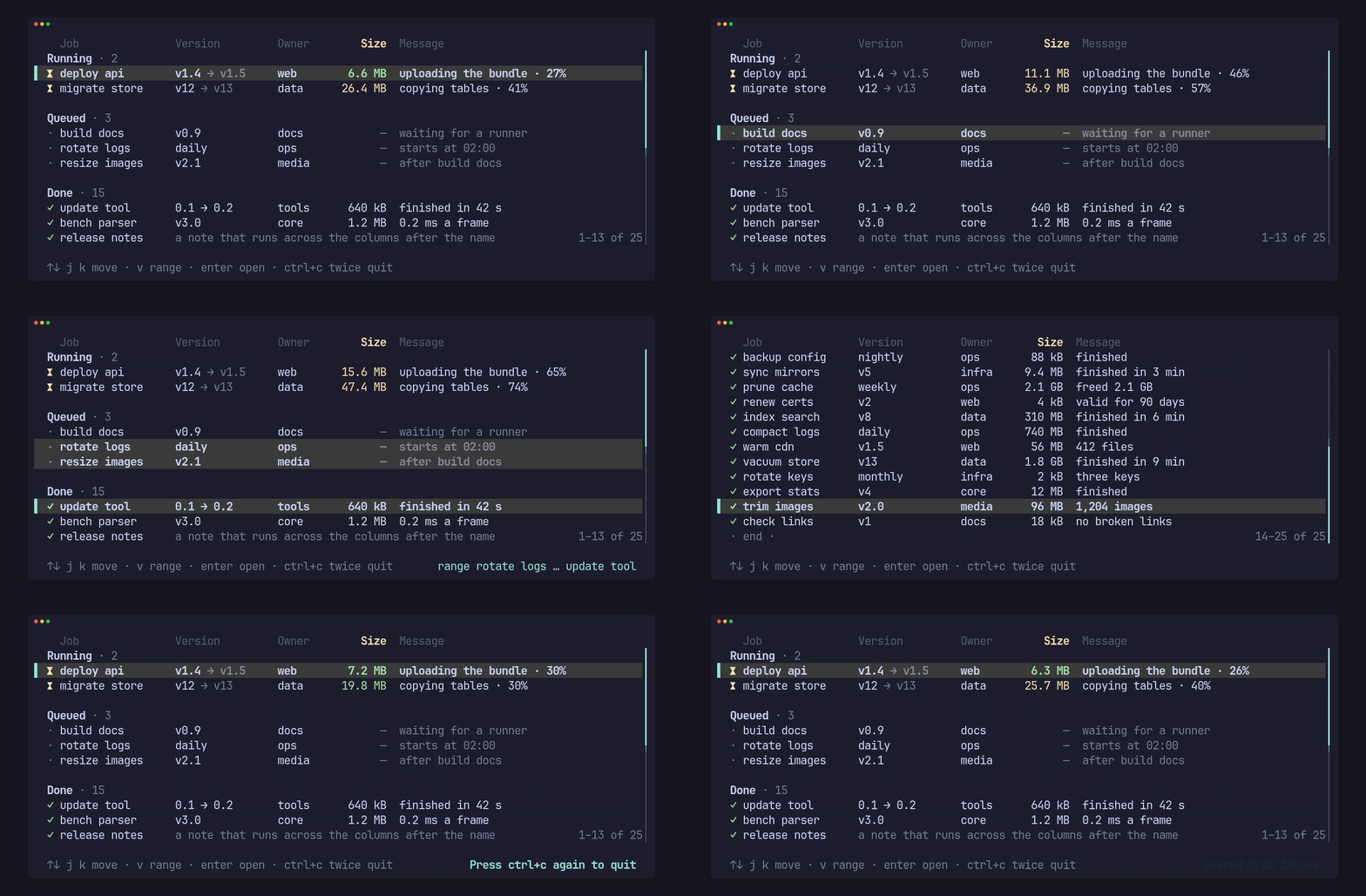
The list behind the PITO MD terminal apps, as a crate: selectable list rows for ratatui apps, in the style of HEY’s terminal UI. The selected row gets a bold “▌ “ marker, the columns pad to line up and drop by priority when the terminal narrows, and the list scrolls, pages, selects ranges and answers clicks. It has no words of its own: every word, style and key comes from your app, so any language works.
It is fast and stays fast as the list grows: about 0.3 ms a frame for a
20,000-row list at 150×40, the same for 100,000 items built on demand, and
zero heap allocations in a warm frame. Drawing the same 20,000 items, it
is 70× faster than a ratatui Table built from every row.
Works on Linux, Windows and macOS (CI-tested on all three).
§At a glance
| Frame time, 20,000 owned rows, 150×40 | 289 µs mean |
| Frame time, 100,000 items built on demand | 292 µs mean (lazy, in groups), 354 µs (shared vector, scrollbar and count) |
| Heap allocations in a warm frame, owned rows | 0 (held by a counting-allocator test) |
Against ratatui 0.30 Table, 20,000 items | 309 µs vs 21,692 µs, 0 vs 260,062 allocations a frame |
| Source | 2,068 lines of Rust in src/ |
| Dependencies | 3: ratatui (no backend feature), unicode-width, unicode-segmentation; crossterm only with the crossterm feature |
| Cold release build of the library, all dependencies included | 47 s |
Measured once on 2026-10-14 on an AMD Ryzen 9 9950X under Linux, Rust 1.97.1,
release profile, with cargo run --release --example bench and
cargo run --release --example versus; the build time with
cargo build --release --lib into an empty target folder. Windows and macOS
are tested by CI but weren’t timed.
§Sections, a selection and a range
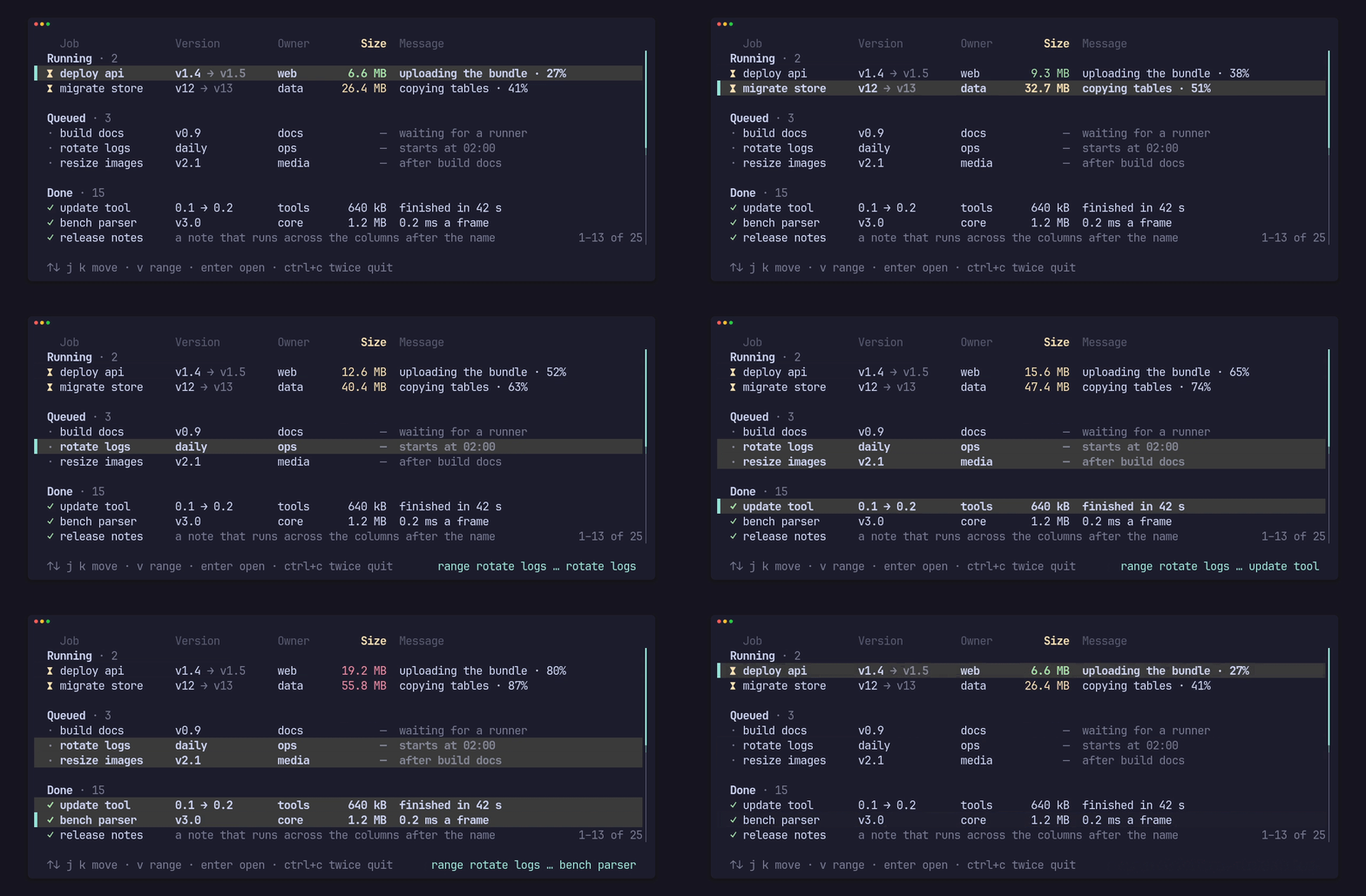
Rows can be grouped under headings (Row::heading) with blank lines between
them; the cursor, paging and clicks skip both. select_range draws every row
between two ends in the selected style for a Visual mode, with the marker on
the cursor row alone. Cells keep their own colours under the selection when
you ask (Styles::keep_colours(true)), and a cell can be several styled parts
(Cell::parts), like “v1.4” followed by a faint “→ v1.5”.
§Columns that make room
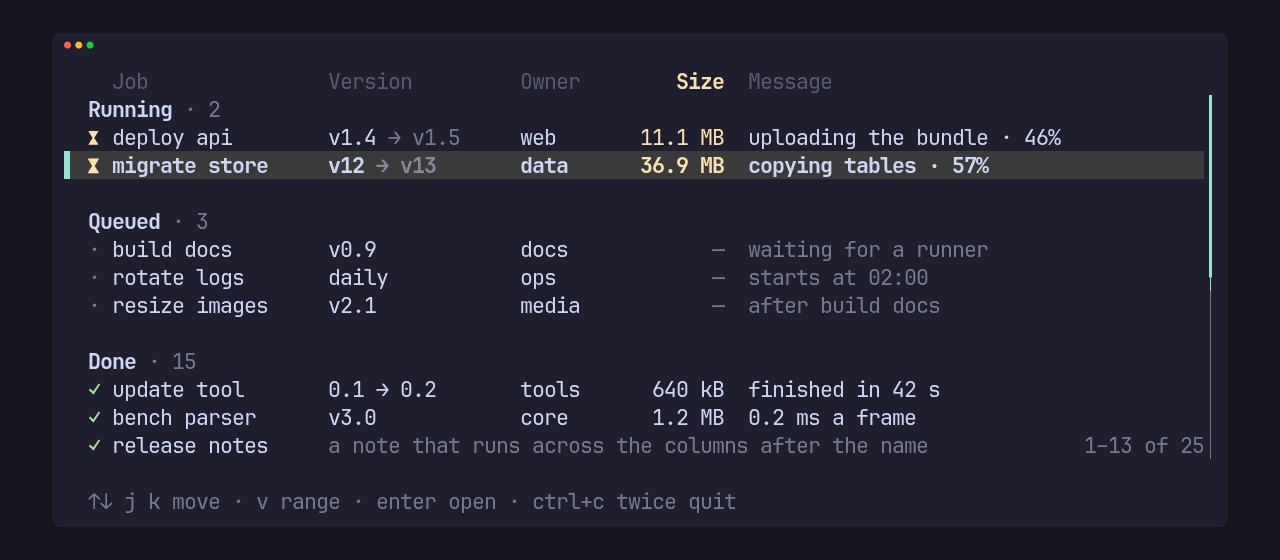
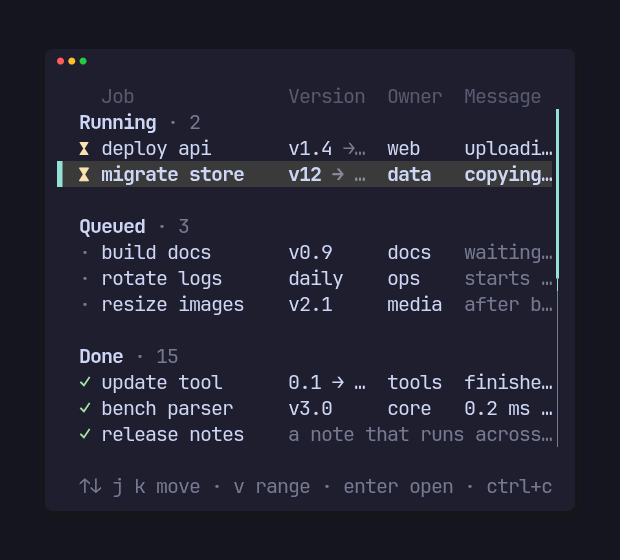
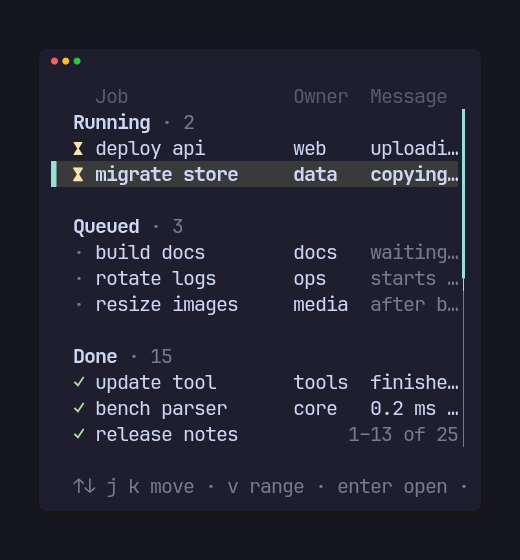
The same list at 96, 46 and 38 columns. Each column has a minimum, a
preferred width and a drop priority: when the width runs out the highest
priority drops first (Size, then Version here), a pinned() column never
drops, and the flexible column (the message) takes what’s left and clips with
“…”. fit(max) sizes a column to its widest cell on screen, right() aligns
numbers, and rest() lets one cell run across the columns after it (the
release note above). Widths are Unicode-aware, so diacritics, wide glyphs and
“…” measure and clip cleanly.
§Scrolling, paging, a scrollbar and a count
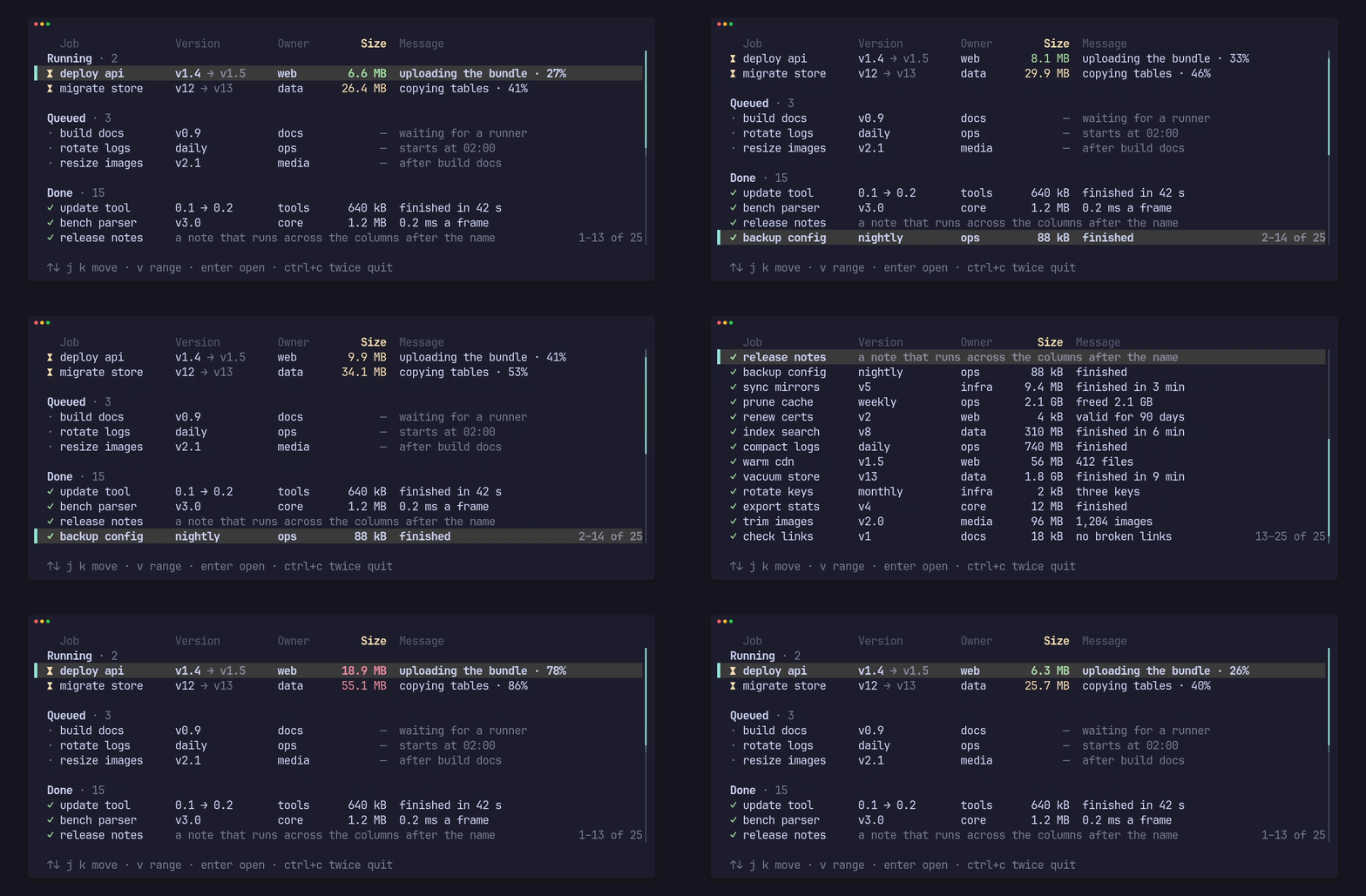
The view keeps the selection in view, paging moves by the rows on screen
(Paging::View keeps the cursor on its screen line instead), and an end line
scrolls in after the last row. ListView::scrollbar(Some(Bar::LINE)) draws a
slim bar with half-cell steps, and ListView::count(..) writes “1–13 of 25” in
your words and number format, both only when the list overflows. Keys come in
as the crate’s own Key (arrows, page keys, home, end and enter, or
Keys::VIM for j/k, g/G and ctrl+u/ctrl+d) and go out as a Step; hit
names the row under a mouse click.
§Rows rewritten in place
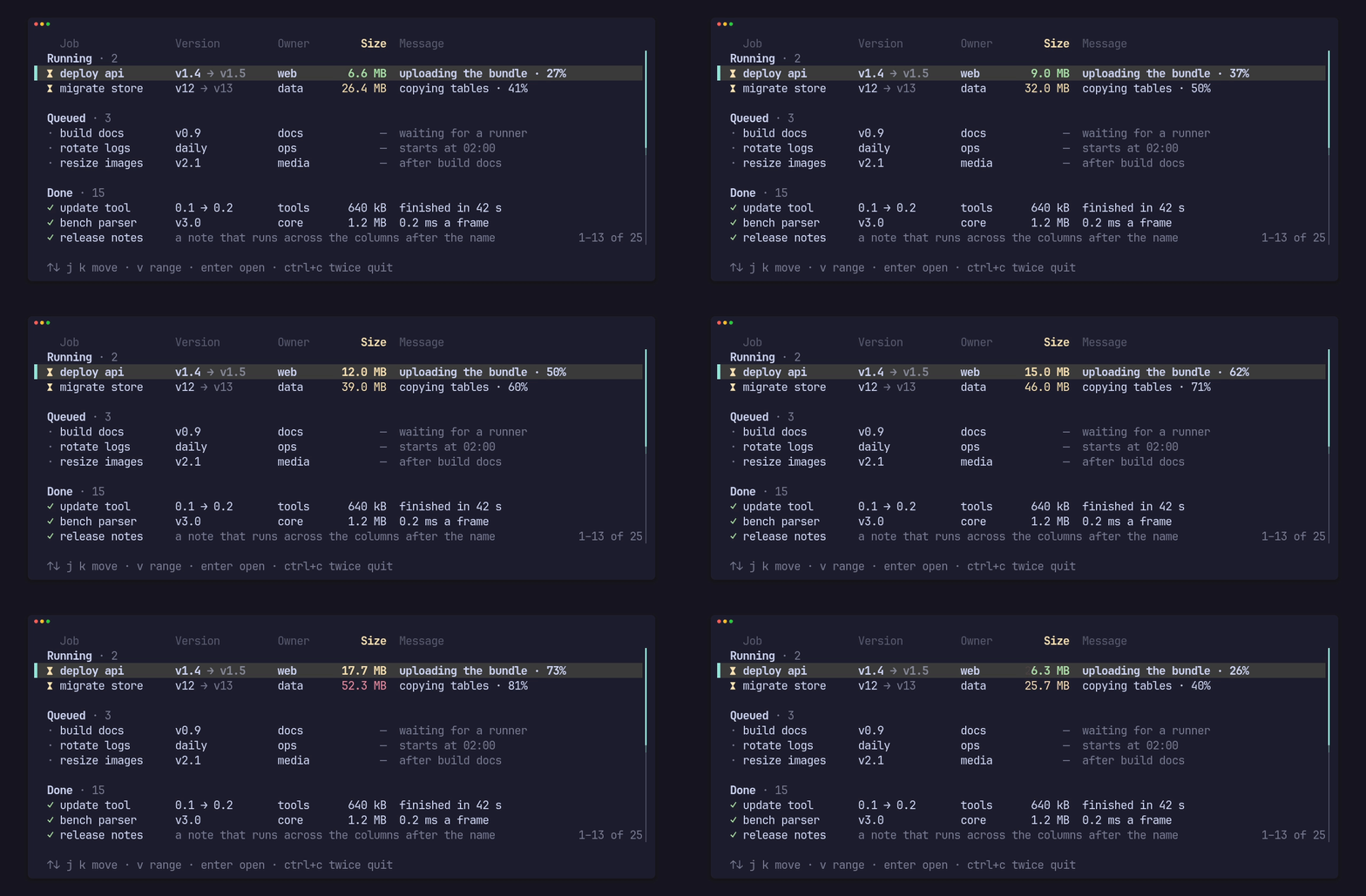
row_mut, Cell::set_text, Cell::set_style and Mark::set_text rewrite a
row’s texts and colours in the strings already there, so a frame that updates
counters every 120 ms and draws allocates nothing once the strings have grown
to their texts.
§Big lists, built on demand
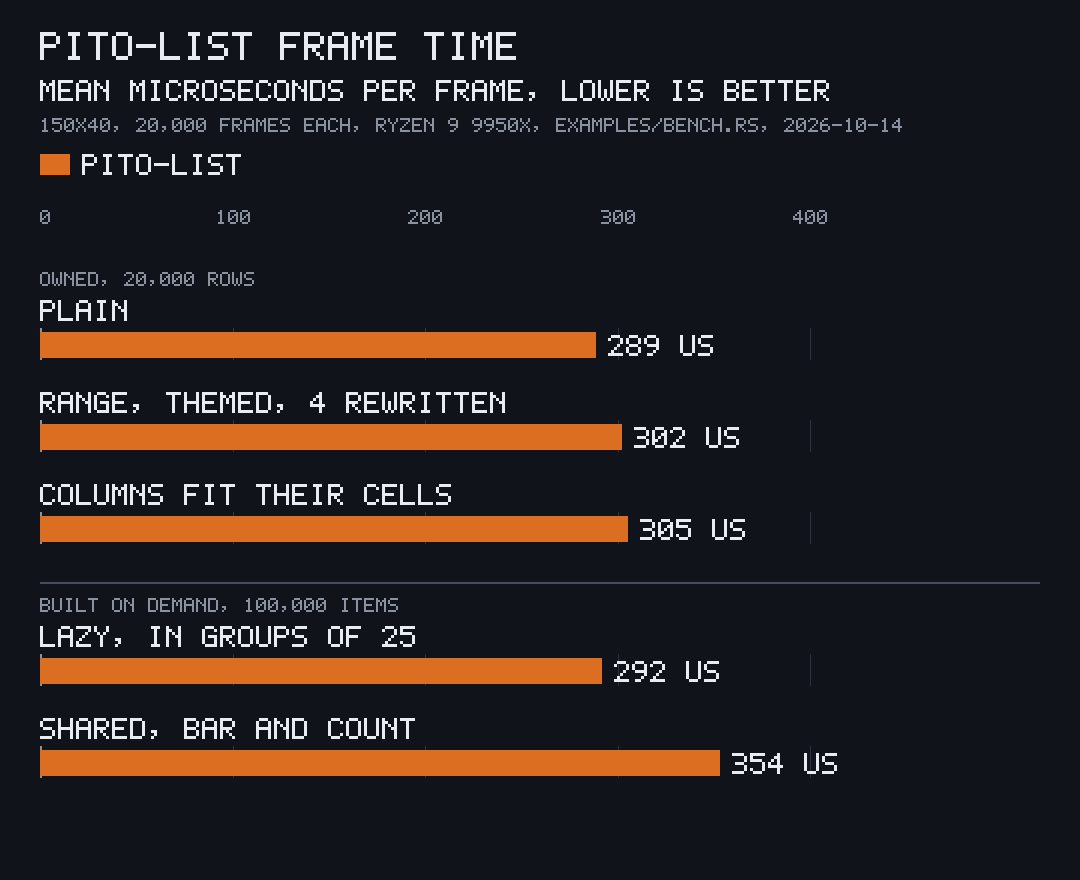
A list can own its rows, or read them from a Source: Shared::new(items, builder) wraps your Arc<Vec<T>> and builds a row only when a draw asks for
it, so 100,000 jobs, pings or log lines cost what the 40 rows on screen cost.
Hand it a new vector every frame for the price of an Arc clone.
§Speed against ratatui’s Table
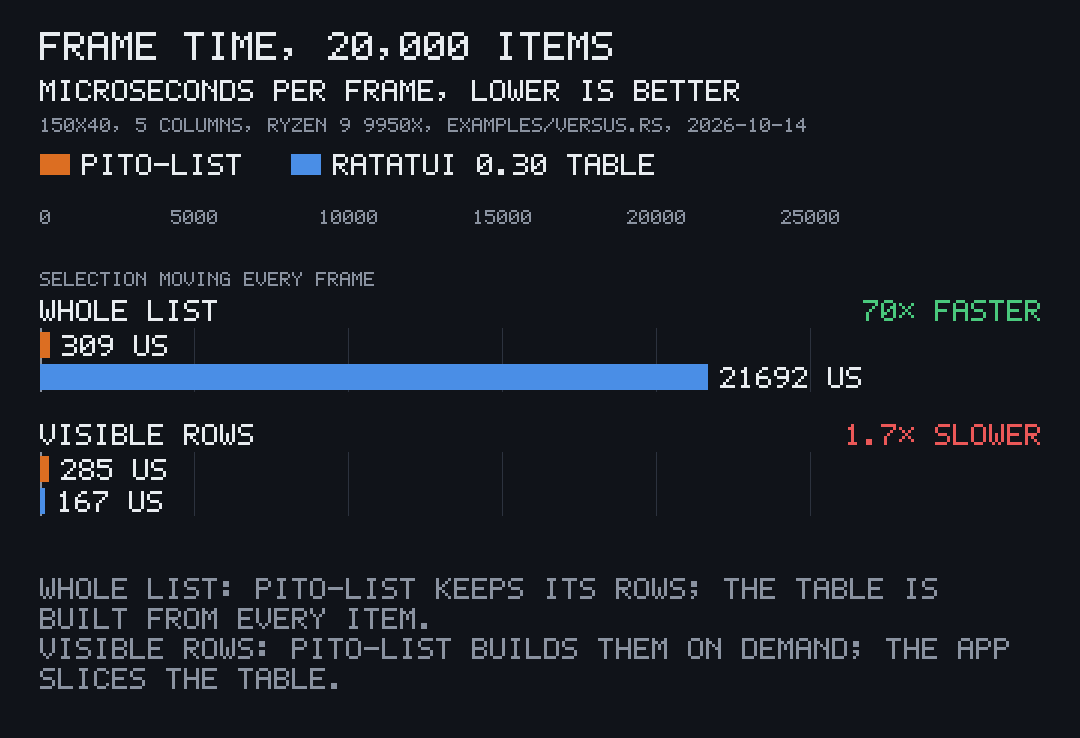
examples/versus.rs draws the same 20,000 items (five
columns, a header, the selection moving every frame) at 150×40, with ratatui
0.30’s own layout cache on:
| Mean frame | Allocations a frame | Bytes a frame | |
|---|---|---|---|
| pito-list, owned rows | 309 µs | 0 | 0 |
| pito-list, shared vector built on demand | 285 µs | 292 | 19,663 |
ratatui Table, every row built each frame | 21,692 µs | 260,062 | 51,844,944 |
ratatui Table, the app slices the visible rows | 167 µs | 569 | 106,032 |
A Table handed every row, the way ratatui’s own examples build one, is 70×
slower and allocates 52 MB a frame. A Table handed only the rows on screen is
1.7× faster than pito-list, but then the app does the scrolling itself, and it
still allocates where pito-list’s owned rows don’t; pito-list also does the
column dropping, sections, ranges, the end line, the scrollbar and the count
in that time.
§Install
It isn’t on crates.io; add it from git, pinned to a release tag. The same line works on Linux, Windows and macOS:
cargo add pito-list --git https://github.com/gmrdad82/pito-list --tag v1.0.1or in Cargo.toml:
pito-list = { git = "https://github.com/gmrdad82/pito-list", tag = "v1.0.1" }Turn on the crossterm feature for Key::from(crossterm::event::KeyEvent)
(crossterm 0.29); without it the crate has no backend dependency. The
conversion turns Alt, Super, Meta or Hyper on a non-character key into
Key::Other, keeps Alt apart on a character (Key::Alt('y')), and passes
Ctrl+Alt plus a character on as that character, which is how AltGr arrives on
some platforms, so diacritics can still be typed.
§First use
Three rows, three columns, the cursor moved down once:
use pito_list::{Cell, Column, Key, List, ListView, Row, Styles};
use ratatui::{
    buffer::Buffer,
    layout::Rect,
    style::{Color, Modifier, Style},
    widgets::Widget,
};

let columns = [
    Column::new("Job", 8, 14).pinned(),
    Column::new("Owner", 5, 7).priority(1),
    Column::new("Message", 8, 0),
];
let mut list = List::new().with_rows([
    Row::new(["deploy api", "web", "uploading the bundle"]),
    Row::new([
        Cell::new("build docs"),
        Cell::new("docs"),
        Cell::new("waiting for a runner").faint(),
    ]),
    Row::new(["rotate logs", "ops", "starts at 02:00"]),
]);
list.key(Key::Down);

let styles = Styles::new().selected(Style::new().fg(Color::Yellow).add_modifier(Modifier::BOLD));
for width in [44, 24] {
    let area = Rect::new(0, 0, width, 4);
    let mut buffer = Buffer::empty(area);
    ListView::new(&mut list, &columns)
        .styles(styles)
        .header(true)
        .render(area, &mut buffer);
}
draws, at 44 and then 24 cells wide (the Owner column drops when it doesn’t fit):
  Job             Owner    Message
  deploy api      web      uploading the bu…
▌ build docs      docs     waiting for a ru…
  rotate logs     ops      starts at 02:00

  Job           Message
  deploy api    uploadi…
▌ build docs    waiting…
  rotate logs   starts …
In an app, keep the List in your state, draw it with
frame.render_widget(ListView::new(&mut list, &columns), area), and pass it
your key events with list.key(Key::from(event)) (the crossterm feature):
it answers Step::Open(index) for enter.
§Try the demo
git clone https://github.com/gmrdad82/pito-list
cd pito-list
cargo run --example demo --features crossterm
The demo is the clip at the top: sample jobs in three sections under a styled
header, sizes that grow and warm in place, the view following the selection
with a scrollbar and the rows on screen counted at its foot, v for a range,
ctrl+d and ctrl+u to page, g and G for the ends, enter to open and ctrl+c
twice to quit, as in every PITO MD terminal app (the quit guard comes from
pito-footer). Every clip and still
on this page is recorded from it with
prec, the tapes kept in render/.
§Everything else
docs/guide.md has every feature in detail, the whole API and a full example with lazy and shared sources, sections, a scrollbar and a count. docs/install.md and the guides in docs/guides/ take one task a page, from a first list in an app to 100,000 items built on demand.
§Part of PITO MD
pito-list is one of the crates behind the PITO MD terminal apps, brought together by pito-tui, the app shell, with pito-header (numbered sections at the top), pito-footer (key hints, notices and confirms at the bottom) and pito-hourglass (the loading animation). The clips on this page are recorded with prec and made into GIFs with pconv, and the charts are drawn by pito-compare.
§Development
bin/gate runs cargo fmt --check, cargo clippy --all-targets --all-features -- -D warnings, every test with cargo nextest (the tests
draw into ratatui buffers, and a counting allocator holds that a warm frame
allocates nothing), the examples in this README and the pages in docs/ as
doctests, and the release build of the bench example. bin/gate --fast leaves the
bench build out. CI runs the whole bin/gate on Linux, Windows and macOS on
every push, every pull request to main and nightly. The charts are drawn from
the data in docs/charts/ with pcmp docs/charts/<name>.toml --out docs/images.
bin/docs-bundle builds tmp/docs-vX.Y.Z.tar.gz for Cargo.toml’s version:
the pages in docs/, an overview from the top of this README, the changelog
and the cargo doc API reference, with every image they use. The release
workflow builds it on every tag and attaches it to the tag’s GitHub Release.
§Contributing
Issues and pull requests are welcome. Please read the
code of conduct first. A change keeps bin/gate green
with no warnings, keeps a warm frame free of allocations, and leaves every
word, style and key to the app. Report a security issue privately, as
SECURITY.md says, not in a public issue.
§Licence
The code is MIT licensed, © Catalin Ilinca: see LICENSE. The MIT grant covers the code only: the PITO MD name and its logos are © Catalin Ilinca, all rights reserved, and are not covered by it; see TRADEMARKS.md. The look is in the style of HEY’s terminal UI; see NOTICE.md.