Expand description
§pfx-scene


One TOML format for 3D scenes, prefabs and material libraries, shared by a game engine and a 3D editor, so a scene saved in one opens in the other. It is the content format of pfx, the PITO MD game and render engine, and of its editor; this crate reads, checks, resolves, edits and migrates it.
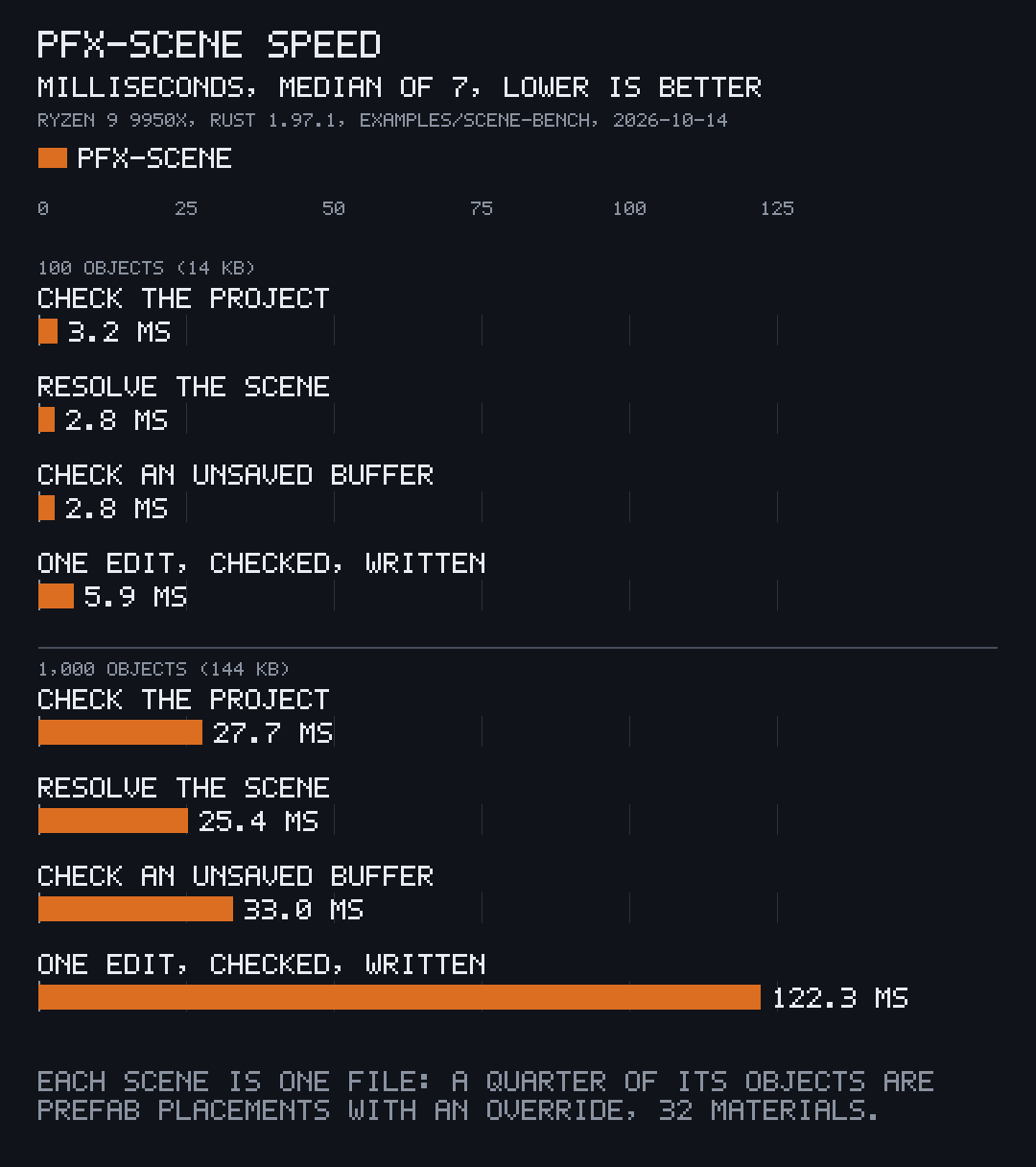
- Fast: resolves a 1,000-object scene in 25 ms and checks its whole project in 28 ms; a 100-object scene takes 3 ms for either.
- Small: three dependencies (
serde,toml,toml_edit; 17 crates in the whole tree), no unsafe code, about 10,900 lines of Rust. - Exact: every mistake is reported at its file, line and column with a stable code, and every edit keeps the author’s comments, spacing and key order.
Works on Linux, Windows and macOS (CI-tested on all three).
It is for the tools on either side of a scene file: an engine’s loader, an editor that saves what a person arranges, a build tool that emits scenes, and a text editor that marks mistakes as someone types.
§Install and first use
Add it to a Rust project, on Linux, Windows or macOS:
[dependencies]
pfx-scene = { git = "https://github.com/gmrdad82/pfx-scene", tag = "v1.0.1" }
Or try it on the demo project first, with a stable Rust toolchain:
git clone https://github.com/gmrdad82/pfx-scene && cd pfx-scene
cargo run --release --example scene-check -- examples/demo
The shortest useful program opens a project, prints every finding and resolves its scene:
use std::path::Path;

let project = pfx_scene::Project::open(Path::new("my-game")).unwrap();
for diagnostic in project.check() {
    println!("{diagnostic}");
}
let scene = project.scene(Path::new("scenes/room.scene.toml")).unwrap();
println!("{} objects", scene.objects.len());§The format
A project is a folder with a project.toml, and every file in it is plain TOML that starts with format = 1. This is the demo’s scene, shortened:
format = 1
materials = ["materials/room.materials.toml"]

[mesh.ball]
id = "ttfwjw4wnm"
file = "assets/ball.gltf"

[[object]]
id = "j66hkn5wx4"
name = "lamp"
mesh = "ball"
material = "brass"
at = [0.0, 2.4, 0.0]
scale = 0.3

# Two crates from one prefab; the second is turned and lighter.
[[object]]
id = "axxz3n1hcj"
name = "right crate"
prefab = "prefabs/crate.prefab.toml"
at = [1.2, 0.5, 0.3]
rotate = [0.0, 30.0, 0.0]

[object.set]
"box.body.density" = 0.5
Scenes (*.scene.toml), prefabs (*.prefab.toml), material libraries (*.materials.toml) and collision proxies (*.proxies.toml) cover meshes, lights, materials, the sky, sun, haze, camera and render settings, rigid bodies, character controllers, trigger volumes, camera rigs, collision layers, glTF animation clips, sprite atlases, tile layers, and a game’s tunables with their ranges. Assets are standard files referenced by path: glTF 2.0, PNG, WAV or Ogg Vorbis, TTF or OTF, Radiance HDR. docs/format.md specifies every key, its type, default and range.
§Errors at file, line and column
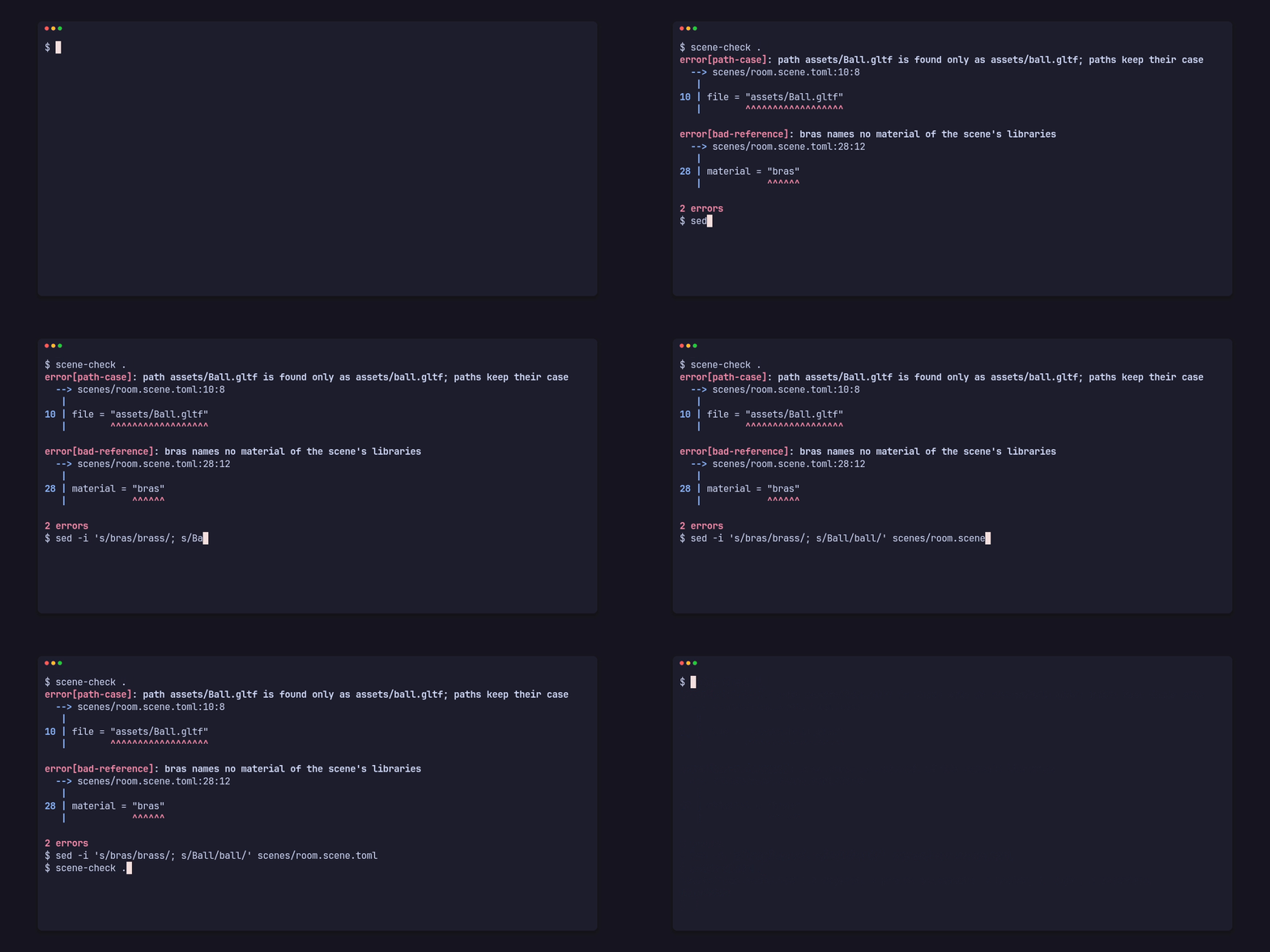
The clip at the top: Project::check checks a whole project and check checks one unsaved buffer against it, so a text editor can mark mistakes as someone types. Each finding has a file, a line, a column, an end, a stable code (bad-reference, path-case, missing-key and the rest, listed in the spec) and, where it helps, the other place involved. A misspelt material, a path whose case differs from the disk, a key of the wrong type, an id used twice and a reference to nothing are each one finding, at the exact text.
§Prefabs, overrides and stable ids
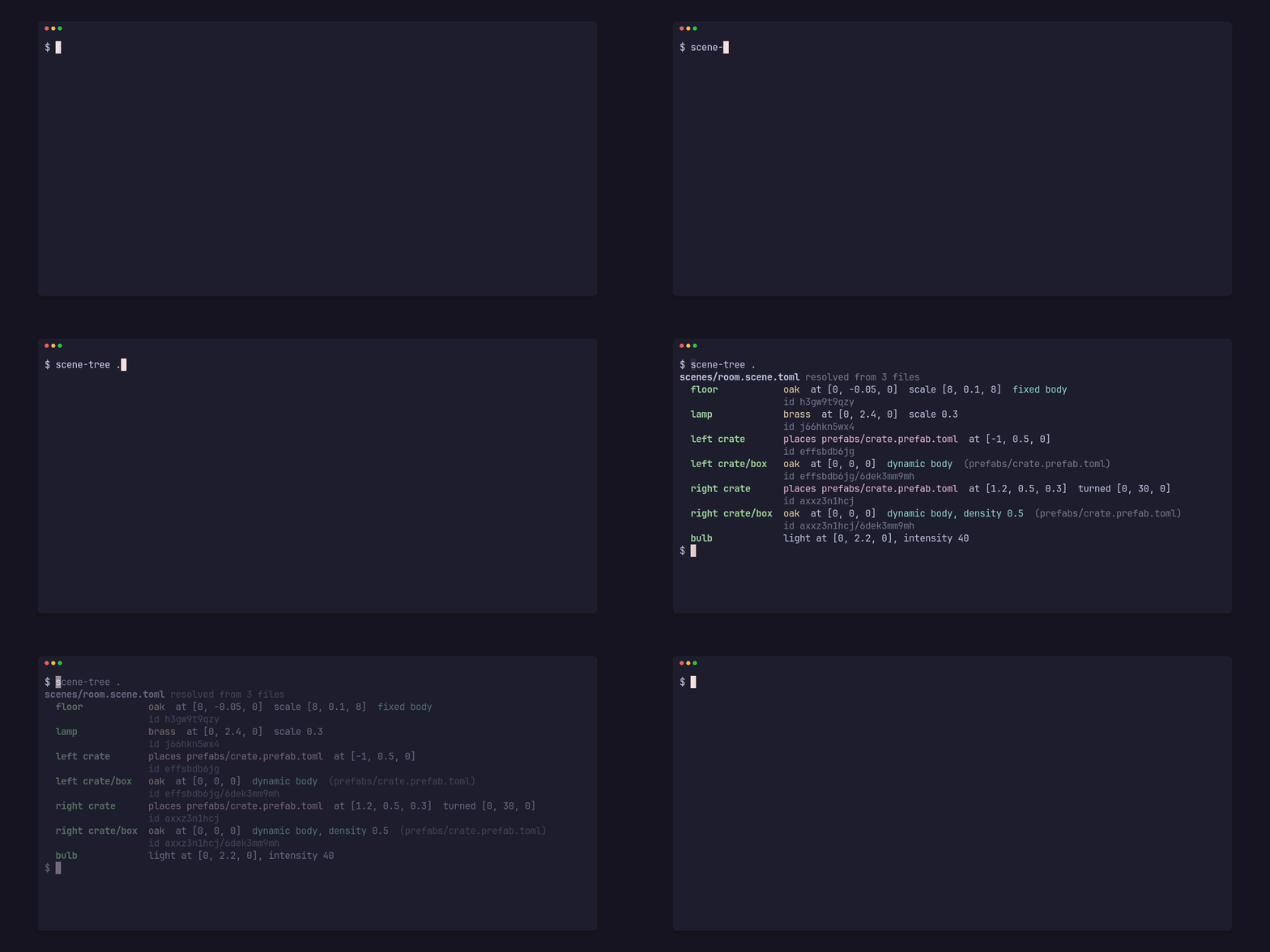
Project::scene resolves a scene: includes merged, prefabs placed as objects with their per-placement overrides ([object.set]), and every reference rewritten to the key of the entry it names. A placed entry’s key and id are namespaced by its placement (right crate/box, axxz3n1hcj/6dek3mm9mh), so two placements of one prefab never collide. References go by id, with names as labels, so a rename or a move never breaks them. Includes and prefabs nest up to 64 deep, and a cycle is refused with its chain of files.
§A careful writer

SceneEdit edits a scene’s files in place. A changed value keeps its place, its neighbours, the comments and the number spelling, so a diff shows only what changed. An edit the checker would refuse is refused before anything is written. Edits group into undo and redo steps by exact text, and dry_run computes an edit’s patches without writing.
§Versioned files

Every file names its format version. An older file is read through an in-memory migration, with its findings pointing into the file as written, and Project::migrate rewrites it on disk through the same writer. A newer file than the crate knows is refused with the version it knows.
§Speed
| Objects in the scene | 100 | 1,000 | 10,000 |
|---|---|---|---|
| Scene file size | 14 KB | 144 KB | 1.4 MB |
Project::check, the whole project | 3.2 ms | 27.7 ms | 418 ms |
Project::scene, resolve | 2.8 ms | 25.4 ms | 360 ms |
check, an unsaved buffer | 2.8 ms | 33.0 ms | 432 ms |
SceneEdit::open | 6.2 ms | 44.6 ms | 664 ms |
One set_at, checked and written | 5.9 ms | 122 ms | 990 ms |
How it was measured: cargo run --release --example scene-bench -- tmp/bench 100 1000 10000, which writes a project per size (one scene file, a quarter of its objects prefab placements with an override, a quarter with rigid bodies, 32 materials, ids filled by Project::fix) and prints the median of 7 runs of each step. Measured once on 2026-10-14 on an AMD Ryzen 9 9950X under Linux with Rust 1.97.1, while the machine was busy with other work; nothing was re-run. The times grow faster than the object count from 1,000 objects up.
§The API
use std::path::Path;

use pfx_scene::{Project, SceneEdit, Target, check};

let project = Project::open(Path::new("my-game")).unwrap();
for diagnostic in project.check() {
    println!("{diagnostic}");
}

let scene = project.scene(Path::new("scenes/room.scene.toml")).unwrap();
for object in &scene.objects {
    println!("{} at {:?}", object.key, object.value.at);
}

let buffer = std::fs::read_to_string("my-game/scenes/room.scene.toml").unwrap();
let marks = check(&buffer, Path::new("scenes/room.scene.toml"), &project);
println!("{} marks for the editor", marks.len());

let mut edit = SceneEdit::open("my-game/scenes/room.scene.toml").unwrap();
edit.set(&Target::Object("crate".into()), &["at"], [0.0, 0.5, 1.0]).unwrap();
edit.undo().unwrap();

let migrated = project.migrate(Path::new("scenes/old.scene.toml")).unwrap();
std::fs::write("my-game/scenes/old.scene.toml", migrated).unwrap();Project::checkchecks every file of a project;checkchecks one unsaved buffer against it.Project::sceneresolves a scene;Project::readreturns one file as its typed data, plain serde structs.SceneEditedits a scene’s files in place, refusing any edit that the checker would refuse;dry_runcomputes an edit’s patches without writing.Project::scene_withandcheck_withresolve and check with unsaved texts in place of the files.Project::fixfills the ids a scene’s files lack.Project::migraterewrites an older file as the current format.
The examples in examples/ are small programs on this API: scene-check checks a project, scene-tree prints a resolved scene, scene-write moves, renames, sets a material or migrates a file, and scene-bench measures the table above. What changed in each version is in CHANGELOG.md.
§Part of PITO MD
pfx-scene is one of the PITO MD tools. pfx, the game and render engine with its scene editor, and Manfred, the scene builder and viewer, keep their scenes in this format and depend on this crate. The clips here were recorded with prec and made into GIFs with pconv, and the chart was drawn by pito-compare.
§Build and test
A stable Rust toolchain (edition 2024) and cargo-nextest are all it needs.
bin/gate          # rustfmt, clippy with no warnings, every test and the doc tests
bin/gate --fast # what CI runs on every push and pull request; the same checks while the crate is small§Contributing
Issues and pull requests are welcome. Please read the code of conduct first, and report security problems as SECURITY.md says. A change to the format changes docs/format.md with it, and bin/gate passes before a pull request.
§Licence
The code is MIT licensed: see LICENSE. The MIT grant covers the code only: the PITO MD name and every app and game name and logo stay Catalin Ilinca’s, all rights reserved, as TRADEMARKS.md says. Where the format and the first code came from is in NOTICE.md.
Re-exports§
pub use types::FORMAT;pub use types::File;pub use types::FileKind;pub use types::MaterialsFile;pub use types::PrefabFile;pub use types::ProjectFile;pub use types::ProjectTable;pub use types::ProxiesFile;pub use types::SceneFile;