
Make a README GIF or WebP

$ pconv talk.mp4 readme.gif --size 480readme.gif$ pconv talk.mp4 readme.webp --size 480readme.webp$ du -h readme.gif readme.webp984K readme.gif452K readme.webpBoth loop forever and keep alpha. With no --size or --fps, they are 800 px wide at 12 fps, or the source’s own width and rate where smaller. They carry no audio.
pconv clip.mp4 readme.gif --size 640 --fps 12pconv clip.mp4 readme.webpHow the GIF is made
Section titled “How the GIF is made”Without alpha, pconv writes the GIF itself, from a 256-colour palette ffmpeg builds from the whole clip:
- Each frame stores only the rectangle that changed, with unchanged pixels transparent.
- A pixel counts as changed only when it moves more than 12 levels (4 with
--profile best), so compression noise doesn’t redraw the frame. - When a slow change spreads over a fifth of the frame (a focus pull, a fade, a pan), the whole frame is redrawn instead, so it never breaks into blocks.
- Frames that don’t change merge into the previous frame’s delay.
With alpha, the GIF is ffmpeg’s two passes: a palette from the whole clip, then sierra2_4a dithering. The WebP is libwebp’s animated encoder at quality 75.
--profile best keeps more detail in the GIF for a larger file. For a terminal recording, the default is usually the right trade: the GIFs on this site were made by pconv, 53 to 131 KB each at 1280 px wide and 15 fps.
Against ffmpeg’s palette recipe
Section titled “Against ffmpeg’s palette recipe”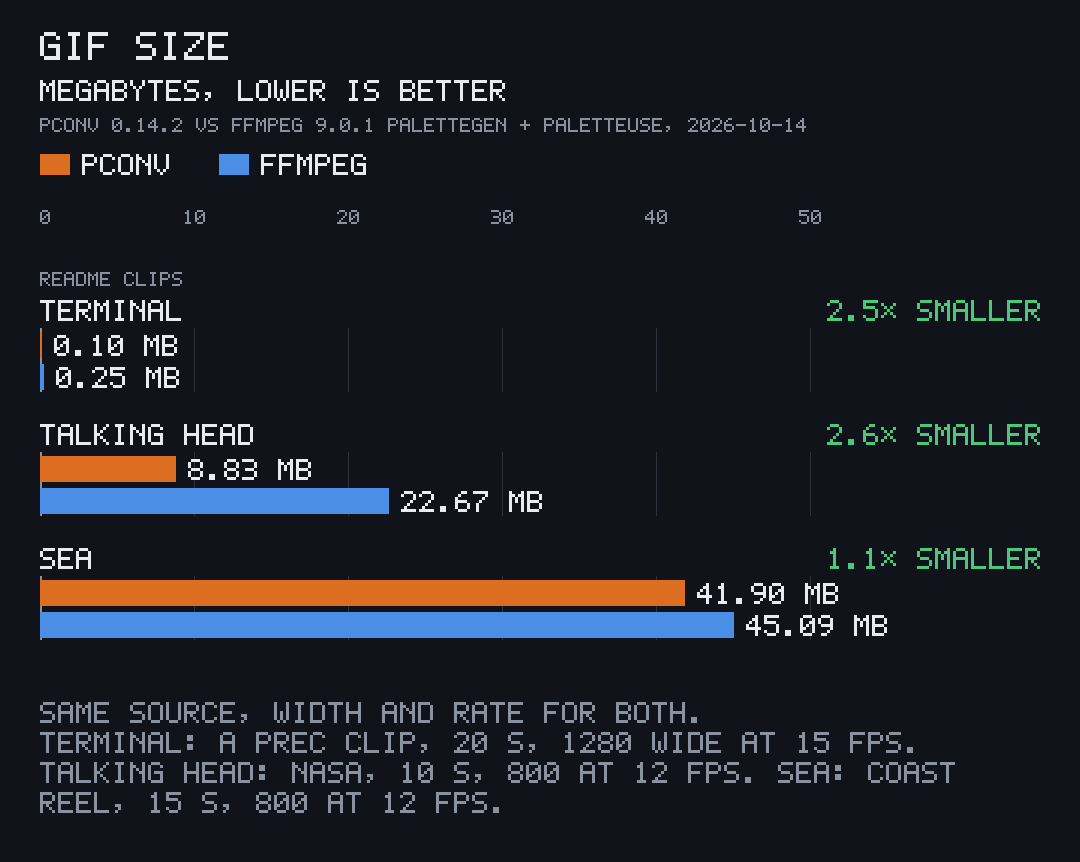
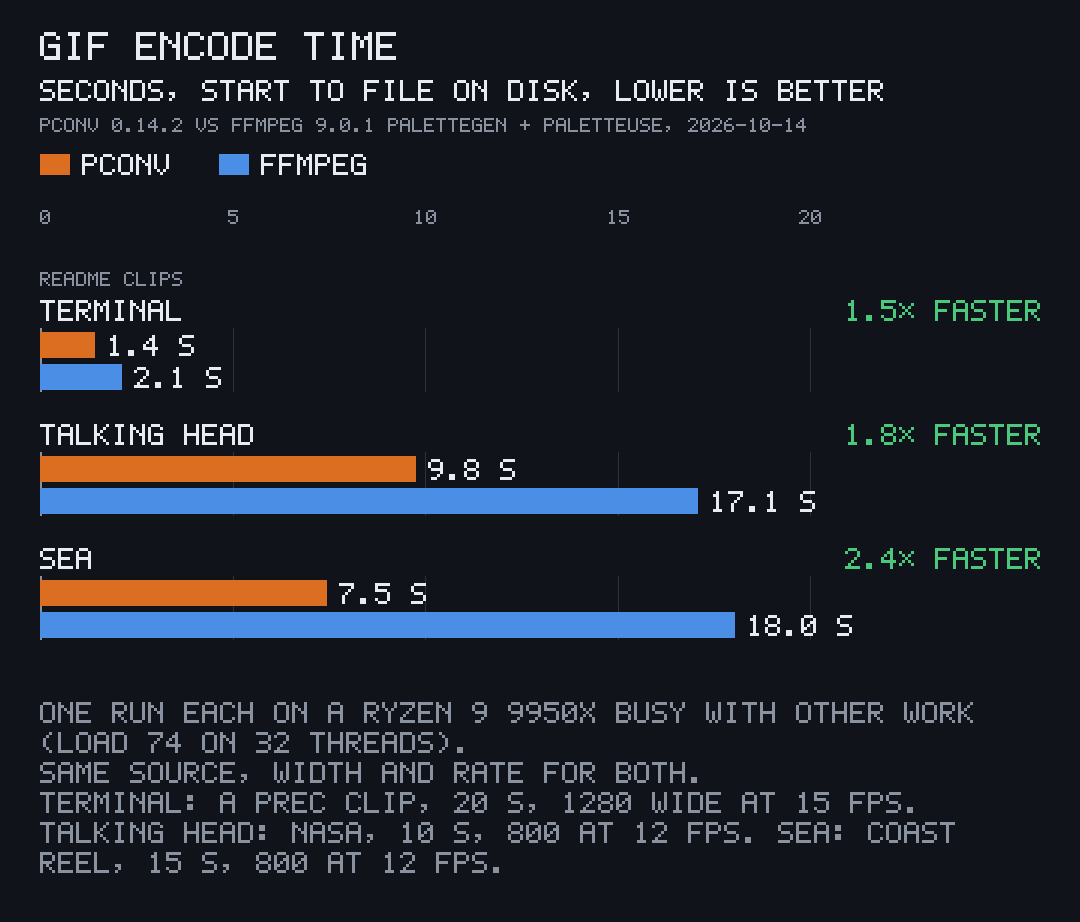
pconv 0.14.2 against ffmpeg 9.0.1’s well-known one-liner at the same width and rate:
ffmpeg -i in.mp4 -vf "fps=F,scale=W:-2:flags=lanczos,split[a][b];[a]palettegen[p];[b][p]paletteuse=dither=sierra2_4a" -loop 0 out.gifpconv in.mp4 out.gif --size W --fps FEach was timed from start to file on disk, once, on 2026-10-14, on Linux with an AMD Ryzen 9 9950X that was busy with other work. The clips: terminal, a 20 s 1280x240 terminal recording made 1280 wide at 15 fps; talking head, the first 10 s of NASA’s “A Message of Resilience from the International Space Station” (public domain), made 800 wide at 12 fps; sea, 15 s of Joe Mabel’s Notleys Landing and Kalaloch Beach footage from Wikimedia Commons (CC BY-SA 4.0), made 800 wide at 12 fps.
PSNR is against the source at the same rate and size, scaled once with ffmpeg’s lanczos and once in linear light (pconv’s own scaler), since each favours its own side:
| Clip | Size, pconv / ffmpeg | Time, pconv / ffmpeg | PSNR, lanczos scale | PSNR, linear scale |
|---|---|---|---|---|
| Terminal | 0.10 / 0.25 MB | 1.43 / 2.12 s | 38.2 / 40.3 dB | 37.5 / 39.1 dB |
| Talking head | 8.83 / 22.67 MB | 9.76 / 17.10 s | 31.8 / 32.5 dB | 33.2 / 31.7 dB |
| Sea | 41.90 / 45.09 MB | 7.45 / 18.04 s | 25.2 / 25.2 dB | 25.2 / 25.1 dB |
The terminal clip trades about 2 dB for its 2.5× smaller file: pconv’s tolerance keeps pixels that moved by noise alone, which text and flat colour hide well.